
Status |
Under development |
Target Release |
4.0 |
Original Authors |
DaveJohnson |
The Roller installation process is unacceptably complex. It's having a negative impact on Roller adoption and distracting the Roller community on the user mailing list. We need to make it really easy to install Roller.
After investigating configuration options in Tomcat and Glassfish and looking at installation procedures for popular Java web applications, we've identified four options for Roller installation.
1) Property file based configuration
2) Separate installer for each Servlet container / app server
3) Standalone bundle with Roller, Servlet container / app server and database
4) Roller completely handles it's own installation
These are covered in Appendix A.
Consensus on the Roller dev list seems to be that option #1 is a must have, #2 and #3 are nice to have and #4 is too complex. Note that the options are not mutually exclusive. Once #1 is in place with it's easy configuration and auto-database create/update then all of the other options are easy to integrate.
This proposal covers option #1 only*. Those who wish to develop #2, #3 and #4 installers can propose those separately.
First an overview. We'll implement option #1 by changing Roller so that it's database configuration comes from the Roller properties override file and by adding table auto-creation/upgrade.
Not everbody will want to use auto-create and nobody will want install-logic running in a production system, so Roller will operate in two modes, controlled by the installation.type property. In production systems, 'installation.type' should be set to 'manual' to ensure that we never show an revealing database error page or "would you like to upgrade" tables page in production.
At installation time, users can choose turn on auto-install by setting installation.type=auto. In this mode, Roller will give informative error messages when the database setup fails, it will create the Roller tables automatically and it will even upgrade them if they need upgrade.
Users with special needs, i.e. very large sites, upgrading from pre 1.2 Roller, customized data models, can choose not use auto-install. By setting installation.type=manual they can choose to do upgrades the old way, running scripts by hand.
These are the steps to install Roller with auto-install:
STEP 0 - Prerequisites: Java 5, Roller supported database, Servlet 2.4 container and JDBC driver jar in Servlet container's classpath.
STEP 1 - Create a database and a database user account with full privileges in that database.
STEP 2 - Create a roller-custom.properties file in Servlet container's classpath with the auto install option and your database connection parameters. For example:
installation.type=auto database.configurationType=jdbc database.jdbc.driverClass=com.mysql.jdbc.Driver database.jdbc.connectionURL=jdbc:mysql://localhost:3306/rollertest database.jdbc.username=scott database.jdbc.password=tiger |
STEP 3 - Deploy roller.war to your Servlet container and browse to context URI. If there is a database connection error, you'll see details in the browser. If tables need creation or upgrade, Roller will do it automatically for you on your command.
Here are the specific changes to be made to enable property based installation/configuration:
database.installation = (auto|manual): if auto, Roller will prompt to create/upgrade tables
database.connectionType = (jndi|jdbc) - choose either JNDI or JDBC connection specification
database.jndiName = jdbc/rollerdb - JNDI name to be used for data-source if type is 'jndi'
database.jdbc.driverClass: JDBC driver class to be used if type is 'jdbc'
database.jdbc.connectionURL: JDBC connection string to be used if type is 'jdbc'
database.jdbc.username: JDBC username to be used if type is 'jdbc'
database.jdbc.password: JDBC password to be used if type is 'jdbc'
mail.connectionType = (jndi|properties) - choose either JNDI or properties for mail session
mail.jndiName - JNDI name to be used for mail-session if type is 'jndi'
mail.hostname: Host name of mail server to be used if type is 'properties'
mail.username: Username for mail server to be used if type is 'properties'
mail.password: Password for mail server to be used if type is 'properties'
When creating persistence strategy, we rely on a DatabaseProvider class with this logic:
When creating mail-session - DONE
This logic is executed ONLY if auto-install is enabled.
If driver cannot be found for some reason, this is what you'll see:
If connection cannot be made for some reason, this is what you'll see:

If tables cannot be found this is what you'll see:

After tables are created:

If tables need upgrade, this is what you'll see:
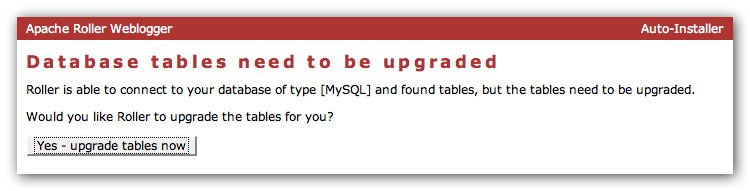
After tables upgraded:

In this case, a user configures the webapp by editing a simple configuration file that specifies the DB connection and mail server configuration; effectively by-passing all application server configuration files. When the webapp loads, it creates and upgrades database tables as needed and the installation is complete.
If we take this approach, we should also support JNDI named resources – some folks won't want to by-pass app server resources. We can do this by first checking for DB and mail properties and if they are not found, we fall back to JNDI resources.
Summary
In this scenario, we provide an installation program for each application server we wish to support. The installer prompts the user for DB and mail parameters, sets up the server resources and/or creates the Roller property override file and deploys Roller.
This can work in combination with option #1.
In this case, we provide a complete bundle with everything the user needs to run Roller, all pre-configured and ready to run. We could provide such a bundle with Tomcat, Derby and Roller. Obviously, this is only going to satisfy a portion of our users; i.e. those who are OK with Tomcat and Derby.
In this scenario, the Roller WAR does it all. You just drop it in, browse to the main page, enter database connection parameters and Roller automatically creates all server resources, creates/upgrades tables and restarts itself if necessary. It also makes a killer lasagna and cleans your bathroom.
Please comment on the dev mailing-list.