1) Repository
Tuscany source code is hosted at Apache subversion repository. If you want to build Tuscany from source, you need to install a subversion client.
|
Command line: http://subversion.tigris.org/ (1.4.2) |
2) Build
|
Maven 2: http://maven.apache.org/ (2.0.4) |
3) Development IDE
|
Eclipse: http://www.eclipse.org/ (3.2.1) |
mvn archetype:create -DgroupId=sample -DartifactId=helloworld |
<project>
    <modelVersion>4.0.0</modelVersion>
    <groupId>org.apache.tuscany.samples.sca</groupId>
    <version>1.0-incubator-SNAPSHOT</version>
    <artifactId>sample-mortgage</artifactId>
    <packaging>jar</packaging>
    <name>Tuscany Mortgage Sample</name>
    <description>A sample Mortgage application made of several SCA components wired together.</description>

    <properties>
        <property name="tuscanyVersion">1.0-incubator-SNAPSHOT</property>
    </properties>

    <dependencies>
        <dependency>
            <groupId>org.osoa</groupId>
            <artifactId>sca-api-r0.95</artifactId>
            <version>${tuscanyVersion}</version>
        </dependency>
        <dependency>
            <groupId>org.apache.tuscany.sca</groupId>
            <artifactId>test</artifactId>
            <version>${tuscanyVersion}</version>
            <scope>test</scope>
        </dependency>
</project>
|
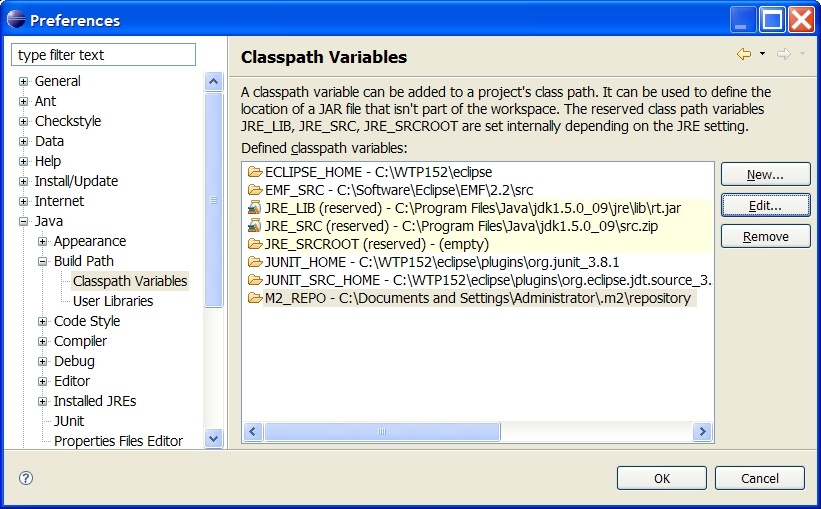
1. Adding M2_REPO classpath variable
mvn -Declipse.workspace=<path-to-eclipse-workspace> eclipse:add-maven-repo |
2. (Optional) Add maven as an external tool for Eclipse
3. Create Eclispe metadata files
mvn -Peclipse eclipse:eclipse |
4. Import projects into Eclipse
File --> Import ... --> Existing Projects into Workspace
1. Declare components in the SCDL
The SCDL file |
2. Implement the components in java
The java file |