This document is intended for first-time reviewers of Apache Taverna, particularly those reviewers who desire additional information about the review process and tools used. It assumes you have already read How to Review a Release and Vote.
First read How to Review a Release and Vote.
In addition to the prerequisites listed in the README file, you will also need:
You may find the following tools useful.
Use the command line interface to verify you have the correct versions of Maven and Java as stated in the README file. Use the following commands to check Maven (mvn) and Java versions.
mvn --version
java --version
Alternatively, you can use wget to download the release candidate. (See Apache Stratos 3.0.0 Test Procedure.)
There are three sources of checksums:
All three checksums should be identical.
There are two steps: generate and verify. You can use a command line interface or a utility. Both methods are described below.
GENERATE. To generate checksums, navigate to the directory containing the .zip file and run the CertUtil command. Append SHA512 and MD5, as shown below, to generate those checksums. (The default gives you the SHA1 checksum.)
CertUtil -hashfile 'apache-taverna-parent-2-incubating-source-release.zip'
CertUtil -hashfile 'apache-taverna-parent-2-incubating-source-release.zip' SHA512
CertUtil -hashfile 'apache-taverna-parent-2-incubating-source-release.zip' MD5
VERIFY. To verify, visually compare the checksums with those listed in the VOTE email, or use an online difference checker.
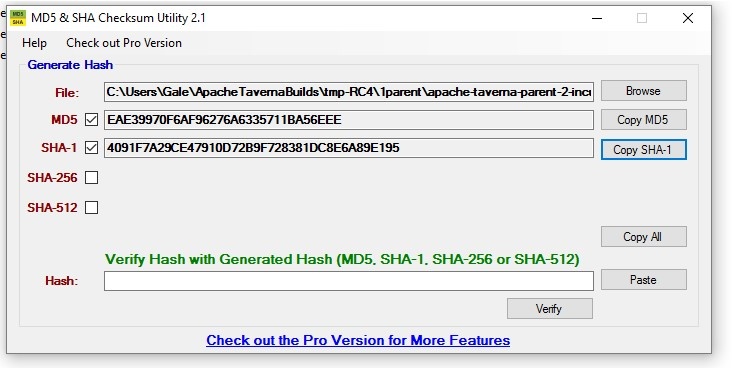
GENERATE. Follow the steps below.
VERIFY. You can visually compare the checksums or use an online difference checker. The utiility also allows you to paste a checksum (e.g., either from the VOTE email or from the downloaded .md5 or .sha1 files) into the Hash input box, and the utility will compare it with the value from the .zip file.
1b. Check that the PGP signature is valid
Each software artifact is signed using a PGP (Pretty Good Privacy) key. Verifying the downloaded key matches the original key is a critical step.
You can verify the signatures using a command line interface. See https://httpd.apache.org/dev/verification.html for some general verification info.
gpg --import keys.txt
gpg --verify 'apache-taverna-...-source-release.zip.asc' 'apache-taverna-...-source-release.zip'
The idea here is to check that the commit ID in the downloaded file matches that in the VOTE email. You will use a command line interface for at least some of these steps.
This approach uses Git commands to compare the downloaded release candidate to a cloned git repository. You will clone one copy and unzip the other copy in such a way that will "trick" Git into thinking you are comparing two versions that you have edited.
Git will then review the checksums of every file and let you know what has "changed."
If there are NO CHANGES, then the commit ID in the VOTE email matches the release candidate.
This approach uses the commit id from the VOTE email to download that commit from GitHub, which is then compared to the release candidate using the diff command.
The files that differ will be shown. If you do this after you build, make sure you don't have any target folders before diff-ing. (Run mvn clean to be sure.)
Again, if there are NO DIFFERENCES, then the commit ID in the VOTE email matches the release candidate.
All Podlings must include a disclaimer indicating they are in incubation. To check a Taverna release candidate, open the DISCLAIMER file (in the top level release candidate folder) and verify the text matches what is shown below. You can use a text editor (e.g., Notepad++) or an integrated development environment (IDE), such as Eclipse, to open the DISCLAIMER files.
        Apache Taverna is an effort undergoing incubation at the Apache Software
        Foundation (ASF), sponsored by the Apache Incubator PMC.
        Incubation is required of all newly accepted projects until a further review
        indicates that the infrastructure, communications, and decision making process
        have stabilized in a manner consistent with other successful ASF projects.
        While incubation status is not necessarily a reflection of the completeness
        or stability of the code, it does indicate that the project has yet to be
        fully endorsed by the ASF.
Check the unzipped release candidate to ensure the top-level distribution folder contains the word "incubating" (Is this all that can be checked before building? See 11 below.)
LICENSE file
Check the text of the LICENSE file in the top-level release candidate folder, and ensure the Apache License matches the text of the required Apache License. The LICENSE file may also include details of additional licenses.
If additional, third-party licenses are listed below the required Apache License, ensure the licenses are allowed in Apache Software Foundation projects. (See also item 9, Check the dependencies - Review binary licenses.)
NOTICE file
Check the text of the NOTICE file in the top-level release candidate folder, and ensure it matches the text below.
        Apache Taverna Language
        Copyright 2014-2016 The Apache Software Foundation
        This product includes software developed at
        The Apache Software Foundation (http://www.apache.org/).
        Portions of this software were originally based on the following:
        - Copyright 2010-2014 University of Manchester, UK
        These have been licensed to the Apache Software Foundation under a software grant.
Check that each file has the ASF license header text and no copyright. The ASF Source Headers web page details how to handle source file headers for code developed at the ASF. In short, the copyright must be removed (see requirements) and files should have the ASF license header text added to the header.
Check that each file has a license and that the license is allowed. Files used by the project, but not submitted by their owners directly to the ASF, are treated differently. Copyright notices stay in the header, and associated licenses must be part of the distribution.
TO DO
Before building, the downloaded zip folder should contain no unexpected binary artifacts. For example, there should be no *.jar files.
There may be some "expected" binary files, such as pictures and test workflows. If these come from third-parties (e.g., a Creative Commons-licensed JPEG), they should be declared in NOTICE/LICENSE.
mvn clean install > console.txt 2> err.txt
BUILD FAILURE: At the completion of the mvn clean install process, if the message is "BUILD FAILURE," review both text files. Report the failure, along with any warning and error messages, on the release candidate's DISCUSS thread.
BUILD SUCCESS: If the completion message is "BUILD SUCCESS," review both text files. Report the success, along with any warning messages, on the release candidate's DISCUSS thread.
Create a list of third-party dependencies using the license:aggregate-add-third-party plugin and review the dependency licenses.)
cat target/generated-sources/license/THIRD-PARTY.txt | sort
Quick check: browse the target folders and make sure there are not any extra folders. (For example, if we are voting on taverna-language there should not be any taverna-engine folders.)
Deeper check: ensure your target folders contains all the same *.jar files as those in TBR.
At least one person should check that all staged JARs are the same as those built from the downloaded release candidate. (One approach is to do a recursive wget of the repository , and then compare the result of "find . -name '*jar'" in the wget-tree with */*/target/*.jar. See StackOverflow response.)
NOTE: Binary releases are considered "convenience only" and are not crucial for the vote: The source release is what everything else should be made from. However, in practical terms most people download the binaries from the Maven repository, so it is important this is checked at least once.
Visually inspect all the *.jar files include the word "incubating" by opening all the /target folders.
Schreiber, Andreas. (2013) "Increasing software quality using the provenance of software development processes," in ESA Software Product Assurance Workshop 2013, 12-13 June 2013, Noordwijk, Niederlande. [link]