How to create and announce a Camel release.
This release guide is based on the General guide for releasing Maven-based projects at Apache, so be sure to check it out before continuing and meet all prerequisites.
Prerequisites
To prepare or perform a release you MUST BE at least an Apache Camel committer.
- The artifacts for each and every release must be SIGNED; your public key should be added to the KEYS file
- Your public key must also be cross-signed by other Apache committers (this can be done at key signing parties at ApacheCon for instance)
- Make sure you have the correct maven configuration in
~/.m2/settings.xml - From Camel 2.15 onwards we will require to use Maven [3.1.1,3.2.5)
- From Camel 2.17 onwards we will require to use Maven [3.2.5,3.3.x)
- You may want to get familiar with the release settings in the parent apache POM.
- Make sure you are using Java 1.8 for Apache Camel 2.18.0 and later (Java 1.7 for older versions).
Maven 2 Setup
Before you deploy anything to the maven repository using Maven 2, you should configure your ~/.m2/settings.xml file so that the file permissions of the deployed artifacts are group writable. If you do not do this, other developers will not able to overwrite your SNAPSHOT releases with newer versions. The settings follow the guidelines used by the Maven project. Please pay particular attention to the password encryption recommendations.
<settings>
  ...
  <servers>
    <!-- Per http://maven.apache.org/developers/committer-settings.html -->

    <!-- To publish a snapshot of some part of Maven -->
    <server>
      <id>apache.snapshots.https</id>
      <username> <!-- YOUR APACHE LDAP USERNAME --> </username>
      <password> <!-- YOUR APACHE LDAP PASSWORD --> </password>
    </server>
    <!-- To publish a website of some part of Maven -->
    <server>
      <id>apache.website</id>
      <username> <!-- YOUR APACHE LDAP USERNAME --> </username>
      <filePermissions>664</filePermissions>
      <directoryPermissions>775</directoryPermissions>
    </server>
    <!-- To stage a release of some part of Maven -->
    <server>
      <id>apache.releases.https</id>
      <username> <!-- YOUR APACHE LDAP USERNAME --> </username>
      <password> <!-- YOUR APACHE LDAP PASSWORD --> </password>
    </server>
    <!-- To stage a website of some part of Maven -->
    <server>
      <id>stagingSite</id> <!-- must match hard-coded repository identifier in site:stage-deploy -->
      <username> <!-- YOUR APACHE LDAP USERNAME --> </username>
      <filePermissions>664</filePermissions>
      <directoryPermissions>775</directoryPermissions>
    </server>

  </servers>
  ...
  <profiles>
    <profile>
      <id>apache-release</id>
      <properties>
        <gpg.useagent>false</gpg.useagent>
        <gpg.passphrase><!-- YOUR GPG PASSPHRASE --></gpg.passphrase>
        <test>false</test>
      </properties>
    </profile>

  </profiles>
...
</settings>
|
It is also essential that you configure your umask to 2 on people.apache.org for non-interactive login. You can do that by including the snipped below in your .profile.
Creating the Camel Release
The release plugin will prompt for a release version, tag and next release version. Use a three digit release version of the form: 2.x.x and for the tag use a string of the form: camel-2.x.x. The next version string should use the two digit from: 2.x-SNAPSHOT as this can be consistent for future SNAPSHOT releases.
Grab the latest source from Git and checkout the target branch to build from
git clone https://git-wip-us.apache.org/repos/asf/camel.git
cd camel

git checkout BRANCH_NAME # e.g. BRANCH_NAME = camel-2.16.x |
Verify headers with rat
mvn -e org.apache.rat:apache-rat-plugin:check
grep -e ' !?????' target/rat.txt   # will show any files without licenses
|
The grep command will return a list of files that don't have correct license headers. If nothing is returned, you can proceed with the next step. Otherwise fix the license header in all listed files and invoke both commands again until no files are returned.
Because of MRELEASE-812, you should use the following setting: |
Do a release dry run to check for problems
mvn release:prepare -DdryRun=true -Prelease,apache-release
|
Check that you are happy with the results. The poms for the proposed tags will be in pom.xml.tag. Check also the generated signature files:
cmueller$ gpg camel-core/target/camel-core-2.7.5-SNAPSHOT.jar.asc
gpg: Signature made Tue Jan 10 20:50:27 2012 CET using RSA key ID 2A239C2C
gpg: Good signature from "Christian Mueller (CODE SIGNING KEY) <cmueller@apache.org>"
|
Prepare the release
When you like the results, clean up:
mvn release:clean -Prelease,apache-release |
NOTE: If your git doesn't remember the username and password, you need pass it to the mvn plugin, otherwise the release plugin will wait forever.
mvn release:prepare -Dusername=USERNAME -Dpassword=PASSWORD -Prelease,apache-release
|
This will create the tag in svn and leave various stuff around locally to direct the perform phase.
Note: If you're located in Europe then release:prepare may fail with 'Unable to tag SCM' and 'svn: No such revision X'. Wait 10 seconds and run mvn release:prepare -Prelease,apache-release
|
again. |
Perform the release to the staging repo
mvn release:perform -Prelease,apache-release
|
- Close the staging repository
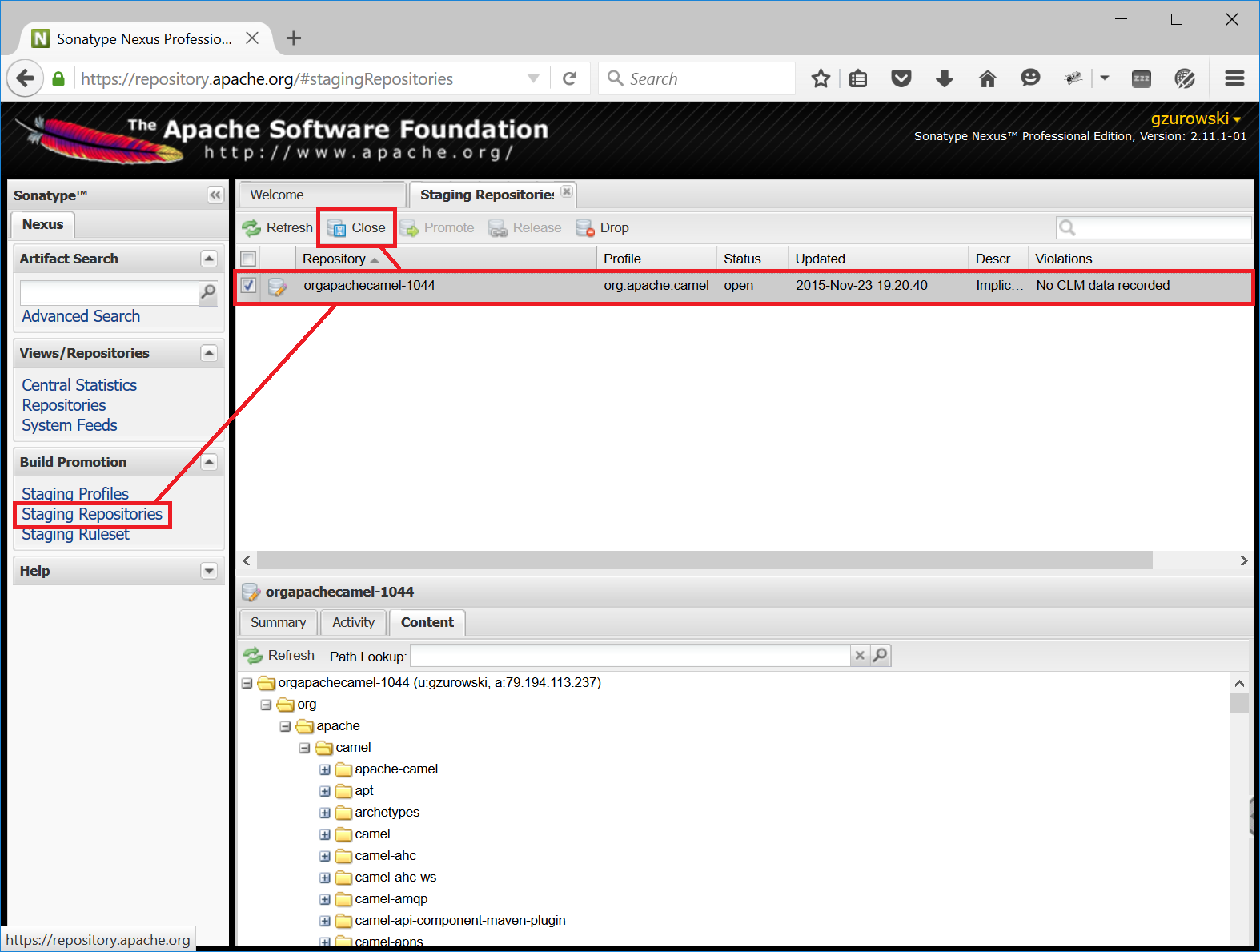
Quote from the Maven release guide for Apache projectsLogin to https://repository.apache.org using your Apache LDAP credentials. Click on "Staging Repositories". Then select "org.apache.camel-xxx" in the list of repositories, where xxx represents your username and ip. Click "Close" on the tool bar above. This will close the repository from future deployments and make it available for others to view. If you are staging multiple releases together, skip this step until you have staged everything. Enter the name and version of the artifact being released in the "Description" field and then click "Close". This will make it easier to identify it later.
See the screenshot below that shows the state of the staging repository at this stage.
- Verify staged artifacts
Quote from the original guideIf you click on your repository, a tree view will appear below. You can then browse the contents to ensure the artifacts are as you expect them. Pay particular attention to the existence of *.asc (signature) files. If the you don't like the content of the repository, right click your repository and choose "Drop". You can then rollback your release and repeat the process.
Note the repository URL, you will need this in your vote email.
Testing the Camel Release Candidate
When folks need to test out a release candidate, the jars will not have been uploaded to the central Maven repo. This means that the example programs which use Maven will not automatically work and you need to follow the Testing a release candidate guidelines.
Afterwards send out the VOTE for this release candidate to the dev@ mailing list.
Announcing the Camel Release
If the VOTE pass,
- Close it by sending the RESULT to the mailing list.
- Promote the artifacts to the central repo. For this login to https://repository.apache.org using your Apache LDAP credentials. Click on "Staging Repositories". Select "org.apache.camel-xxx" in the list of repositories, where xxx represents your username and ip. Click "Release" on the tool bar above. This will promote all artifacts to the central maven repo. Enter the name and version of the artifact being released in the "Description" field and then click "Release". This will make it easier to identify it later.
- Perform a release in JIRA and create a new release version in JIRA
- There should be already a release notes page in the In Progress folder (if not create one based on the Camel x.y.z Release (template)). Edit it and change the number of fixed issues, and update its parent to be the Download page, and make sure to remove the (release in progress) in the title. Now would be a good time to create a new release notes page for the next release based on the template mentioned before. It is useful and simpler to keep it up to date during the development cycle.
Copy the newly deployed distribution to Apache website:
cd ${CAMEL_ROOT_DIR}/etc/scripts
./release-distro.sh <Camel version>
|
The script will download all distribution artifacts using wget and eventually show the following message:
Distro artifacts prepared for upload, but not yet uploaded. Verify distro then complete upload!
cd /tmp/camel-release/dist/x.y.z/
svn status
svn ci -m "Apache Camel x.y.z released artifacts."
Remove previous distro on same branch if necessary
DONE |
Finish this step by following the provided command sequence using svn after checking the artifacts.
Remove the old release by using svn:
svn rm https://dist.apache.org/repos/dist/release/camel/apache-camel/OLD_CAMEL_VERSION -m "Removed the old release" |
- Update the download link of the Camel x.y.z Release to with http://archive.apache.org/dist/
- Copy the KEYS file by ssh into /www/www.apache.org/dist/camel/apache-camel/ on people.apache.org if you changed it
- Update the Download page to refer to the latest release distributions (search & replace the version numbers mostly)
Upload the newly deployed schema and the manual to Apache:
cd ${CAMEL_ROOT_DIR}/etc/scripts
./release-website.sh <Camel version>
|
The script will download the website release artifacts using wget. Once all artifacts are downloaded, the following message is displayed:
NOTE: Manual steps required! Check the schemas and manual files for new artifacts,
      add them to the repository as required and commit your changes. This step
      is intentionally not automated at this point to avoid errors.

cd /tmp/camel-release/websites/production/camel/x.y.z/schema/
svn status
svn add <schema-x.y.z-qualifier>.xsd
svn ci -m "Uploading released schemas for camel-x.y.z"

cd /tmp/camel-release/websites/production/camel/x.y.z/manual/
svn status
svn add camel-manual-x.y.z.html
svn ci -m "Uploading released manuals for camel-x.y.z" |
Finish this step by following the provided command sequence using svn after checking the artifacts.
Upload the javadocs to Apache, you need to checkout the files from "https://svn.apache.org/repos/infra/websites/production/camel/content/maven/"
To be able to perform a checkout on people.apache.org from svn.apache.org, you have to trust the server certificate: svn list "https://svn.apache.org/repos/infra/websites/production/camel/content"
Error validating server certificate for 'https://svn.apache.org:443':
The certificate is not issued by a trusted authority. Use the fingerprint to validate the certificate manually!
Certificate information:
Hostname: *.apache.org
Valid: from Tue, 20 Dec 2011 00:00:00 GMT until Mon, 17 Feb 2014 23:59:59 GMT
Issuer: Thawte, Inc., US
Fingerprint: bc:5f:40:92:fd:6a:49:aa:f8:b8:35:0d:ed:27:5e:a6:64:c1:7a:1b
(R)eject, accept (t)emporarily or accept (p)ermanently?
|
|
- Update the Xml Reference page with a link to the XSD's
- Update the Manual page with a link to the PDF/HTML if it's a new major/minor version
- Mail the dev@camel.apache.org, users@camel.apache.org & announce@apache.org lists
- Post a news entry in the wiki which links to the release page so folks can download it!
- perform a full export of the Camel WIKI sites to see your blog on the Camel index site. To do this, you have to remove the main.pageCache file in the content/cache sub directory:
- execute: svn rm https://svn.apache.org/repos/infra/websites/production/camel/content/cache/main.pageCache
- Add the release version number to the following
spring.schemas file located in src/main/resources/META-INF directory of the following components: - Have a beer!
