The Default Clinical Pipeline is a great place for the new user of a binary installation to start. New developers should look at the ctakes-examples project to start.
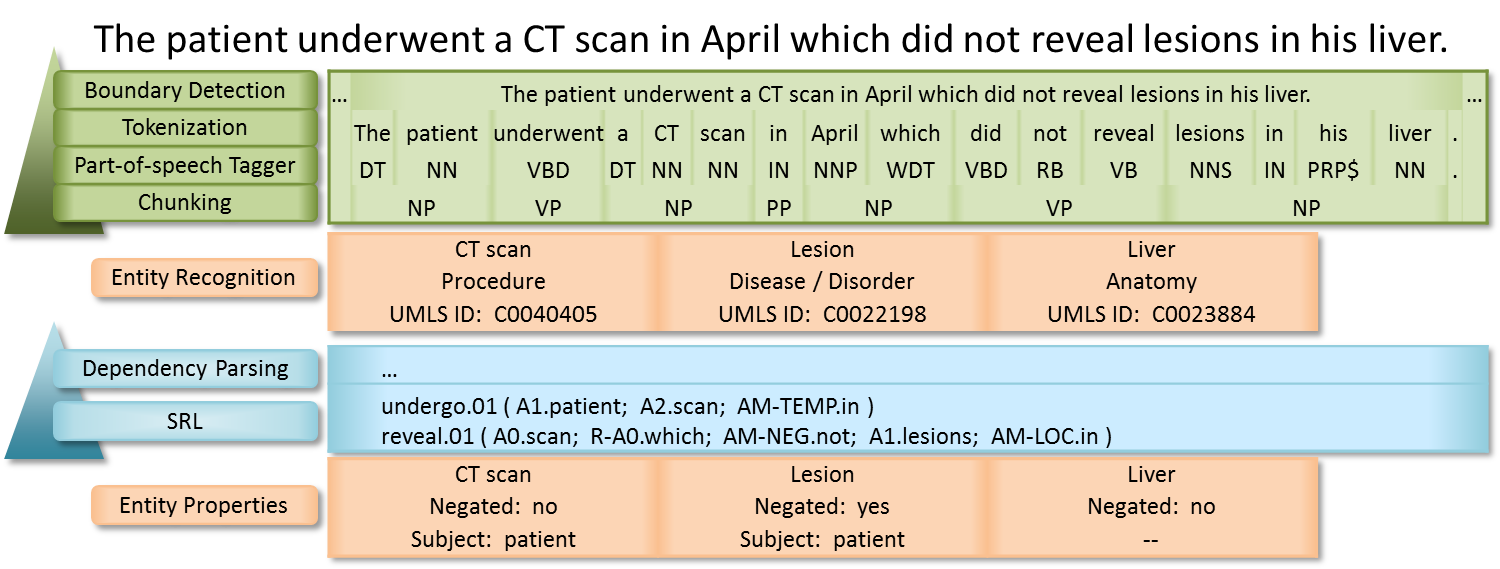
The Default Clinical Pipeline produces the most commonly desired output from cTAKES. This includes annotations for Anatomical sites, Signs/Symptoms, Procedures, Diseases/Disorders and Medications. For each annotation there are normalized UMLS CUIs, plus values for negation, uncertainty and subject.
Figure 1. A sample sentence processed by the Default Clinical Pipeline.
Run via command line.
bin/runClinicalPipeline -i inputDirectory --xmiOut outputDirectory --user umlsUsername --pass umlsPasswordThe pipeline will write log information to the screen and will write an XMI file for each file in inputDirectory and its subdirectories. The directory tree below inputDirectory will be mirrored in outputDirectory.
You can view information in the XMI files using the UIMA Cas Visual Debugger (CVD).
bin/runctakesCVD TypeSystem.xml in resources/org/apache/ctakes/typesystem/types/.xmi file in your outputDirectorySelections in the tree on the left can provide highlighting in the document text on the right. Browsing annotations is not necessarily straightforward. Reference the CVD main area documentation for how to use the CVD. See the cTAKES 4.0 Component Use Guide for cTAKES annotations and attributes.
For cTAKES 4.0, if runClinicalPipeline fails with "ERROR PipelineBuilder - No Collection Reader specified.", verify that you used -i inputDirectory
The command line bin/runClinicalPipeline runs the Piper File |
Related articles appear here based on the labels you select. Click to edit the macro and add or change labels.
|