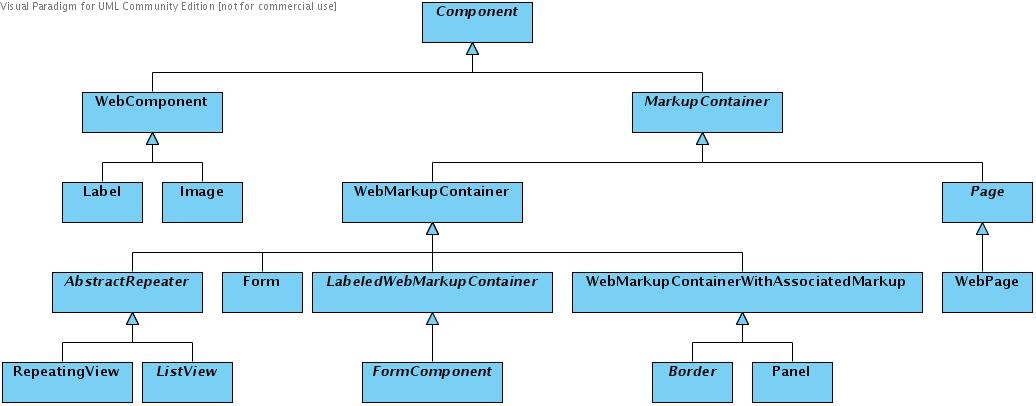
Component
Component serves as the highest level abstract base class for all components. These are some of the common component features:
- Identity - All Components have a non-null id which is retrieved by calling getId(). The id must be unique within the MarkupContainer that holds the Component, but does not have to be globally unique or unique within a Page's component hierarchy. You can not have the same java object as a child for two different MarkupContainers.
- Parent - All components have a parent which can be retrieved with getParent(). If a component is an instance of MarkupContainer, it may have children. Pages don't have parents.
- Model - Model is an object that implements IModel interface. Components use their models to render a response in HTML markup language. In addition, form components know how to update their models based on request information. Model can be set via setModel(IModel model) and retrieved via getModel()(see also Working with Wicket models).
- Versioning - Components can be versioned (see also versioning for pages). You can set versioning via the setVersioned(boolean) method and check with isVersioned(). By default all components are versioned, though isVersioned() will return false if component's parent is not versioned or if component is not rendered yet.
- Visibility - Components can be invisible. Invisible components (and their children) will not render a response. Visibility can be set by setVisible(boolean visible) and checked by isVisible().
- AttributeModifiers - You can add one or more AttributeModifiers to any component if you need to programmatically manipulate attributes of the markup tag to which a Component is attached. See also How to modify an attribute on a HTML tag.
WebComponent
Base class for simple HTML components which do not hold nested components.
MarkupContainer
A MarkupContainer holds an array of child components. Children can be added by calling the add(), addOrReplace() methods and replaced by replace() method. Children can be looked up using a dotted path. For example, if a container called "a" held a nested container "b" which held a nested component "c", then a.get("b.c") would return the Component with id "c". The number of children in a MarkupContainer can be determined by calling size(). The children of a MarkupContainer can be iterated using iterator() method. The whole hierarchy of children held by a MarkupContainer can be traversed by calling visitChildren(), passing in an implementation of Component.IVisitor.
Normally you should not subclass MarkupContainer. Instead subclass a markup-specific class such as WebPage or WebMarkupContainer.
WebMarkupContainer
A container of HTML markup and components. It is very similar to the base class MarkupContainer, except that the markup type is defined to be HTML. Subclass WebMarkupContainer to define an inline component (a component which has its markup in parent's container markup file).
WebMarkupContainerWithAssociatedMarkup
It is very similar to the base class WebMarkupContainer except that it adds the ability to process <wicket:head> tag. Though it may seem from the name of the class that its subclasses must have their own file with markup, it is not so. To create a component with associated markup file you should subclass Panel.

Page
Page is an abstract base class for pages. As a MarkupContainer subclass, a Page can contain a component hierarchy and markup in some markup language such as HTML. Users of the framework should not attempt to subclass Page directly. Instead they should subclass WebPage.
- Construction - When a page is constructed, it is automatically added to the current PageMap in the Session. When a Page is added to the Session's PageMap, the PageMap assigns the Page an id. A PageMap is roughly equivalent to a browser window and encapsulates a set of pages accessible through that window (see Page maps).

- Bookmarkable Pages - Pages can be constructed with any constructor when they are being used in a Wicket session, but if you wish to link to a Page using a URL that is "bookmarkable" (which implies that the URL will not have any session information encoded in it, and that you can call this page directly without having a session first directly from your browser), you need to implement your Page with a no-arg constructor or with a constructor that accepts a PageParameters argument (which wraps any query string parameters for a request). In case the page has both constructors, the constructor with PageParameters will be used. See also Bookmarkable pages and links.
- Models - Pages, like other Components, can have models (see IModel). A Page can be assigned a model by passing one to the Page's constructor, by overriding initModel() or with an explicit invocation of setModel(). If the model is a CompoundPropertyModel, Components on the Page can use the Page's model implicitly via container inheritance (see also Working with Wicket models).

- Versioning - Versioning means that a page can remember changes made to it and all versioned child components and later reverse the changes. These changes include setting different object to a component model, changing the state of a component (for example making it disabled), replacing a component with another one or adding/removing a component from page's components hierarchy. By default all Pages support versioning. All versioned pages have its own instance of IPageVersionManager implementation which they use to manage changes.
Panel
A panel is a reusable component that holds markup and other components. A panel has its own associated markup file and the container content is taken from that file.
See Panel for more information.
Border
A border component has associated markup which is drawn and determines placement of any markup and/or components nested within the border component.
The portion of the border's associated markup file which is to be used in rendering the border is denoted by a <wicket:border> tag. The children of the border component instance are then inserted into this markup, replacing the first <wicket:body> tag in the border's associated markup.
See Consistent page layout using borders.