Definition: What is it?
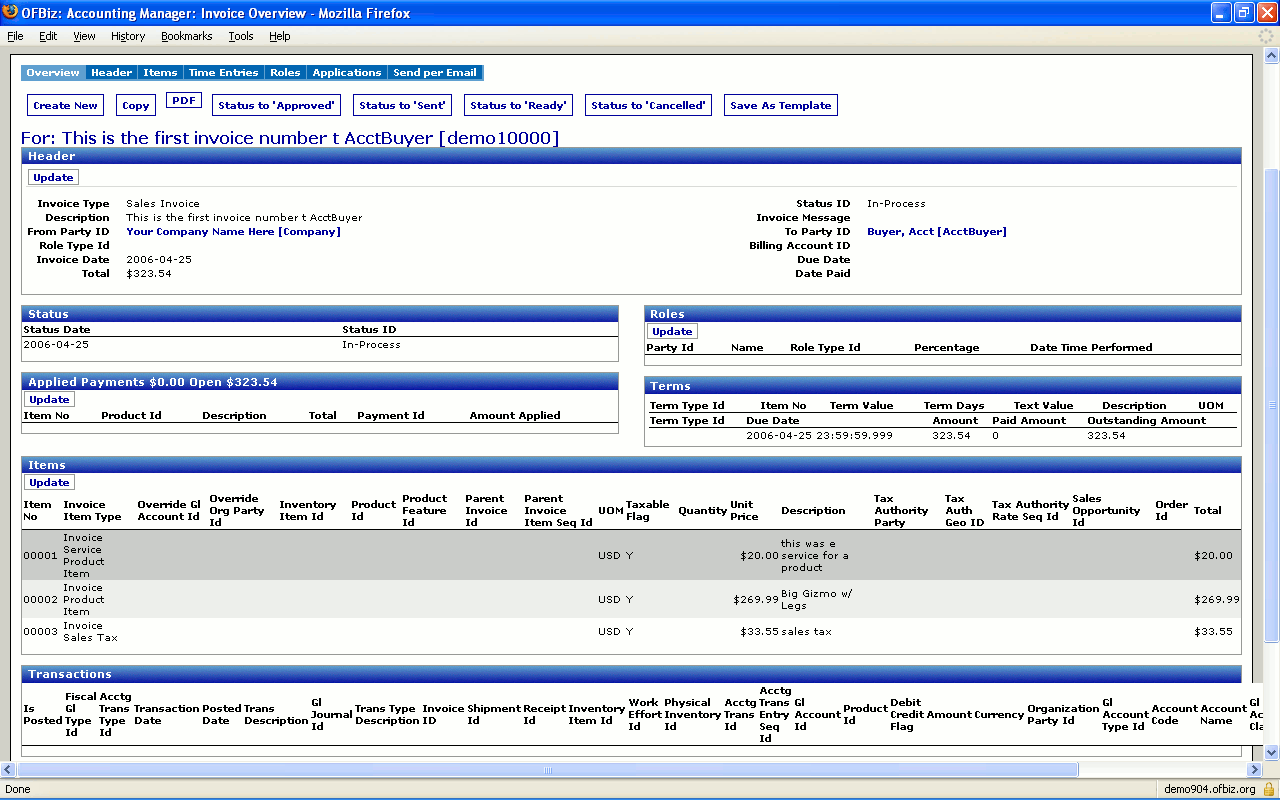
The Invoice Overview screen is used to display the summary view of the invoice. The screen itself is divided into sections that show various information related to the Invoice (eg Roles, Status, Terms, Items, Payments Applied , Transactions etc).
Invoices can be of two types - Sales Invoices or Purchase Invoices.
The following options are currently available from this screen:
- Create New (Create a new invoice)
- Copy (Create a copy of the current invoice)
- PDF (View a PDF of the current invoice)
- PDF default currency (NOTE TO CHECK: Need to see how this is different from just the PDF view......)
- Status to 'Approved' (Change the status of the current invoice to 'Approved)
- Status to 'Sent' (Change the status of the current invoice to 'Sent')
- Status to 'Ready' (Change the status of the current invoice to 'Ready'. NOTE: This will create the relevant accounting transactions and post them to the general ledger)
- Status to 'Cancelled' (Change the status of the current invoice to 'Cancelled')
- Save as Template (NOTE TO CHECK: Save the current invoice format as a template)
NOTE TO CHECK: Check if there are any other (or different) statuses for a Purchase Invoice....
What is it used for?
It is used to give the user an full overview of the details of the invoice in one single view. For (all?) Invoices the following details are shown:
- Customer Details
- Invoice Status (In Process, Paid, Sent, Approved etc)
- Order Date
- Invoice Amount
- Payments Applied to the Invoice and the date Paid
- Invoice item details (including any work effort or time entries)
- List of general ledger accounting transactions generated
The screen also contains links to the following sub menus:
What's on the screen?
To do