This document will walk you through the steps to get a ServiceMix 4.0 milestone build up and running.
ServiceMix 4 requires JDK 1.5 or later. For optimal results, confirm that your JDK version matches JDK listed at http://java.sun.com/javase/downloads:
Brians-Desktop:apache-servicemix-4.0-m1 topping$ java -version java version "1.6.0_05" Java(TM) SE Runtime Environment (build 1.6.0_05-b13-120) Java HotSpot(TM) 64-Bit Server VM (build 1.6.0_05-b13-52, mixed mode) |
The download page contains information about the latest packages for ServiceMix 4. For purposes of this document, we will assume that you are using one of the following packages:
If you wish to use the source code as supplementary documentation, be sure to download the "-sources" file as well.
Using the appropriate archive expander, create the directory tree on your hard drive. If you chose to download the sources, unpack them second after the binary distribution without changing directories. The sources are an overlay and fill in the empty "src" directory in the binary distribution archive.
cd <installation_parent> unzip apache-servicemix-4.0-m1.zip unzip apache-servicemix4.0-m1-src.zip |
cd <installation_parent> tar xvfz apache-servicemix-4.0-m1.tar.gz tar xvfz apache-servicemix4.0-m1-src.tar.gz |
Debug output is sent to <installation_dir>/data/log/servicemix.log. The default logging level is set at INFO, but you may desire to see more. You can change this at <installation_dir>/etc/system.properties:
org.ops4j.pax.logging.DefaultServiceLog.level=DEBUG |
From within the directory you created when unpacking, start the ServiceMix container:
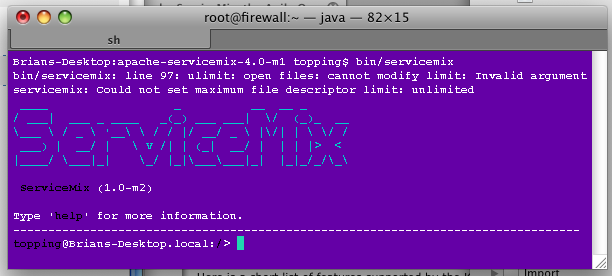
Brians-Desktop:apache-servicemix-4.0-m1 topping$ bin/servicemix |
If all goes well, you will be greeted with the ServiceMix banner and a prompt for the GShell plugin:
Here are a selection of common problems:
This is a problem with the startup script that shows itself on OS-X for the Milestone 1 build. You can safely ignore this, and it is fixed in the current Subversion trunk.