Data IO is often a bottleneck for training and inference workflows with image data. And as data size gets larger and is unable to fit in the main memory, data loading can bring down the performance of the workflow. Which is why it would be beneficial to have the image stored in the binary recordIO format, which is much more compact than raw image files, occupies less memory and more efficient while data loading.
The goal of this project is to have an easy to use and intuitive interface to pre-process image data and create recordIO files. Currently our customers have to clone the whole MXNet repository to use a command line tool to pre-process and create recordIO files from image datasets. This is inconvenient for our customers, with the proposed change the customers will be able to use this functionality straight out of the PyPi package.
As a user, I’d like to have an API to convert a dataset of raw images into binary format and pack them as RecordIO files.
the ideal solution is to rewrite the file as files are always read and written as streams of data and it would not be possible to add records in the middle of a file in-place. This cannot be seen as a drawback of the API as this limitation is shared by the reading/writing of any generic text file in Python or other programming languages. But reading, writing and editing of record files can be accomplished by read_idx() and write_idx() methods of the MXIndexedRecordIO object.
'''
Existing RecordIO files can perused and edited and rewritten using the below
two code snippets of reading and writing RecordIO files.
'''

# Write a record
label1 = [2,3]
id1 = 2
header1 = mx.recordio.IRHeader(0, label1, id1, 0)
with open('img.jpg', 'rb') as fin:
    img = fin.read()
    s1 = mx.recordio.pack(header1, img)
write_record = mx.recordio.MXIndexedRecordIO('img.idx', 'img.rec', 'w')
write_record.write_idx(id1, s1)


# Read record
read_record = mx.recordio.MXIndexedRecordIO('img.idx', 'img.rec', 'r')
item = read_record.read_idx(2)
header, img = mx.recordio.unpack_img(item)
print(header.label) |
Implement a new API in MXNet's Data IO API that accepts an image list file or a numpy array, and converts that data into recordIO file format and stores the file. The proposed approach will also parallelize and user will be given the option to set the number of threads he/she can use to perform this function. The proposed API will have the same functionality as an existing CLI tool, which is currently used by customers for creating .rec files, but customers will have the convenience of using this functionality from the PyPi package itself.
Creating recordIO files is accomplished using a command line tool. The tool accepts arguments to determine
Each of these arguments are passed as parameters to the command line tool and the resultant .rec file is stored in the local folder. The current C++ tool runs as a single threaded process, whereas the python tool supports the use of multiple threads/workers.
The process of pre-processing image data and converting the dataset into RecordIO file format should be easy and intuitive for the user. Here is the ideal workflow the user should have -
imageTransform = transforms.Compose([
                            transforms.Resize(300),
                            transforms.ResizedCrop(224),
                            transforms.Brightness(0.1),
                            transforms.Normalize(0, 1)])

mx.io.im2rec(list_filename, imageTransform, dataset_params, output_path) |
He/She should be able to stack the desired image transformations into a gluon.transform.Compose and pass that object to the im2rec API which will apply those transforms and then pack the transformed images into recordIO files.
Multi-Reader Single-Writer Design for Creating .rec file
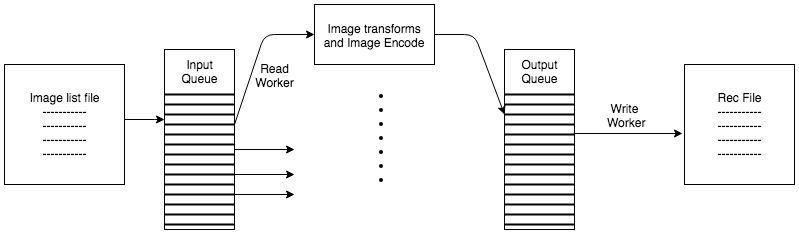
Given a list file with the following formatinteger_image_index \t label \t path_to_raw_image
Transform the input raw images as per the stacked transforms specified in gluon.transforms and pack the image files into RecordIO format as per the parameters in the dataset_params dictionary object( See Appendix ), and return the path to the output .rec file.
def mx.io.im2rec(list_file, transforms, dataset_params, output_path):
    """
    Convert image.list file containing the path to the raw images to binary files.
     Input Parameters -
     ----------
     list_file - str object containing the path to the list file
     transforms - gluon.transforms.Compose object
     dataset_params - dict object whose description is given in the appendix
     output_path - string object containing the path to the output location

     Return type -
     ----------
     rec_file_path - str object depicting the path of the output rec file
    """
return rec_file_path |
Post implementing the API the existing CLI tool will continue to exist, but users will also be directed to the new API and its accompanying documentation/tutorials.
<>
One of the initial approaches I came up with involved having each of the image transforms and dataset_params as a parameter to the API. This will end up creating an API with potentially 10-15 parameters and adding/removing more transforms or parameters might be difficult and could lead to API breakage. Hence using gluon.transforms was preferred.
These parameters describe how the record files will be packed sequentially in the .rec file
Parameter | Default Value/Optional | Description |
num_workers | 1 | Have multiple workers doing the job. This option will imply shuffling the dataset. |
| batch_size | 4096 | |
| pass_through | False | |
| pack_label | ||
parts | 1 | used for part generation, logically split the .lst file to NSPLIT parts by position |
These transforms are to perform pre-processing of images. Each of these transforms will be implemented as a gluon transform functions. The proposed API spec accepts transforms.Compose which is of type SequentialBlock. This SequentialBlock will contain a stack of transforms that will be applied. The user could define his own HybridBlock and include it in the SequentialBlock, to make it extensible.
Parameter | Default Value/Optional | Description |
resize | Optional | resize the image to the newsize [width, height] |
center_crop | 0 | specify whether to crop the center image to make it square. 1 - perform cropping 0 - no cropping |
quality | 95 for JPEG; 9 for PNG | JPEG quality for encoding (1-100, default: 95) PNG compression for encoding (1-9, default: 3). |
| color | -1 | Force color (1), gray image (0) or keep source unchanged (-1) |
| encoding | [‘.jpg’] | Encoding type. Can be '.jpg' or '.png' |
| inter_method | 1 | Image interpolation methods. NN(0) BILINEAR(1) CUBIC(2) AREA(3) LANCZOS4(4) AUTO(9) RAND(10) |