Purpose
This is the functional specification to keep management server in maintenance mode.
Bug Reference
N/A
Branch
main
Introduction
CloudStack currently supports safe shutdown of management server from 4.19.0 release onwards. The management server still holds the agents responsibility when it's ready to shutdown. When shutdown triggered on management server, the agent reconnection storms for the management servers and takes time to settle down. This proposed feature will migrate the agents to other available management servers in CloudStack, optimise the performance of agent reconnections, thus reducing or removing downtime during rolling restarts of management servers and keeps management server in maintenance mode. Management server maintenance mode is supported when more than one active management servers available.
Document History
| Author | Description | Date |
|---|
| Added feature specification and design | Nov 2024 |
Glossary
Use cases
This feature should able to:
- Admin should be able to put the management server in Maintenance mode, and be able to perform any out of band operations such as package updates/upgrades/restart on the management server host, in a one-by-one or rolling basis. During the process of putting the management server into maintenance, agent connections should be migrated to a different management server.
- Admin should be able to list management servers, and pending jobs and connected agents by a specific management server.
- Admin must be able to have UI/API that assists to keep management servers in maintenance mode.
Feature specification
- Add support to keep management server in maintenance mode.
Functionality support
- Prepare for maintenance
- Triggers transfer agents to other available management servers for maintenance, new agent command MigrateAgentConnectionCommand to initiate transfer of indirect agents.
- Cancel maintenance
- Cancel the maintenance and bring back the management server to Up state.
Test Guidelines
- Initiate management server maintenance when some jobs are running and host agents are connected.
Error Handling
- All errors at various levels will be logged in management-server.log.
Target Users
- CloudStack Admins.
Design description
Update the existing shutdown plugin to support maintenance mode of the management server.
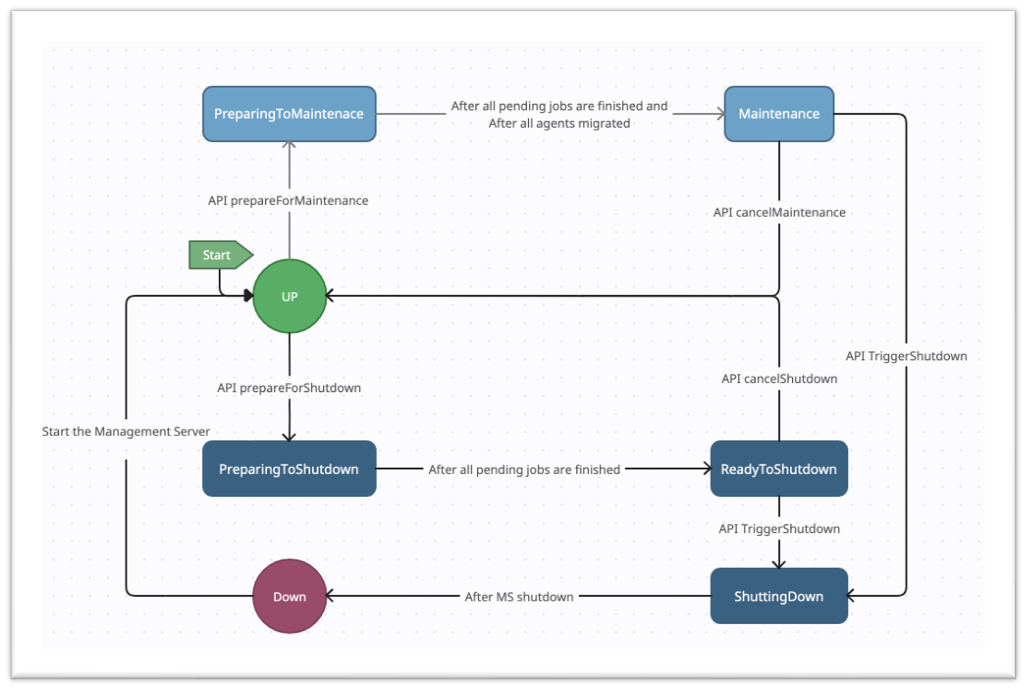
- New Management Server States: PrepareForMaintenance, Maintenance will be introduced for the CloudStack management server (MS) maintenance mode. Maintenance mode will take care of the migration of the agents to a new management server and waits for all the pending jobs to be finished, where are existing shutdown mode will wait only for all the pending jobs to be finished, purely to shutdown the management server. In both the cases, management server will be kept in read only mode, no new jobs are allowed.
- Agents Migration is initiated to the available management servers, after pending jobs are finished. Implement new command for the agents migration (maybe, MigrateAgentConnectionCommand). Management Server should be made aware of the transfer, with transfer flag in the startup command to optimise the re-connection.
Migration of agent connections will involve skipping or optimised lazy processing of a few commands operations which are not required for the hosts which is already in Up state. This can speed up migration of a health host and agent from an old MS to a new one.- For Indirect Agents:
The following are some of the commands which are sent by management server to the host during processing of indirect agents:
o ModifyStoragePoolCommand,
o CheckNetworkCommand,
o CleanupNetworkRulesCmd,
o SetHostParamsCommand,
o ModifySshKeysCommand,
o ReadyCommand (this may still needed to be proceed during migration of an agent connection to a new management server)
When a KVM agent tries to connect to a management server, it fills the KVMHostInfo by reading the host hardware details which may not also be required. This happens when KVM agent prepares the StartupRoutingCommand to the management server to intiate the connection.
In order to balance the load of agent connections across the management servers existing “indirect.agent.lb.algorithm” settings can be used which takes the values of “static”, “roundrobin” and “shuffle”. This can also be extended for the agent to choose the management server to connect. New API “prepareForMaintenance” will also an optional parameter “agentlbalgorithm” to override the value in the global setting, to make it more specific only to this maintenance operation. - For Direct Agents:
The following are some of the commands which are sent by management server to the host during processing of connections direct agents:
o ModifyStoragePoolCommand,
o CheckNetworkCommand,
o ReadyCommand (this may still needed to be proceed during migration of an agent connection to a new management server)
In order to balance the load of agent connections across the management servers new API “prepareForMaintenance” will also an optional parameter “agentlbalgorithm” which takes values of “static”, “roundrobin” and “shuffle”. By default it will be “static”.
Configuration settings
The configuration settings changes below, are incorporated.
Configuration | Description | Default Value |
management.server.maintenance.window | Timeout (in mins) for the management server maintenance window | 60 mins |
API Flow
The update API flow for the management server API calls, and respective state changes.
Assumptions and Limitations
- This feature is applicable only for a clustered management server setup.
- When a management server is tried to put in maintenance and there are no other management servers in Up state then “prepareForMaintenance” API will be failed.
- Cancelling of async/pending jobs may not always be possible or a force cancellation can cause side-effects that the admin may need to handle/cleanup out of band.
- This feature gives facilities via API and UI that can be used to perform rolling restarts and maintenance on the management server hosts in a controlled manner. However, it may not support or work in cases such as those from management server faults and crashes, or issues arising on the management server host causing unexpected side effects.
- Rebalancing of the agents should happen as per the current flow.
API changes
New API “prepareForMaintenance” will handle the migration of the connected agents (KVM) and also the direct agents (VMware, XCP) to new MSs and waits for the pending jobs to be finished. This will keep the MS in readonly mode. Once the maintenance is finished from the backend another new API “cancelMaintenance” API needs to be called to bring back the MS to UP state. A new global setting “management.server.maintenance.timeout” will be introduced to control the time for the maintenance window for the MS.
New APIs:
- prepareForMaintenance API, with following parameters:
- managementserverid
- algorithm (optional) - indirect agents lb algorithm.
- cancelMaintenance API call, with following parameters:
- managementserverid
Existing APIs:
- listHosts API - list the hosts managed/owned by the management server.
- managementserverid
DB changes
N/A
Hypervisors supported
KVM (Indirect Agents), VMWare, XenServer (Direct Agents)
UI Flow
- Go to Management Servers section, and the perform action prepare for maintenance.
- New Tab with "Connected Agents" for the Management Server.
Upgrade
N/A
Open Items/Questions
N/A
References
[1] Feature: Safely shutdown cloudstack
