DUE TO SPAM, SIGN-UP IS DISABLED. Goto Selfserve wiki signup and request an account.

CookBook
This document describes various recipes for working with Camel
- Bean Integration describes how to work with beans and Camel in a loosely coupled way so that your beans do not have to depend on any Camel APIs
- Annotation Based Expression Language binds expressions to method parameters
- Bean Binding defines which methods are invoked and how the Message is converted into the parameters of the method when it is invoked
- Bean Injection for injecting Camel related resources into your POJOs
- Parameter Binding Annotations for extracting various headers, properties or payloads from a Message
- POJO Consuming for consuming and possibly routing messages from Camel
- POJO Producing for producing camel messages from your POJOs
- RecipientList Annotation for creating a Recipient List from a POJO method
- Using Exchange Pattern Annotations describes how pattern annotations can be used to change the behaviour of method invocations
- Hiding Middleware describes how to avoid your business logic being coupled to any particular middleware APIs allowing you to easily switch from in JVM SEDA to JMS, ActiveMQ, Hibernate, JPA, JDBC, iBatis or JavaSpace etc.
- Visualisation describes how to visualise your Enterprise Integration Patterns to help you understand your routing rules
- Business Activity Monitoring (BAM) for monitoring business processes across systems
- Extract Transform Load (ETL) to load data into systems or databases
- Testing for testing distributed and asynchronous systems using a messaging approach
- Camel Test for creating test cases using a single Java class for all your configuration and routing
- Spring Testing uses Spring Test together with either XML or Java Config to dependency inject your test classes
- Guice uses Guice to dependency inject your test classes
- Templating is a great way to create service stubs to be able to test your system without some back end system.
- Database for working with databases
- Parallel Processing and Ordering on how using parallel processing and SEDA or JMS based load balancing can be achieved.
- Asynchronous Processing in Camel Routes.
- Implementing Virtual Topics on other JMS providers shows how to get the effect of Virtual Topics and avoid issues with JMS durable topics
- Camel Transport for CXF describes how to put the Camel context into the CXF transport layer.
- Fine Grained Control Over a Channel describes how to deliver a sequence of messages over a single channel and then stopping any more messages being sent over that channel. Typically used for sending data over a socket and then closing the socket.
- EventNotifier to log details about all sent Exchanges shows how to let Camels
EventNotifierlog all sent to endpoint events and how long time it took. - Loading routes from XML files into an existing CamelContext.
- Using MDC logging with Camel
- Running Camel standalone and have it keep running shows how to keep Camel running when you run it standalone.
- Hazelcast Idempotent Repository Tutorial shows how to avoid to consume duplicated messages in a clustered environment.
- How to use Camel as a HTTP proxy between a client and server shows how to use Camel as a HTTP adapter/proxy between a client and HTTP service.
Annotation Based Expression Language
You can also use any of the Languages supported in Camel to bind expressions to method parameters when using Bean Integration. For example you can use any of these annotations:
Annotation |
Description |
|---|---|
Inject a Bean expression |
|
Inject a BeanShell expression |
|
Inject a Constant expression |
|
Inject an EL expression |
|
Inject a Groovy expression |
|
Inject a Header expression |
|
Inject a JavaScript expression |
|
Inject a MVEL expression |
|
Inject an OGNL expression |
|
Inject a PHP expression |
|
Inject a Python expression |
|
Inject a Ruby expression |
|
Inject an Simple expression |
|
Inject an XPath expression |
|
Inject an XQuery expression |
Example:
public class Foo {

    @MessageDriven(uri = "activemq:my.queue")
    public void doSomething(@XPath("/foo/bar/text()") String correlationID, @Body String body) {
		// process the inbound message here
    }
}
Advanced example using @Bean
And an example of using the the @Bean binding annotation, where you can use a POJO where you can do whatever java code you like:
public class Foo {

    @MessageDriven(uri = "activemq:my.queue")
    public void doSomething(@Bean("myCorrelationIdGenerator") String correlationID, @Body String body) {
		// process the inbound message here
    }
}
And then we can have a spring bean with the id myCorrelationIdGenerator where we can compute the id.
public class MyIdGenerator {

    private UserManager userManager;

    public String generate(@Header(name = "user") String user, @Body String payload) throws Exception {
       User user = userManager.lookupUser(user);
       String userId = user.getPrimaryId();
       String id = userId + generateHashCodeForPayload(payload);
       return id;
   }
}
The POJO MyIdGenerator has one public method that accepts two parameters. However we have also annotated this one with the @Header and @Body annotation to help Camel know what to bind here from the Message from the Exchange being processed.
Of course this could be simplified a lot if you for instance just have a simple id generator. But we wanted to demonstrate that you can use the Bean Binding annotations anywhere.
public class MySimpleIdGenerator {

    public static int generate()  {
       // generate a unique id
       return 123;
   }
}
And finally we just need to remember to have our bean registered in the Spring Registry:
<bean id="myCorrelationIdGenerator" class="com.mycompany.MySimpleIdGenerator"/>
Example using Groovy
In this example we have an Exchange that has a User object stored in the in header. This User object has methods to get some user information. We want to use Groovy to inject an expression that extracts and concats the fullname of the user into the fullName parameter.
    public void doSomething(@Groovy("$request.header['user'].firstName $request.header['user'].familyName) String fullName, @Body String body) {
		// process the inbound message here
    }
Groovy supports GStrings that is like a template where we can insert $ placeholders that will be evaluated by Groovy.
Bean Binding
Bean Binding in Camel defines both which methods are invoked and also how the Message is converted into the parameters of the method when it is invoked.
Choosing the method to invoke
The binding of a Camel Message to a bean method call can occur in different ways, in the following order of importance:
- if the message contains the header CamelBeanMethodName then that method is invoked, converting the body to the type of the method's argument.
- From Camel 2.8 onwards you can qualify parameter types to select exactly which method to use among overloads with the same name (see below for more details).
- From Camel 2.9 onwards you can specify parameter values directly in the method option (see below for more details).
- you can explicitly specify the method name in the DSL or when using POJO Consuming or POJO Producing
- if the bean has a method marked with the
@Handlerannotation, then that method is selected - if the bean can be converted to a Processor using the Type Converter mechanism, then this is used to process the message. The ActiveMQ component uses this mechanism to allow any JMS MessageListener to be invoked directly by Camel without having to write any integration glue code. You can use the same mechanism to integrate Camel into any other messaging/remoting frameworks.
- if the body of the message can be converted to a BeanInvocation (the default payload used by the ProxyHelper) component - then that is used to invoke the method and pass its arguments
- otherwise the type of the body is used to find a matching method; an error is thrown if a single method cannot be chosen unambiguously.
- you can also use Exchange as the parameter itself, but then the return type must be void.
- if the bean class is private (or package-private), interface methods will be preferred (from Camel 2.9 onwards) since Camel can't invoke class methods on such beans
In cases where Camel cannot choose a method to invoke, an AmbiguousMethodCallException is thrown.
By default the return value is set on the outbound message body.
Asynchronous processing
From Camel 2.18 onwards you can return a CompletionStage implementation (e.g. a CompletableFuture) to implement asynchronous processing.
Please be sure to properly complete the CompletionStage with the result or exception, including any timeout handling. Exchange processing would wait for completion and would not impose any timeouts automatically. It's extremely useful to monitor Inflight repository for any hanging messages.
Note that completing with "null" won't set outbody message body to null, but would keep message intact. This is useful to support methods that don't modify exchange and return CompletableFuture<Void>. To set body to null, just add Exchange method parameter and directly modify exchange messages.
Examples:
Simple asynchronous processor, modifying message body.
public CompletableFuture<String> doSomethingAsync(String body)
Composite processor that do not modify exchange
 public CompletableFuture<Void> doSomethingAsync(String body) {
     return CompletableFuture.allOf(doA(body), doB(body), doC());
 }
Parameter binding
When a method has been chosen for invocation, Camel will bind to the parameters of the method.
The following Camel-specific types are automatically bound:
org.apache.camel.Exchangeorg.apache.camel.Messageorg.apache.camel.CamelContextorg.apache.camel.TypeConverterorg.apache.camel.spi.Registryjava.lang.Exception
So, if you declare any of these types, they will be provided by Camel. Note that Exception will bind to the caught exception of the Exchange - so it's often usable if you employ a Pojo to handle, e.g., an onException route.
What is most interesting is that Camel will also try to bind the body of the Exchange to the first parameter of the method signature (albeit not of any of the types above). So if, for instance, we declare a parameter as String body, then Camel will bind the IN body to this type. Camel will also automatically convert to the type declared in the method signature.
Let's review some examples:
Below is a simple method with a body binding. Camel will bind the IN body to the body parameter and convert it to a String.
public String doSomething(String body)
In the following sample we got one of the automatically-bound types as well - for instance, a Registry that we can use to lookup beans.
public String doSomething(String body, Registry registry)
We can use Exchange as well:
public String doSomething(String body, Exchange exchange)
You can also have multiple types:
public String doSomething(String body, Exchange exchange, TypeConverter converter)
And imagine you use a Pojo to handle a given custom exception InvalidOrderException - we can then bind that as well:
public String badOrder(String body, InvalidOrderException invalid)
Notice that we can bind to it even if we use a sub type of java.lang.Exception as Camel still knows it's an exception and can bind the cause (if any exists).
So what about headers and other stuff? Well now it gets a bit tricky - so we can use annotations to help us, or specify the binding in the method name option.
See the following sections for more detail.
Binding Annotations
You can use the Parameter Binding Annotations to customize how parameter values are created from the Message
Examples
For example, a Bean such as:
public class Bar {
    public String doSomething(String body) {
    // process the in body and return whatever you want
    return "Bye World";
}
Or the Exchange example. Notice that the return type must be void when there is only a single parameter of the type org.apache.camel.Exchange:
 public class Bar {
     public void doSomething(Exchange exchange) {
         // process the exchange
         exchange.getIn().setBody("Bye World");
 }
@Handler
You can mark a method in your bean with the @Handler annotation to indicate that this method should be used for Bean Binding.
This has an advantage as you need not specify a method name in the Camel route, and therefore do not run into problems after renaming the method in an IDE that can't find all its references.
public class Bar {
    @Handler
    public String doSomething(String body) {
        // process the in body and return whatever you want
        return "Bye World";
    }
}
Parameter binding using method option
Available as of Camel 2.9
Camel uses the following rules to determine if it's a parameter value in the method option
- The value is either
trueorfalsewhich denotes a boolean value - The value is a numeric value such as
123or7 - The value is a String enclosed with either single or double quotes
- The value is null which denotes a
nullvalue - It can be evaluated using the Simple language, which means you can use, e.g., body, header.foo and other Simple tokens. Notice the tokens must be enclosed with ${ }.
Any other value is consider to be a type declaration instead - see the next section about specifying types for overloaded methods.
When invoking a Bean you can instruct Camel to invoke a specific method by providing the method name:
.bean(OrderService.class, "doSomething")
Here we tell Camel to invoke the doSomething method - Camel handles the parameters' binding. Now suppose the method has 2 parameters, and the 2nd parameter is a boolean where we want to pass in a true value:
public void doSomething(String payload, boolean highPriority) {
    ...
}
This is now possible in Camel 2.9 onwards:
.bean(OrderService.class, "doSomething(*, true)")
In the example above, we defined the first parameter using the wild card symbol *, which tells Camel to bind this parameter to any type, and let Camel figure this out. The 2nd parameter has a fixed value of true. Instead of the wildcard symbol we can instruct Camel to use the message body as shown:
.bean(OrderService.class, "doSomething(${body}, true)")
The syntax of the parameters is using the Simple expression language so we have to use ${ } placeholders in the body to refer to the message body.
If you want to pass in a null value, then you can explicit define this in the method option as shown below:
.to("bean:orderService?method=doSomething(null, true)")
Specifying null as a parameter value instructs Camel to force passing a null value.
Besides the message body, you can pass in the message headers as a java.util.Map:
.bean(OrderService.class, "doSomethingWithHeaders(${body}, ${headers})")
You can also pass in other fixed values besides booleans. For example, you can pass in a String and an integer:
.bean(MyBean.class, "echo('World', 5)")
In the example above, we invoke the echo method with two parameters. The first has the content 'World' (without quotes), and the 2nd has the value of 5.
Camel will automatically convert these values to the parameters' types.
Having the power of the Simple language allows us to bind to message headers and other values such as:
.bean(OrderService.class, "doSomething(${body}, ${header.high})")
You can also use the OGNL support of the Simple expression language. Now suppose the message body is an object which has a method named asXml. To invoke the asXml method we can do as follows:
.bean(OrderService.class, "doSomething(${body.asXml}, ${header.high})")
Instead of using .bean as shown in the examples above, you may want to use .to instead as shown:
.to("bean:orderService?method=doSomething(${body.asXml}, ${header.high})")
Using type qualifiers to select among overloaded methods
Available as of Camel 2.8
If you have a Bean with overloaded methods, you can now specify parameter types in the method name so Camel can match the method you intend to use.
Given the following bean:
 from("direct:start")
    .bean(MyBean.class, "hello(String)")
    .to("mock:result");
Then the MyBean has 2 overloaded methods with the names hello and times. So if we want to use the method which has 2 parameters we can do as follows in the Camel route:
from("direct:start")
    .bean(MyBean.class, "hello(String,String)")
    .to("mock:result");
We can also use a * as wildcard so we can just say we want to execute the method with 2 parameters we do
 from("direct:start")
    .bean(MyBean.class, "hello(*,*)")
    .to("mock:result");
By default Camel will match the type name using the simple name, e.g. any leading package name will be disregarded. However if you want to match using the FQN, then specify the FQN type and Camel will leverage that. So if you have a com.foo.MyOrder and you want to match against the FQN, and not the simple name "MyOrder", then follow this example:
.bean(OrderService.class, "doSomething(com.foo.MyOrder)")
Camel currently only supports either specifying parameter binding or type per parameter in the method name option. You cannot specify both at the same time, such as
doSomething(com.foo.MyOrder ${body}, boolean ${header.high})
This may change in the future.
@RecipientList Annotation
We support the use of @RecipientList on a bean method to easily create a dynamic Recipient List using a Java method.
Simple Example using @Consume and @RecipientList
package com.acme.foo;

public class RouterBean {

    @Consume(uri = "activemq:foo")
    @RecipientList
    public String[] route(String body) {
        return new String[]{"activemq:bar", "activemq:whatnot"};
    }
}
For example if the above bean is configured in Spring when using a <camelContext> element as follows
<?xml version="1.0" encoding="UTF-8"?>
<beans xmlns="http://www.springframework.org/schema/beans"
       xmlns:xsi="http://www.w3.org/2001/XMLSchema-instance"
       xsi:schemaLocation="
       http://www.springframework.org/schema/beans http://www.springframework.org/schema/beans/spring-beans.xsd
       http://camel.apache.org/schema/spring http://camel.apache.org/schema/spring/camel-spring.xsd
    ">

  <camelContext xmlns="http://activemq.apache.org/camel/schema/spring"/>

  <bean id="myRecipientList" class="com.acme.foo.RouterBean"/>

</beans>
then a route will be created consuming from the foo queue on the ActiveMQ component which when a message is received the message will be forwarded to the endpoints defined by the result of this method call - namely the bar and whatnot queues.
How it works
The return value of the @RecipientList method is converted to either a java.util.Collection / java.util.Iterator or array of objects where each element is converted to an Endpoint or a String, or if you are only going to route to a single endpoint then just return either an Endpoint object or an object that can be converted to a String. So the following methods are all valid
@RecipientList
public String[] route(String body) { ... }

@RecipientList
public List<String> route(String body) { ... }

@RecipientList
public Endpoint route(String body) { ... }

@RecipientList
public Endpoint[] route(String body) { ... }

@RecipientList
public Collection<Endpoint> route(String body) { ... }

@RecipientList
public URI route(String body) { ... }

@RecipientList
public URI[] route(String body) { ... }
Then for each endpoint or URI the message is forwarded a separate copy to that endpoint.
You can then use whatever Java code you wish to figure out what endpoints to route to; for example you can use the Bean Binding annotations to inject parts of the message body or headers or use Expression values on the message.
More Complex Example Using DSL
In this example we will use more complex Bean Binding, plus we will use a separate route to invoke the Recipient List
public class RouterBean2 {

    @RecipientList
    public String route(@Header("customerID") String custID String body) {
    	if (custID == null)  return null;
        return "activemq:Customers.Orders." + custID;
    }
}

public class MyRouteBuilder extends RouteBuilder {
    protected void configure() {
        from("activemq:Orders.Incoming").recipientList(bean("myRouterBean", "route"));
    }
}
Notice how we are injecting some headers or expressions and using them to determine the recipients using Recipient List EIP.
See the Bean Integration for more details.
Using Exchange Pattern Annotations
When working with POJO Producing or Spring Remoting you invoke methods which typically by default are InOut for Request Reply. That is there is an In message and an Out for the result. Typically invoking this operation will be synchronous, the caller will block until the server returns a result.
Camel has flexible Exchange Pattern support - so you can also support the Event Message pattern to use InOnly for asynchronous or one way operations. These are often called 'fire and forget' like sending a JMS message but not waiting for any response.
From 1.5 onwards Camel supports annotations for specifying the message exchange pattern on regular Java methods, classes or interfaces.
Specifying InOnly methods
Typically the default InOut is what most folks want but you can customize to use InOnly using an annotation.
public interface Foo {
  Object someInOutMethod(String input);
  String anotherInOutMethod(Cheese input);

  @InOnly
  void someInOnlyMethod(Document input);
}
The above code shows three methods on an interface; the first two use the default InOut mechanism but the someInOnlyMethod uses the InOnly annotation to specify it as being a oneway method call.
Class level annotations
You can also use class level annotations to default all methods in an interface to some pattern such as
@InOnly
public interface Foo {
  void someInOnlyMethod(Document input);
  void anotherInOnlyMethod(String input);
}
Annotations will also be detected on base classes or interfaces. So for example if you created a client side proxy for
public class MyFoo implements Foo {
  ...
}
Then the methods inherited from Foo would be InOnly.
Overloading a class level annotation
You can overload a class level annotation on specific methods. A common use case for this is if you have a class or interface with many InOnly methods but you want to just annote one or two methods as InOut
@InOnly
public interface Foo {
  void someInOnlyMethod(Document input);
  void anotherInOnlyMethod(String input);

  @InOut
  String someInOutMethod(String input);
}
In the above Foo interface the someInOutMethod will be InOut
Using your own annotations
You might want to create your own annotations to represent a group of different bits of metadata; such as combining synchrony, concurrency and transaction behaviour.
So you could annotate your annotation with the @Pattern annotation to default the exchange pattern you wish to use.
For example lets say we want to create our own annotation called @MyAsyncService
@Retention(RetentionPolicy.RUNTIME)
@Target({ElementType.TYPE, ElementType.METHOD})

// lets add the message exchange pattern to it
@Pattern(ExchangePattern.InOnly)

// lets add some other annotations - maybe transaction behaviour?

public @interface MyAsyncService {
}
Now we can use this annotation and Camel will figure out the correct exchange pattern...
public interface Foo {
  void someInOnlyMethod(Document input);
  void anotherInOnlyMethod(String input);

  @MyAsyncService
  String someInOutMethod(String input);
}
Visualisation
This functionality is deprecated and to be removed in future Camel releases.
Camel supports the visualisation of your Enterprise Integration Patterns using the GraphViz DOT files which can either be rendered directly via a suitable GraphViz tool or turned into HTML, PNG or SVG files via the Camel Maven Plugin.
Here is a typical example of the kind of thing we can generate
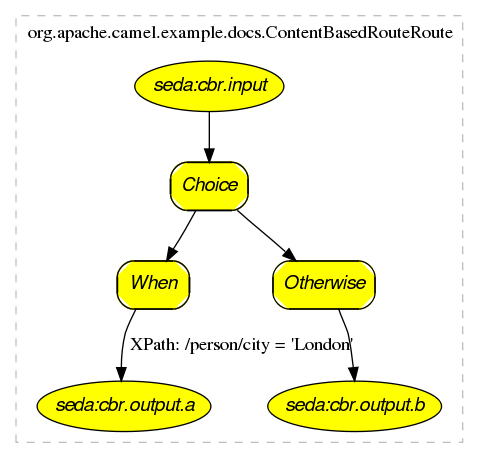
If you click on the actual generated htmlyou will see that you can navigate from an EIP node to its pattern page, along with getting hover-over tool tips ec.
How to generate
See Camel Dot Maven Goal or the other maven goals Camel Maven Plugin
For OS X users
If you are using OS X then you can open the DOT file using graphviz which will then automatically re-render if it changes, so you end up with a real time graphical representation of the topic and queue hierarchies!
Also if you want to edit the layout a little before adding it to a wiki to distribute to your team, open the DOT file with OmniGraffle then just edit away 
Business Activity Monitoring
The Camel BAM module provides a Business Activity Monitoring (BAM) framework for testing business processes across multiple message exchanges on different Endpoint instances.
Consider, for example, a simple system in which you submit Purchase Orders into system A and then receive Invoices from system B. You might want to test that, for a given Purchase Order, you receive a matching Invoice from system B within a specific time period.
How Camel BAM Works
Camel BAM uses a Correlation Identifier on an input message to determine the Process Instance to which it belongs. The process instance is an entity bean which can maintain state for each Activity (where an activity typically maps to a single endpoint - such as the submission of Purchase Orders or the receipt of Invoices).
You can then add rules to be triggered when a message is received on any activity - such as to set time expectations or perform real time reconciliation of values across activities.
Simple Example
The following example shows how to perform some time based rules on a simple business process of 2 activities - A and B - which correspond with Purchase Orders and Invoices in the example above. If you would like to experiment with this scenario, you may edit this Test Case, which defines the activities and rules, and then tests that they work.
As you can see in the above example, we first define two activities, and then rules to specify when we expect them to complete for a process instance and when an error condition should be raised.p. The ProcessBuilder is a RouteBuilder and can be added to any CamelContext.
Complete Example
For a complete example please see the BAM Example, which is part of the standard Camel Examples
Use Cases
In the world of finance, a common requirement is tracking trades. Often a trader will submit a Front Office Trade which then flows through the Middle Office and Back Office through various systems to settle the trade so that money is exchanged. You may wish to test that the front and back office trades match up within a certain time period; if they don't match or a back office trade does not arrive within a required amount of time, you might signal an alarm.
Mock Component
The Mock component provides a powerful declarative testing mechanism, which is similar to jMock in that it allows declarative expectations to be created on any Mock endpoint before a test begins. Then the test is run, which typically fires messages to one or more endpoints, and finally the expectations can be asserted in a test case to ensure the system worked as expected.
This allows you to test various things like:
- The correct number of messages are received on each endpoint,
- The correct payloads are received, in the right order,
- Messages arrive on an endpoint in order, using some Expression to create an order testing function,
- Messages arrive match some kind of Predicate such as that specific headers have certain values, or that parts of the messages match some predicate, such as by evaluating an XPath or XQuery Expression.
Note that there is also the Test endpoint which is a Mock endpoint, but which uses a second endpoint to provide the list of expected message bodies and automatically sets up the Mock endpoint assertions. In other words, it's a Mock endpoint that automatically sets up its assertions from some sample messages in a File or database, for example.
Remember that Mock is designed for testing. When you add Mock endpoints to a route, each Exchange sent to the endpoint will be stored (to allow for later validation) in memory until explicitly reset or the JVM is restarted. If you are sending high volume and/or large messages, this may cause excessive memory use. If your goal is to test deployable routes inline, consider using NotifyBuilder or AdviceWith in your tests instead of adding Mock endpoints to routes directly.
From Camel 2.10 onwards there are two new options retainFirst, and retainLast that can be used to limit the number of messages the Mock endpoints keep in memory.
URI format
Where someName can be any string that uniquely identifies the endpoint.
You can append query options to the URI in the following format, ?option=value&option=value&...
Options
Option | Default | Description |
|---|---|---|
|
| A size to use a throughput logger for reporting |
|
| Camel 2.10: To only keep first X number of messages in memory. |
|
| Camel 2.10: To only keep last X number of messages in memory. |
Simple Example
Here's a simple example of Mock endpoint in use. First, the endpoint is resolved on the context. Then we set an expectation, and then, after the test has run, we assert that our expectations have been met.
You typically always call the assertIsSatisfied() method to test that the expectations were met after running a test.
Camel will by default wait 10 seconds when the assertIsSatisfied() is invoked. This can be configured by setting the setResultWaitTime(millis) method.
Using assertPeriod
Available as of Camel 2.7
When the assertion is satisfied then Camel will stop waiting and continue from the assertIsSatisfied method. That means if a new message arrives on the mock endpoint, just a bit later, that arrival will not affect the outcome of the assertion. Suppose you do want to test that no new messages arrives after a period thereafter, then you can do that by setting the setAssertPeriod method, for example:
Setting expectations
You can see from the javadoc of MockEndpoint the various helper methods you can use to set expectations. The main methods are as follows:
Method | Description |
|---|---|
To define the expected message count on the endpoint. | |
To define the minimum number of expected messages on the endpoint. | |
To define the expected bodies that should be received (in order). | |
To define the expected header that should be received | |
To add an expectation that messages are received in order, using the given Expression to compare messages. | |
To add an expectation that messages are received in order, using the given Expression to compare messages. | |
To add an expectation that no duplicate messages are received; using an Expression to calculate a unique identifier for each message. This could be something like the |
Here's another example:
Adding expectations to specific messages
In addition, you can use the message(int messageIndex) method to add assertions about a specific message that is received.
For example, to add expectations of the headers or body of the first message (using zero-based indexing like java.util.List), you can use the following code:
There are some examples of the Mock endpoint in use in the camel-core processor tests.
Mocking existing endpoints
Available as of Camel 2.7
Camel now allows you to automatically mock existing endpoints in your Camel routes.
Important: The endpoints are still in action. What happens differently is that a Mock endpoint is injected and receives the message first and then delegates the message to the target endpoint. You can view this as a kind of intercept and delegate or endpoint listener.
Suppose you have the given route below:
You can then use the adviceWith feature in Camel to mock all the endpoints in a given route from your unit test, as shown below:
Notice that the mock endpoints is given the uri mock:<endpoint>, for example mock:direct:foo. Camel logs at INFO level the endpoints being mocked:
Endpoints which are mocked will have their parameters stripped off. For example the endpoint "log:foo?showAll=true" will be mocked to the following endpoint "mock:log:foo". Notice the parameters have been removed.
Its also possible to only mock certain endpoints using a pattern. For example to mock all log endpoints you do as shown:
The pattern supported can be a wildcard or a regular expression. See more details about this at Intercept as its the same matching function used by Camel.
Mind that mocking endpoints causes the messages to be copied when they arrive on the mock.
That means Camel will use more memory. This may not be suitable when you send in a lot of messages.
Mocking existing endpoints using the camel-test component
Instead of using the adviceWith to instruct Camel to mock endpoints, you can easily enable this behavior when using the camel-test Test Kit.
The same route can be tested as follows. Notice that we return "*" from the isMockEndpoints method, which tells Camel to mock all endpoints.
If you only want to mock all log endpoints you can return "log*" instead.
Mocking existing endpoints with XML DSL
If you do not use the camel-test component for unit testing (as shown above) you can use a different approach when using XML files for routes.
The solution is to create a new XML file used by the unit test and then include the intended XML file which has the route you want to test.
Suppose we have the route in the camel-route.xml file:
Then we create a new XML file as follows, where we include the camel-route.xml file and define a spring bean with the class org.apache.camel.impl.InterceptSendToMockEndpointStrategy which tells Camel to mock all endpoints:
Then in your unit test you load the new XML file (test-camel-route.xml) instead of camel-route.xml.
To only mock all Log endpoints you can define the pattern in the constructor for the bean:
Mocking endpoints and skip sending to original endpoint
Available as of Camel 2.10
Sometimes you want to easily mock and skip sending to a certain endpoints. So the message is detoured and send to the mock endpoint only. From Camel 2.10 onwards you can now use the mockEndpointsAndSkip method using AdviceWith or the Test Kit. The example below will skip sending to the two endpoints "direct:foo", and "direct:bar".
The same example using the Test Kit
Limiting the number of messages to keep
Available as of Camel 2.10
The Mock endpoints will by default keep a copy of every Exchange that it received. So if you test with a lot of messages, then it will consume memory.
From Camel 2.10 onwards we have introduced two options retainFirst and retainLast that can be used to specify to only keep N'th of the first and/or last Exchanges.
For example in the code below, we only want to retain a copy of the first 5 and last 5 Exchanges the mock receives.
Using this has some limitations. The getExchanges() and getReceivedExchanges() methods on the MockEndpoint will return only the retained copies of the Exchanges. So in the example above, the list will contain 10 Exchanges; the first five, and the last five.
The retainFirst and retainLast options also have limitations on which expectation methods you can use. For example the expectedXXX methods that work on message bodies, headers, etc. will only operate on the retained messages. In the example above they can test only the expectations on the 10 retained messages.
Testing with arrival times
Available as of Camel 2.7
The Mock endpoint stores the arrival time of the message as a property on the Exchange.
You can use this information to know when the message arrived on the mock. But it also provides foundation to know the time interval between the previous and next message arrived on the mock. You can use this to set expectations using the arrives DSL on the Mock endpoint.
For example to say that the first message should arrive between 0-2 seconds before the next you can do:
You can also define this as that 2nd message (0 index based) should arrive no later than 0-2 seconds after the previous:
You can also use between to set a lower bound. For example suppose that it should be between 1-4 seconds:
You can also set the expectation on all messages, for example to say that the gap between them should be at most 1 second:
In the example above we use seconds as the time unit, but Camel offers milliseconds, and minutes as well.
Testing
Testing is a crucial activity in any piece of software development or integration. Typically Camel Riders use various different technologies wired together in a variety of patterns with different expression languages together with different forms of Bean Integration and Dependency Injection so its very easy for things to go wrong! . Testing is the crucial weapon to ensure that things work as you would expect.
Camel is a Java library so you can easily wire up tests in whatever unit testing framework you use (JUnit 3.x (deprecated), 4.x, or TestNG). However the Camel project has tried to make the testing of Camel as easy and powerful as possible so we have introduced the following features.
Testing Mechanisms
The following mechanisms are supported:
Name | Component | Description |
|---|---|---|
| Is a standalone Java library letting you easily create Camel test cases using a single Java class for all your configuration and routing without using CDI, Spring or Guice for Dependency Injection which does not require an in-depth knowledge of Spring + Spring Test or Guice. Supports JUnit 3.x (deprecated) and JUnit 4.x based tests. | |
| CDI Testing | camel-test-cdi | Provides a JUnit 4 runner that bootstraps a test environment using CDI so that you don't have to be familiar with any CDI testing frameworks and can concentrate on the testing logic of your Camel CDI applications. Testing frameworks like Arquillian or PAX Exam, can be used for more advanced test cases, where you need to configure your system under test in a very fine-grained way or target specific CDI containers. |
| Supports JUnit 3.x (deprecated) or JUnit 4.x based tests that bootstrap a test environment using Spring without needing to be familiar with Spring Test. The plain JUnit 3.x/4.x based tests work very similar to the test support classes in Also supports Spring Test based tests that use the declarative style of test configuration and injection common in Spring Test. The Spring Test based tests provide feature parity with the plain JUnit 3.x/4.x based testing approach. Note: | |
| Camel 2.10: Provides the ability to do unit testing on blueprint configurations | |
| Deprecated Uses Guice to dependency inject your test classes | |
Camel TestNG |
| Deprecated Supports plain TestNG based tests with or without CDI, Spring or Guice for Dependency Injection which does not require an in-depth knowledge of CDI, Spring + Spring Test or Guice. From Camel 2.10: this component supports Spring Test based tests that use the declarative style of test configuration and injection common in Spring Test and described in more detail under Spring Testing. |
In all approaches the test classes look pretty much the same in that they all reuse the Camel binding and injection annotations.
Camel Test Example
Here is the Camel Test example:CamelTestSupport but has no CDI, Spring or Guice dependency injection configuration but instead overrides the createRouteBuilder() method.
CDI Test Example
Here is the CDI Testing example:camel-example-cdi-test example and the test classes that come with it.
Spring Test with XML Config Example
Here is the Spring Testing example using XML Config:@DirtiesContext on the test methods to force Spring Testing to automatically reload the CamelContext after each test method - this ensures that the tests don't clash with each other, e.g., one test method sending to an endpoint that is then reused in another test method.
Also note the use of @ContextConfiguration to indicate that by default we should look for the FilterTest-context.xml on the classpath to configure the test case which looks like this:
Spring Test with Java Config Example
Here is the Spring Testing example using Java Config.
For more information see Spring Java Config.ContextConfig class does all of the configuration; so your entire test case is contained in a single Java class. We currently have to reference by class name this class in the @ContextConfiguration which is a bit ugly. Please vote for SJC-238 to address this and make Spring Test work more cleanly with Spring JavaConfig.
Its totally optional but for the ContextConfig implementation we derive from SingleRouteCamelConfiguration which is a helper Spring Java Config class which will configure the CamelContext for us and then register the RouteBuilder we create.
Since Camel 2.11.0 you can use the CamelSpringJUnit4ClassRunner with CamelSpringDelegatingTestContextLoader like example using Java Config with CamelSpringJUnit4ClassRunner:
Spring Test with XML Config and Declarative Configuration Example
Here is a Camel test support enhanced Spring Testing example using XML Config and pure Spring Test based configuration of the Camel Context:@RunWith annotation to support the features of CamelTestSupport through annotations on the test class. See Spring Testing for a list of annotations you can use in your tests.
Blueprint Test
Here is the Blueprint Testing example using XML Config:getBlueprintDescriptors to indicate that by default we should look for the camelContext.xml in the package to configure the test case which looks like this:
Testing Endpoints
Camel provides a number of endpoints which can make testing easier.
Name | Description |
|---|---|
For load & soak testing this endpoint provides a way to create huge numbers of messages for sending to Components and asserting that they are consumed correctly | |
For testing routes and mediation rules using mocks and allowing assertions to be added to an endpoint | |
Creates a Mock endpoint which expects to receive all the message bodies that could be polled from the given underlying endpoint |
The main endpoint is the Mock endpoint which allows expectations to be added to different endpoints; you can then run your tests and assert that your expectations are met at the end.
Stubbing out physical transport technologies
If you wish to test out a route but want to avoid actually using a real physical transport (for example to unit test a transformation route rather than performing a full integration test) then the following endpoints can be useful.
Name | Description |
|---|---|
Direct invocation of the consumer from the producer so that single threaded (non-SEDA) in VM invocation is performed which can be useful to mock out physical transports | |
Delivers messages asynchronously to consumers via a java.util.concurrent.BlockingQueue which is good for testing asynchronous transports | |
Works like SEDA but does not validate the endpoint URI, which makes stubbing much easier. |
Testing existing routes
Camel provides some features to aid during testing of existing routes where you cannot or will not use Mock etc. For example you may have a production ready route which you want to test with some 3rd party API which sends messages into this route.
Name | Description |
|---|---|
Allows you to be notified when a certain condition has occurred. For example when the route has completed five messages. You can build complex expressions to match your criteria when to be notified. | |
Allows you to advice or enhance an existing route using a RouteBuilder style. For example you can add interceptors to intercept sending outgoing messages to assert those messages are as expected. |
Templating
When you are testing distributed systems its a very common requirement to have to stub out certain external systems with some stub so that you can test other parts of the system until a specific system is available or written etc.
A great way to do this is using some kind of Template system to generate responses to requests generating a dynamic message using a mostly-static body.
There are a number of templating components included in the Camel distribution you could use
or the following external Camel components
Example
Here's a simple example showing how we can respond to InOut requests on the My.Queue queue on ActiveMQ with a template generated response. The reply would be sent back to the JMSReplyTo Destination.
from("activemq:My.Queue").
  to("velocity:com/acme/MyResponse.vm");
If you want to use InOnly and consume the message and send it to another destination you could use
from("activemq:My.Queue").
  to("velocity:com/acme/MyResponse.vm").
  to("activemq:Another.Queue");
See Also
- Mock for details of mock endpoint testing (as opposed to template based stubs).
Database
Camel can work with databases in a number of different ways. This document tries to outline the most common approaches.
Database endpoints
Camel provides a number of different endpoints for working with databases
- JPA for working with hibernate, openjpa or toplink. When consuming from the endpoints entity beans are read (and deleted/updated to mark as processed) then when producing to the endpoints they are written to the database (via insert/update).
- iBATIS similar to the above but using Apache iBATIS
- JDBC similar though using explicit SQL
- SQL uses spring-jdbc behind the scene for the actual SQL handling. The difference between this component and JDBC component is that in case of SQL the query is a property of the endpoint and it uses message payload as parameters passed to the query
Database pattern implementations
Various patterns can work with databases as follows
- Idempotent Consumer
- Aggregator
- BAM for business activity monitoring