DUE TO SPAM, SIGN-UP IS DISABLED. Goto Selfserve wiki signup and request an account.

DUE TO SPAM, SIGN-UP IS DISABLED. Goto Selfserve wiki signup and request an account.
Introduction
Purpose
This is a draft spec for utilizing Q-in-Q to provide scalable isolated networks in the cloudstack environment.
Q-in-Q, also referred to as "double-tagged" vlans, is the concept of nesting tagged vlans inside each other. Thus, each
of the 4096 available vlans can also host 4096 vlans. This provides a way to scale isolated networks that is more compatible
with standard network equipment and lower overhead than GRE or other technologies that create point-to-point tunnels.
This has been designed and tested on the KVM platform, there's no reason to believe it wouldn't work on others, but more
time and expertise will be required to create and verify code.
References
Document History
Glossary
Feature Specifications
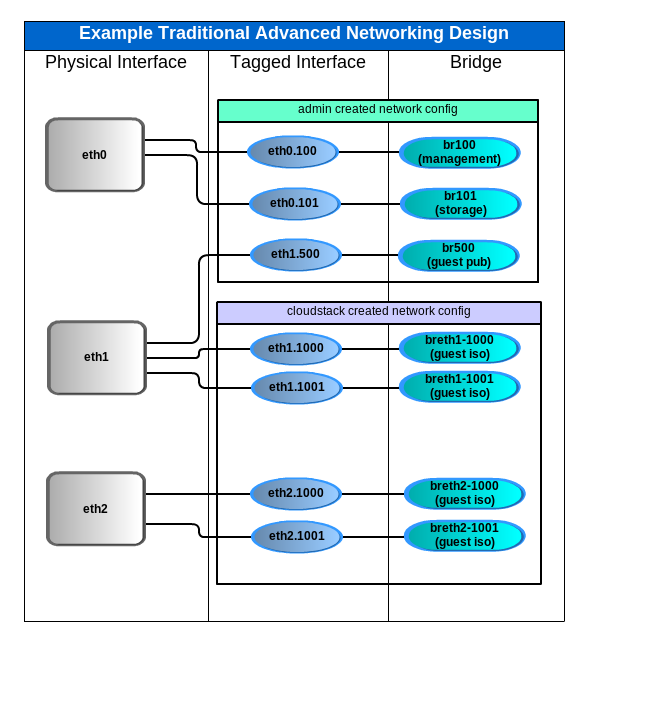
A traditional CloudStack advanced network environment might look like the below chart, with management, storage, and a public network created by the admin, and multiple vlans provisioned by cloudstack as needed:
This functional spec extends this design by allowing tagged interfaces to be utilized at the physical interface level:
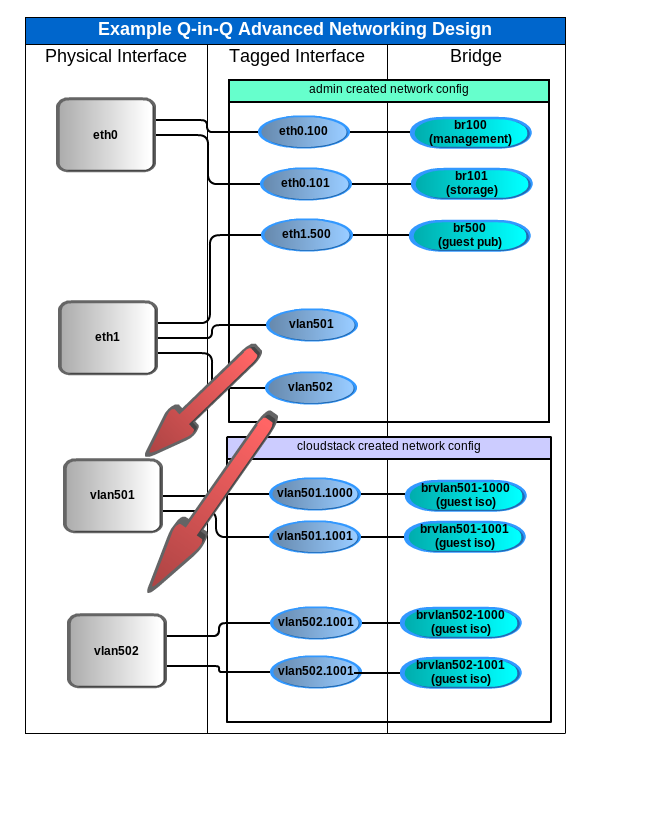
The admin simply needs to create any 'vlan#' devices, and CloudStack uses them as physical devices.
CloudStack doesn't support defining actual physical devices to be used; instead it uses "traffic labels" to allow the admin to specify which bridges to use for what traffic, and then cloudstack determines the physical devices from those bridges. It then uses those physical devices to create subsequent tagged interfaces/bridges dynamically. Normally, if CloudStack finds that a bridge is on a tagged interface, it then looks up the parent of that interface. A small patch simply keeps CloudStack from looking up the parent if the device is a vlan# device, so that the vlan# dev is instead treated as a physical device and subsequent tagged networks are created there.
MTU
Actual MTU values and what is included in them vary slightly between manufacturers and operating systems, but in general it should be kept in mind that Q-in-Q requires extra space in order to contain the new vlan tag. The table below provides an idea of what MTU values have been tested to work. Generally speaking, an admin should increase the MTU on the applicable switch hardware in order to be compatible with existing MTUs in CloudStack system VMs and guest instances.
Switch MTU |
1500 |
1532 |
9000 |
9032 |
|---|---|---|---|---|
Instance MTU 1468* |
Y |
Y |
Y |
Y |
Instance MTU 1500 |
N |
Y |
Y |
Y |
Instance MTU 8968* |
N |
N |
Y |
Y |
Instance MTU 9000* |
N |
N |
N |
Y |
* Special consideration is required for MTU != 1500 for any virtual routers. Will need to add the ability to set MTU in the VR, perhaps in the same way that SSVM gets MTU set in the global settings.
Use cases
put the relevant use case/stories to explain how the feature is going to be used/work
Architecture and Design description
Appendix
Appendix A:
Appendix B: