DUE TO SPAM, SIGN-UP IS DISABLED. Goto Selfserve wiki signup and request an account.

DUE TO SPAM, SIGN-UP IS DISABLED. Goto Selfserve wiki signup and request an account.
"My company has a xyz feature for CloudStack. Can someone help me test it?"
This page is a proposal for creating a unified design for QA testing and automation. It should be looked at as a blueprint to follow for a QA set-up (think QACloud like DevCloud)
Any comments / suggestions will be much appreciated.
It is important to note that keeping it simple and easy to replicate is one of the main goals of this exercise. Thus, it may not cater to every possible use case.
The code is based on Prasanna's effort on similar lines (big thanks to Prasanna!)
Every single set-up would contain
At the heart is a VM that serves as a Jenkins slave, and contains a set of tools to allow one to run QA tests on a clean environment. These tools, hosted on the VM (lets call it "Provisioner"), are :
Tool / Software |
Use |
Comments |
|---|---|---|
Cobbler |
Provision baremetal hosts with hypervisor |
Cobbler integrates well with Puppet and provides useful helper scripts |
Puppet |
Configure management server with mysql etc |
|
DNSMASQ |
DHCP + DNS |
Used to provision hosts |
Squid |
HTTP Proxy |
Testing infrastructure uses isolated network. Some tasks, like yum install, need internet access |
NFS Server |
As NFS secondary storage |
Packeged systemVM and builtin templates for quicker download |
ipmitool |
Interact with baremetal machines through IPMI network |
|
Marvin |
Deployment and testing framework for CloudStack |
|
The whole code is Python based making it easier to package as needed in future.
A typical deployment would have the Provisioner VM also act as a Jenkins slave for builds and launching test suite
There are two steps in the QA process :
Typically, the setting up of the Cloud is a separate Jenkins job, upon successful run of which we launch a test suite in a different job. Note that, the code contains basic elements for you to set-up a single Jenkins job for
both the steps, though it may be very slow (Since BVTs are run sequentially in this case to avoid Marvin issues)
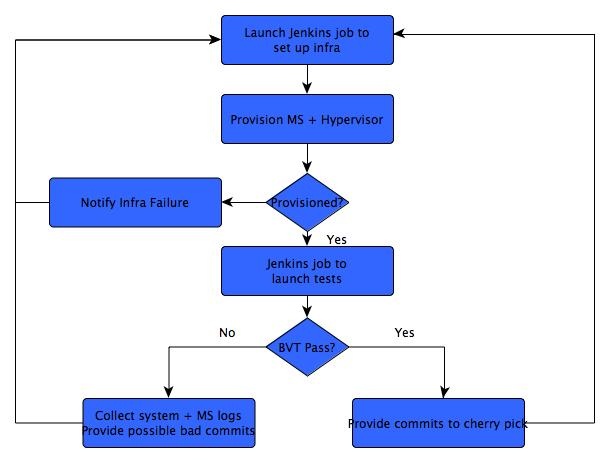
Follow the instructions here to set-up the infrastructure from scratch.
The configuration would look something like the below after things are correctly set-up, after which you should proceed to adding Jenkins jobs as described in next section. 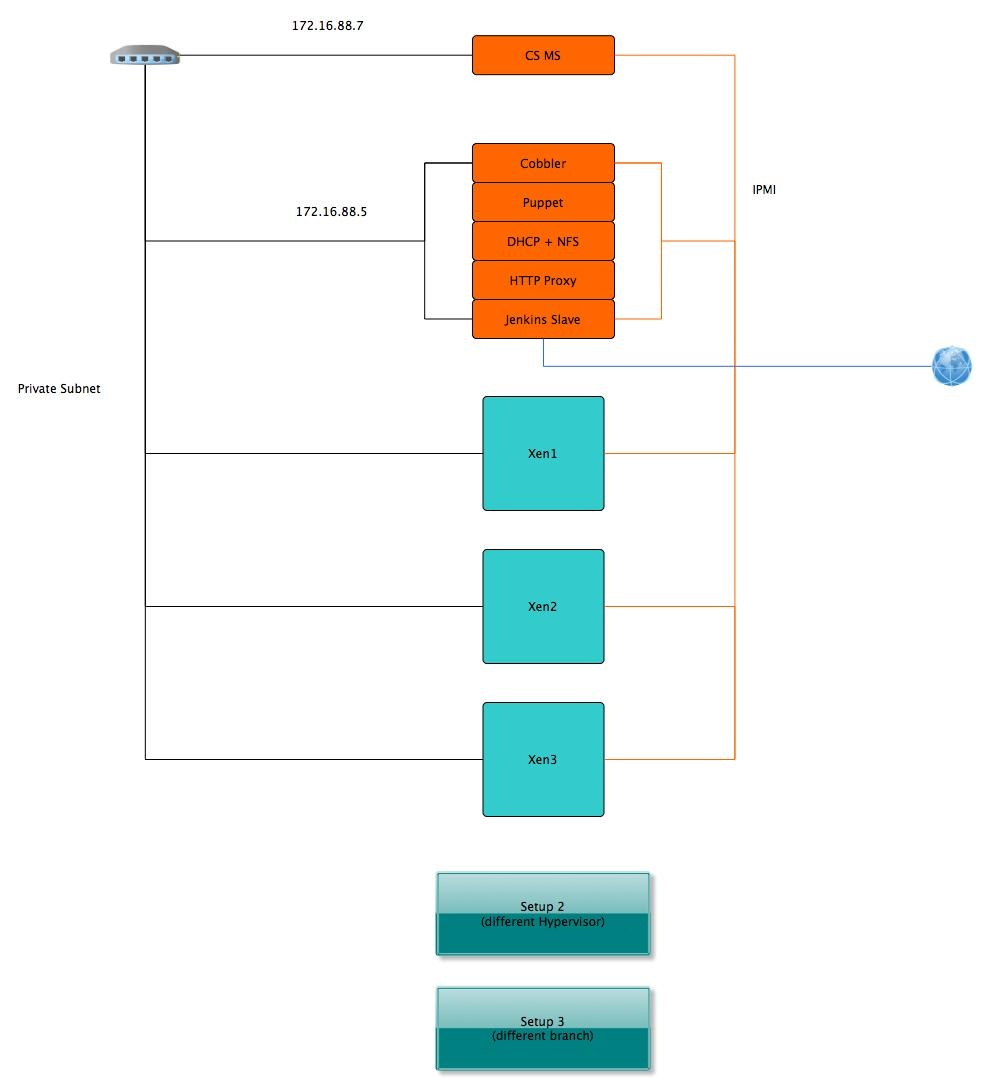
Set-up Jenkins job for infrastructure provisioning. This is a simple jenkins job that packages CloudStack RPMs and launches a tester.py python script. The following configuration may be used :
echo export M2_HOME=/usr/local/apache-maven-3.1.0
echo export M2=/usr/local/apache-maven-3.1.0/bin
echo export PATH=/usr/local/apache-maven-3.1.0/bin:$PATH
PACKAGE_NAME="CloudStack_Auto-rhel6.3"
cd $WORKSPACE
rm -rf dist/rpmbuild/*
cd packaging/centos63
./package.sh
cd ../..
tempdir=`mktemp -d`
mkdir -p "$tempdir"
cp dist/rpmbuild/RPMS/x86_64/*.rpm $tempdir/
createrepo $tempdir/mv $tempdir $PACKAGE_NAME
tar -cvzf $PACKAGE_NAME.tar.gz $PACKAGE_NAME
cd /root/cloud-autodeploypython2.7 /root/cloud-autodeploy/tester.py $WORKSPACE xen