Cisco Virtual Network Management Center (VNMC) provides centralized multidevice and policy management for Cisco network virtual services.
When combined with the Cisco Nexus 1000V Switch, ASA 1000V Cloud Firewall, or the Cisco Virtual Security Gateway (VSG), it enables:
- CloudStack integration through XML APIs
- Support for ASA 1000v edge firewalls to enable:
- Adding and configuring edge firewalls
- Creating and applying edge security profiles that contain access control list (ACL) policy sets (ingress and egress), connection timeout, Network Address Translation (NAT) policy sets, TCP intercept, VPN interface policy sets, and more
- Site-to-site IPsec VPNs
Currently the 1000v series and the VSG are supported on VMWare hypervisors.
This would be the deployment model with CloudStack: 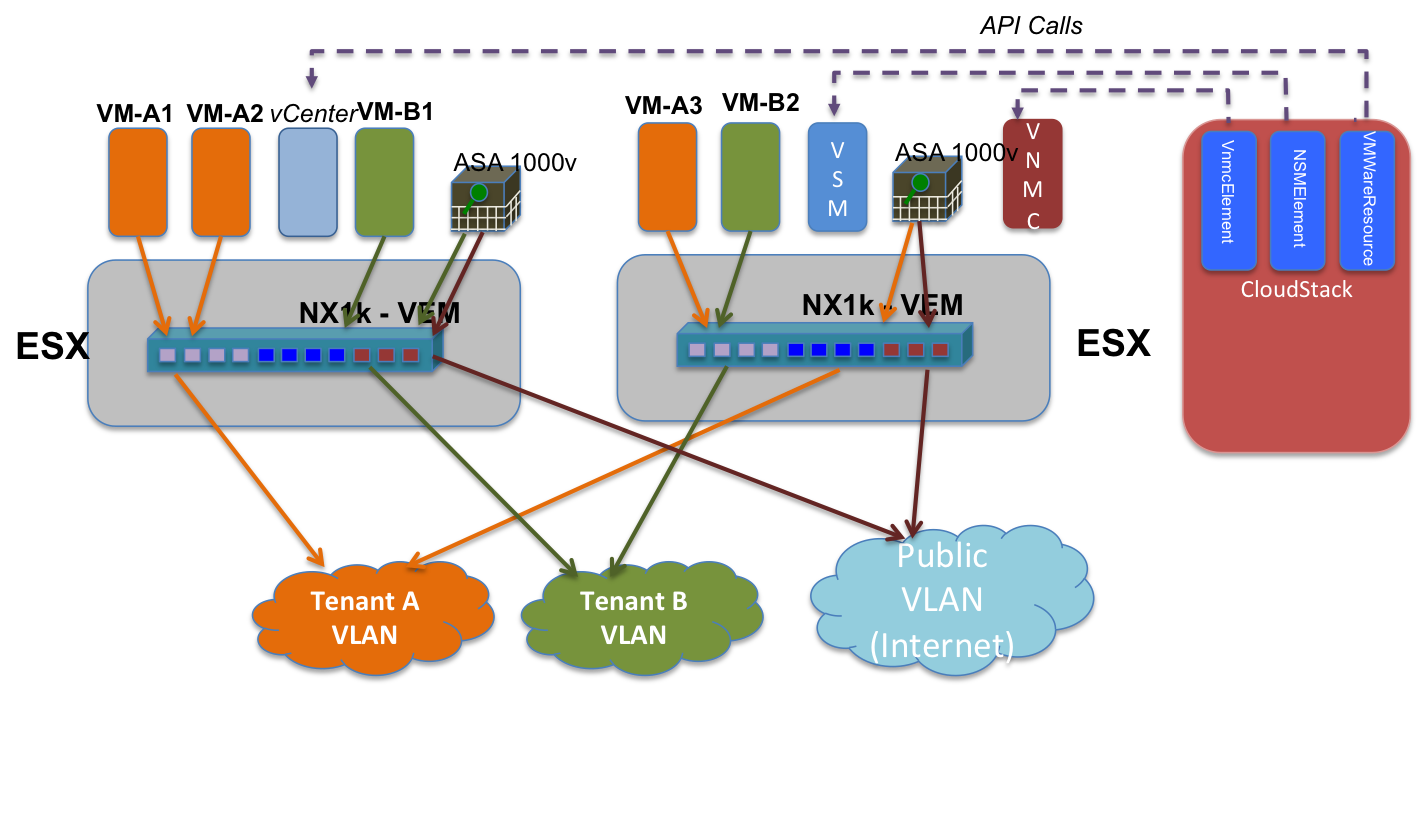
Use Cases / Flow
- Cloud operator adds VNMC as a network element using admin API addCiscoVnmcController, specifying username and password
- Cloud operator creates isolated guest network offering with source nat using ASA1000v as the service provider for firewall, source nat, port forwarding. CloudStack system vm is used for DHCP, userdata and metadata, password server
- Cloud operator creates VPC network offering with source nat using ASA1000v as the service provider for firewall, source nat, port forwarding, ACL and routing. CloudStack system vm is used for DHCP, userdata and metadata, password server.
- Network offerings as above, but using VXLAN as the isolation technology
- Network offerings as above, with LB added, and using Cloudstack System VM as LB provider
- Network offerings as above, with LB added, and using Netscaler VPX as LB provider
VNMC interaction
The VNMC controller is a VMWare appliance that presents an XML API to control the Cisco virtual appliance porfolio.
The GUI is a Flash-based web application that utilizes the XML API to interact with the controller. By enabling the flash debugger (see http://s.apache.org/v5) we can capture the precise XML commands required by CloudStack.
Design details
CiscoVnmcResource
The resource translates abstract network configuration commands such as SetStaticNatRule into concrete XML api calls to the VNMC controller
CiscoVnmcElementService
The service is a pluggable service that allows the cloud operator to provision the VNMC controller URL and credentials into CloudStack
CiscoVnmcManager
The manager implements the CiscoVnmcElementService. It also pre-creates and manages a pool of ASA1000v appliances. The pool is created with an initial capacity and is expanded as demand grows. As networks are de-provisioned, the appliances are returned to the pool.
CiscoVnmcElement
The network element participates in L2 orchestration by extending NetworkElement. When a network is created, the element needs to
- create a tenant and tenant vdc in VNMC if not already created
- create the following policies / objects if not already created inside the tenant VDC
- Edge Static route policy
- Edge static route
- Source NAT pool
- Edge security profile to deny all incoming traffic
- Create an edge firewall
- Associate an unused ASA1000v to the firewall
The Cisco ASA1000v can function as a DHCP server, however it cannot guarantee a specific ip<->mac address mapping. Therefore the CloudStack systemvm will be used for this purpose.
The CiscoVnmcElement also implement the IpDeployer and various service provider interfaces to satisfy the requirements of the network offering.
VXLAN isolation
VXLAN isolation needs to be added as an isolation method, with a specific Guru managing allocation of the VXLAN network identifier (VNI)
VSG interaction
The VSG can be used to provide security group isolation.
ASA deployment model
Prereqs for ASA
Nexus 1000v appliance is setup and configured in CS (when adding Vmware cluster)
VNMC appliance is configured and added to CS (separate lifecycle commands will be provided for this)
ASA setup and configuration
Spin up an ASA instance in standalone mode (do we need to support HA mode?)
Following configuration needs to be provided:
- ESX host
- Port profiles for mgmt. and ha n/w interfaces (some port profiles created on n1kv switch, can be same or different)
- Specify some dummy port profiles for inside/outside n/w interfaces (dummy as these will be replaced with appropriate profiles while implementing guest n/w)
- Mgmt. IP for ASA (from private IP range of the zone), specify g/w such that VNMC IP is reachable
- Admin password
- VNMC IP and other parameters
After the ASA instance is powered on the VNMC needs to be registered from ASA console
- ASA1000V(config)# vnmc policy-agent
- ASA1000V(config-vnmc-policy-agent)# registration host vnmc_ip_address
- ASA1000V(config-vnmc-policy-agent)# shared-secret key where key is the shared secret for authentication of the ASA 1000V connection to the Cisco VNMC
Guest network implement() logic
Guest network gets implemented when first guest VM is deployed
Guest network implementation
- VirtualRouterElement creates the VR for DHCP, userdata and metadata, password server
- CiscoVNMCElement::implement() does the following:
- Create tenant/edge_security_profile/logical_edge_firewall in VNMC. There will be helper methods in VnmcResource class for all these operations (currently assuming one VNMC appliance per zone. do we need to support multiple VNMCs per zone, in that case how to choose?)
- Tenant creation
- Edge security profile
- Logical edge firewall
- Create vservice_node, in_port_profile, out_port_profile for ASA in VSM for the Vmware cluster. This is done through VsmCommand class
- vservice_node (below commands for doing it on CLI)
vservice node ASA-%vlanid% type asa
ip address 10.1.1.1
adjacency l2 vlan %vlanid%
fail-mode close
- in_port_profile
port-profile type vethernet ASA-Inside-%vlanid
vmware port-group
switchport mode access
switchport access vlan %vlanid%
no shutdown
state enabled
- out_port_profile
same as in_port_profile but with some vlan for public n/w
- Reconfigure in/out n/w interfaces for ASA appliance with in_port_profile and out_port_profile respectively (need to check what all need to be stored name, cluster, ip address for getting hold of vCenter reference for this VM so that reconfigure can be done)
- Associate ASA appliance with logical_edge_firewall (in VNMC). IP address of ASA is required for this. This is again done using VnmcResource
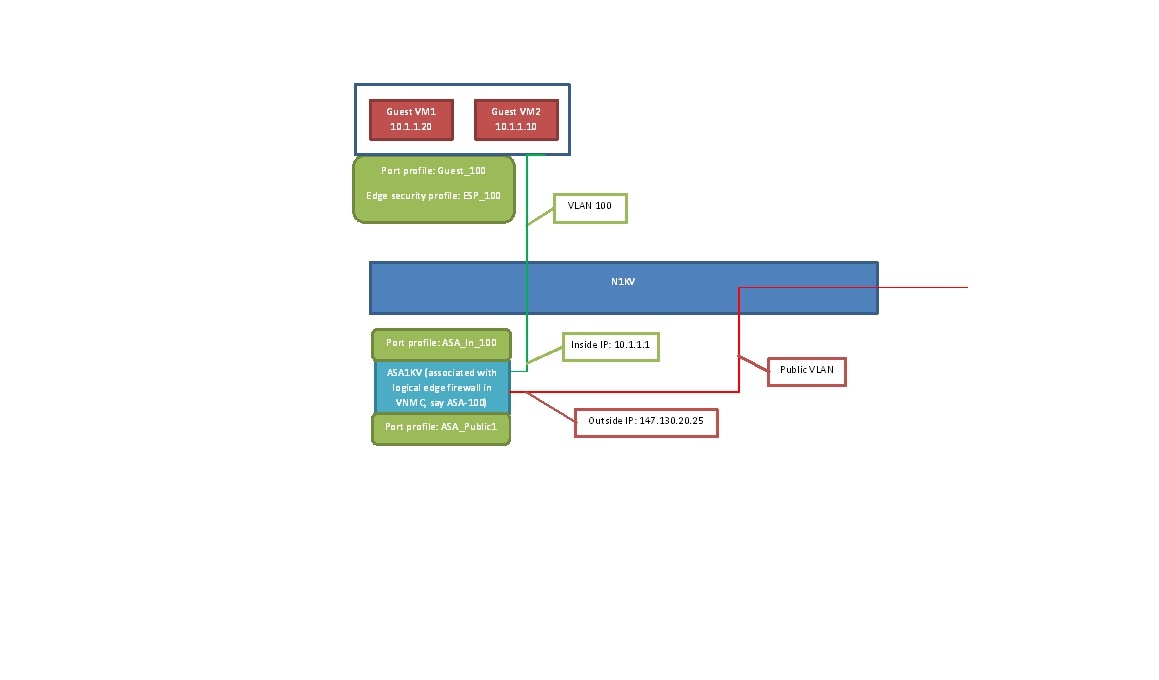
For guest VM the following change is required while creating the port profile in VSM
Create port profile guest VM and associate logical_edge_firewall, edge_security_profile
- guest_port_profile
port-profile type vethernet Guest-%vlanid%
vmware port-group
switchport mode access
switchport access vlan %vlanid%
org root/%tenant%
vservice node ASA-%vlanid% profile edge_security_profile
no shutdown
state enabled
API changes
VNMC lifecycle APIs
- addCiscoVNMCResource physical n/w id, mgmt. ip, username, password
- deleteCiscoVNMCResource resource UUID
- listCiscoVNMCResource
Currently in the code there is another set of lifecycle commands - (add/delete/list)NetworkDeviceCommand, can these be reused instead of creating a new set?
ASA 1000v APIs
Typically lifecycle of ASA is tied to the associated guest network. But since ASA requires some CLI configuration it is not possible to spin it up as part of guest network creation. One option is to pre-create a pool of ASA appliances. During network creation ASA is assigned from the pool and released when the network is destroyed.
- createASA1000vPool (need to check if the deployment of ovf can be automated? if not then these need to be manually deployed and then registered with CS)
DB changes
A new table needs to be created for storing VNMC details
TODO:
Currently ASA is manually setup and configured. Need to see if this can be automatically provisioned?
Links
http://www.cisco.com/en/US/docs/security/asa/quick_start/asa1000V/setup_vnmc.html
