DUE TO SPAM, SIGN-UP IS DISABLED. Goto Selfserve wiki signup and request an account.

DUE TO SPAM, SIGN-UP IS DISABLED. Goto Selfserve wiki signup and request an account.
Cisco Virtual Network Management Center (VNMC) provides centralized multidevice and policy management for Cisco network virtual services.
When combined with the Cisco Nexus 1000V Switch, ASA 1000V Cloud Firewall, or the Cisco Virtual Security Gateway (VSG), it enables:
Currently the 1000v series and the VSG are supported on VMWare hypervisors.
This would be the deployment model with CloudStack: 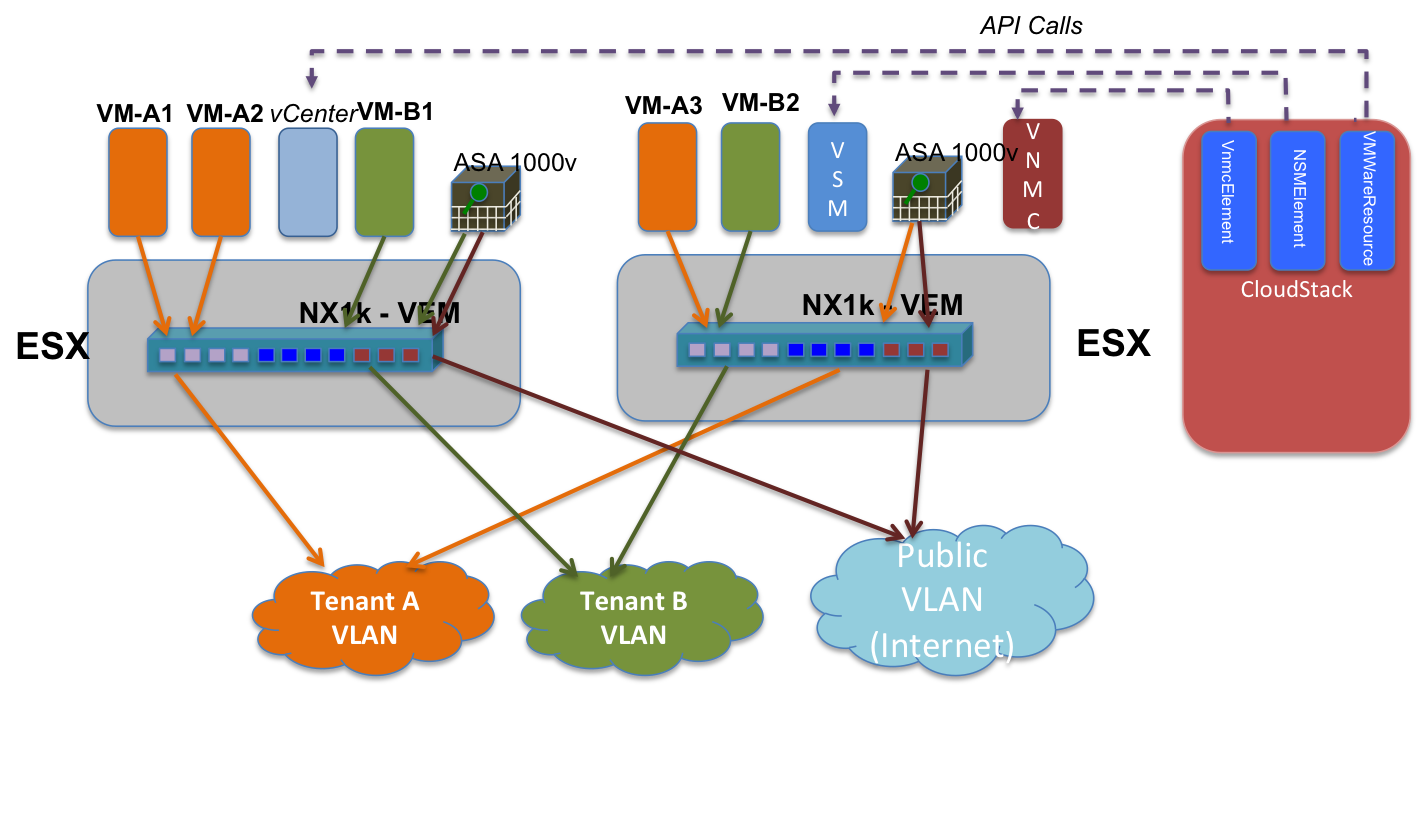
The VNMC controller is a VMWare appliance that presents an XML API to control the Cisco virtual appliance porfolio.
The GUI is a Flash-based web application that utilizes the XML API to interact with the controller. By enabling the flash debugger (see http://s.apache.org/v5) we can capture the precise XML commands required by CloudStack.
The resource translates abstract network configuration commands such as SetStaticNatRule into concrete XML api calls to the VNMC controller
The service is a pluggable service that allows the cloud operator to provision the VNMC controller URL and credentials into CloudStack
The manager implements the CiscoVnmcElementService. It also pre-creates and manages a pool of ASA1000v appliances. The pool is created with an initial capacity and is expanded as demand grows. As networks are de-provisioned, the appliances are returned to the pool.
The network element participates in L2 orchestration by extending NetworkElement. When a network is created, the element needs to
The Cisco ASA1000v can function as a DHCP server, however it cannot guarantee a specific ip<->mac address mapping. Therefore the CloudStack systemvm will be used for this purpose.
The CiscoVnmcElement also implement the IpDeployer and various service provider interfaces to satisfy the requirements of the network offering.
VXLAN isolation needs to be added as an isolation method, with a specific Guru managing allocation of the VXLAN network identifier (VNI)
The VSG can be used to provide security group isolation.
Nexus 1000v appliance is setup and configured in CS (when adding Vmware cluster)
VNMC appliance is configured and added to CS (separate lifecycle commands will be provided for this)
ASA 1000v appliances are setup/configured outside of CS
In current CS there is a 1:1 mapping between Vmware cluster and Nexus 1000v. Now one or more ASAs can use this Nexus 1000v.
Isolated guest network will be associated with a single ASA appliance. Now if this network spans multiple clusters then some book-keeping needs to be done as to which Nexus 1000v VSM should be used for ASA's and guest VMs for doing required configuration. To simplify things I am currently making the assumption that there will be a single Vmware cluster in the zone where ASA support is required. This can be changed later on. Moreover the scenario where a guest network spans multiple clusters (with n1kv) is not a supported scenario currently.
Also the network can have guest VMs on the Vmware cluster only as n1kv is not available on other HVs.
Spin up an ASA instance in standalone mode (do we need to support HA mode?)
Following configuration needs to be provided:
After the ASA instance is powered on the VNMC needs to be registered from ASA console
Guest network gets implemented when first guest VM is deployed
Create port profile for guest VM and associate edge_security_profile
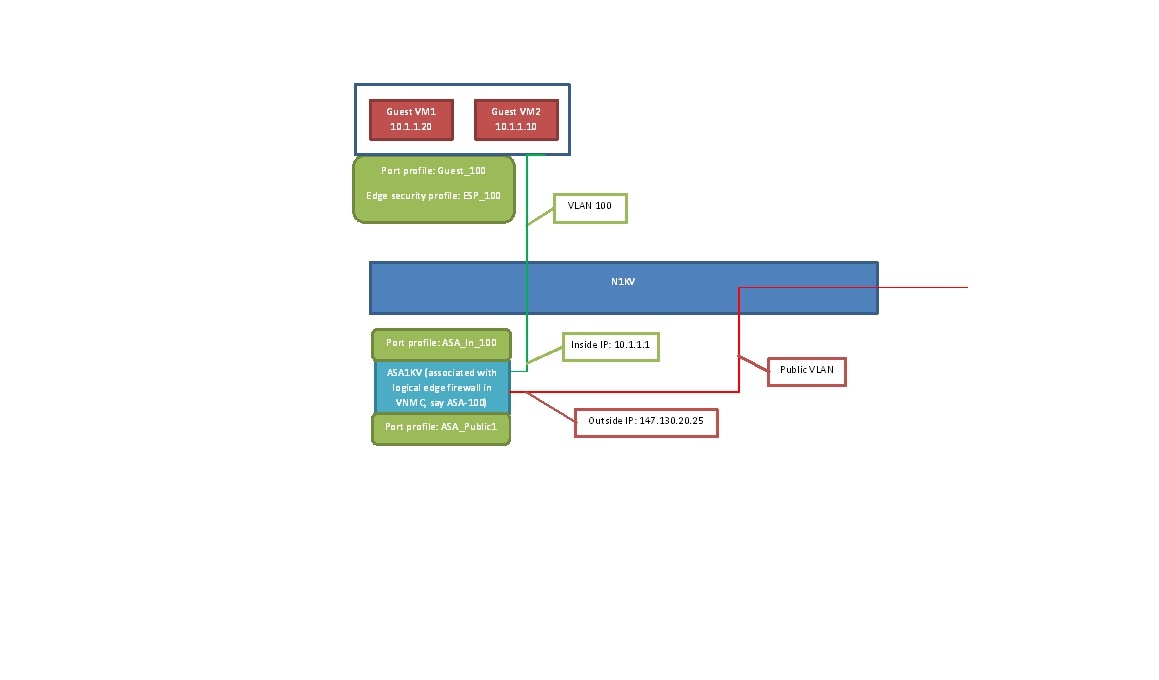
Typically lifecycle of ASA is tied to the associated guest network. But since ASA requires some CLI configuration it is not possible to spin it up as part of guest network creation. One option is to pre-create a pool of ASA appliances. During network creation ASA is assigned from the pool and released when the network is destroyed. The pool will be created using lifecycle APIs
A table needs to be created for storing VNMC details.
CREATE TABLE `cloud`.`external_cisco_vnmc_devices` (
`id` bigint unsigned NOT NULL AUTO_INCREMENT COMMENT 'id',
`uuid` varchar(255) UNIQUE,
`physical_network_id` bigint unsigned NOT NULL COMMENT 'id of the physical network in to which cisco vnmc device is added',
`provider_name` varchar(255) NOT NULL COMMENT 'Service Provider name corresponding to this cisco vnmc device',
`device_name` varchar(255) NOT NULL COMMENT 'name of the cisco vnmc device',
`host_id` bigint unsigned NOT NULL COMMENT 'host id coresponding to the external cisco vnmc device',
PRIMARY KEY (`id`),
CONSTRAINT `fk_external_cisco_vnmc_devices__host_id` FOREIGN KEY (`host_id`) REFERENCES `host`(`id`) ON DELETE CASCADE,
CONSTRAINT `fk_external_cisco_vnmc_devices__physical_network_id` FOREIGN KEY (`physical_network_id`) REFERENCES `physical_network`(`id`) ON DELETE CASCADE
) ENGINE=InnoDB DEFAULT CHARSET=utf8;
A table needs to be created for storing ASA 1000v details.
CREATE TABLE `cloud`.`external_cisco_asa1000v_devices` (
`id` bigint unsigned NOT NULL AUTO_INCREMENT COMMENT 'id',
`uuid` varchar(255) UNIQUE,
`management_ip` varchar(255) NOT NULL COMMENT 'mgmt. ip of cisco asa1kv device',
`in_port_profile` varchar(255) NOT NULL COMMENT 'inside port profile name of cisco asa1kv device',
PRIMARY KEY (`id`)
) ENGINE=InnoDB DEFAULT CHARSET=utf8;
A table to store the mapping between guest network and ASA device.
CREATE TABLE `cloud`.`network_asa1000v_map` (
`id` bigint unsigned NOT NULL AUTO_INCREMENT COMMENT 'id',
`network_id` bigint unsigned NOT NULL UNIQUE COMMENT 'id of guest network',
`asa1000v_id` bigint unsigned NOT NULL UNIQUE COMMENT 'id of asa1000v device',
PRIMARY KEY (`id`),
CONSTRAINT `fk_network_asa1000v_map__network_id` FOREIGN KEY (`network_id`) REFERENCES `networks`(`id`) ON DELETE CASCADE,
CONSTRAINT `fk_network_asa1000v_map__asa1000v_id` FOREIGN KEY (`asa1000v_id`) REFERENCES `external_cisco_asa1000v_devices`(`id`) ON DELETE CASCADE
) ENGINE=InnoDB DEFAULT CHARSET=utf8;
TODO:
Currently ASA is manually setup and configured. Need to see if this can be automatically provisioned?
http://www.cisco.com/en/US/docs/security/asa/quick_start/asa1000V/setup_vnmc.html