-
Created by Unknown User (chiradeep), last updated on Feb 19, 2014
2 minute read
You are viewing an old version of this page. View the current version.
Compare with Current
View Page History
« Previous
Version 2
Next »
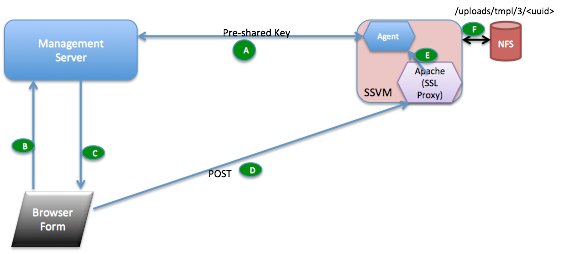
- Browser based upload
- Management Server generates a unique pre-shared key (PSK1) on install and shares it with the SSVM agent. Nobody else has access to this key of course.
- Browser UI requests the upload form
- MS sends down a form with standard fields pre-populated such as the upload url, url expiry time, account uuid, content-type AND a signature calculated over these fields. The signature is calculated using the pre-shared key PSK1. The user can be asked for inputs such as the filename on her local computer, format, hypervisor and the MD5 sum of the file. The form action is to POST to the SSVM's public IP
- The browser POSTS the form as enctype="multipart/form-data" over HTTPS to the SSVM's public IP
The Apache web server on the SSVM matches the url, decrypts and passes on to the SSVM java agent as plain HTTP. The SSVM agent checks the signature against the form fields using the key PSK1. Once the fields are verified, it writes the to the NFS storage to the location encoded in the URL.
- Once the upload completes, the MD5 checksum is compared (if available from step c). If it matches, the agent informs the MS that the upload is successful and the template is registered. The MS returns the template identifier to the agent and the agent returns this id
- API-based upload
- Preshared key as before
- New API request "GetUploadParams" encoded the usual CloudStack API way using api keys. Request parameters include format, hypervisor, md5 sum
- MS response to (b) is a json document which includes an inner json structure detailing the form parameters as in (c) above. Outer json contains the upload URL and the pre-calculated signature (using PSK1) over the inner json.
- API user makes a PUT request over HTTPS to the URL obtained in (c)
- as before
- as before.
