DUE TO SPAM, SIGN-UP IS DISABLED. Goto Selfserve wiki signup and request an account.
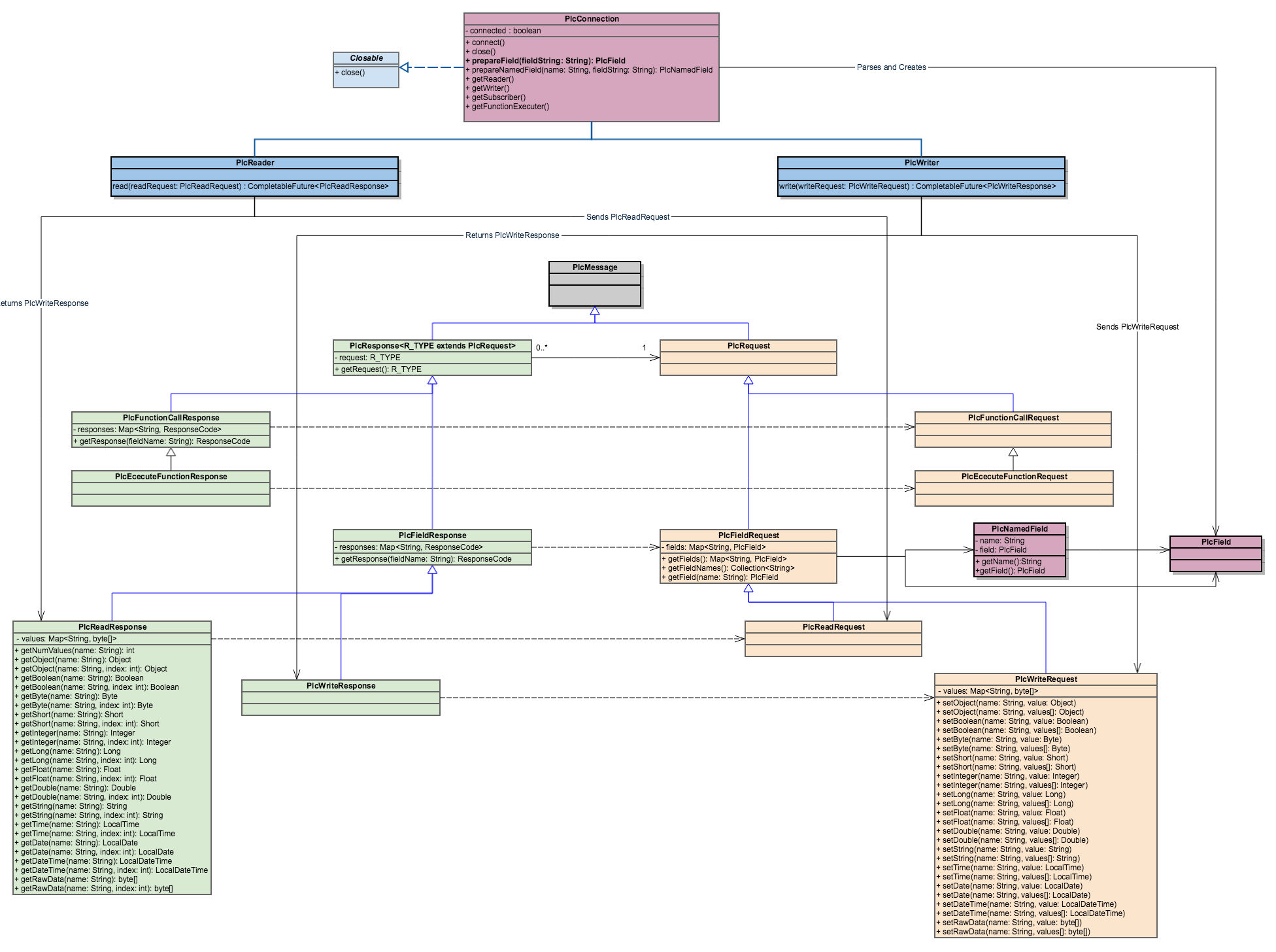
General
- I ensured all of our classes have the "Plc" prefix, as I did encounter situations in which very generic type names had collisions and I had to use the fully qualified class name (including the package name). The "Plc" prefix reduces this risk.
- Introduced a PlcFieldRequest / Response classes, allowing PlcRequests and Responses that don't use field information (When calling functions, for example)
- Removed the "RequestItems". Now the data for the plc read responses is contained in the PlcReadResponse/PlcWriteRequest itself.
- Added the concept of a named-field which is in general a Field description combined with a string alias.
- All sub-types of the PlcFieldRequest/Response use these aliases to reference the field they want to access. Resulting in an API that is more similar to JDBCs RecordSet.
PlcField (Aka Address)
- I Renamed Address to PlcField
- I still think there is no immediate need to define any fields or methods in this interface as I haven't seen any common ground yet. Even if we are currently adding "TYPE" information to most fields, in Modbus the type is directly tied to the address you are reading. So If you are reading a "Register" or a "Coil", the datatype is fixed.
PlcNamedField
- This class is only used for constructing the PlcFieldRequest objects as it allows passing in pairs of name and field into the PlcFieldRequests constructor.
PlcConnection
I removed the "getLister" method as I haven't seen any protocol or use-case where this actually made sense.
- I added a getFunctionExecutor method that should return a component for executing functions on PLCs that support this.
- I changed the "parseAddress" to "prepareField". This abstract method has to be implemented by every Driver and it handles parsing of the field description for each protocol. Some times I could imagine, that more work is involved than simple parsing of a string (For Beckhoff ADS and EtherNet/IP this method could actively connect to the corresponding resource so in future read operations only the connection-id has to be provided)
PlcRequest & PlcResponse
- As mentioned before, I introduced a new Level PlcFieldRequest/Response which deals with request/responses which target fields (such as read, write, subscribe).
- The requests contain a Map of Named-Fields
- The responses contain a reference to the corresponding request
- The responses contain a response code for every field in the request
- A PlcReadResponse also contains a map of byte data that contains the raw data.
- (The data should be in a general format shared by all drivers, so the drivers requiring special formats need to convert this when constructing the objects)
PlcReadResponse & PlcWriteRequest
- The getObject() is a convenience method to return values of the natural type determined by the field definition itself. This is the smallest possible type fit to contain the PLC type.
- The setObject() is a convenience method. Actually thinking about it a little bit more, we might even have just the setObject version and get rid of the rest.
Example Code
Here comes some example code to demonstrate how a Programm using this API could look like.
public static void main(String[] args) throws Exception {
    PlcDriverManager manager = new PlcDriverManager();
    try (PlcConnection conn = manager.getConnection("s7://192.168.167.211/0/0")) {
        Optional<PlcReader> optionalReader = conn.getReader();
        if (!optionalReader.isPresent()) {
            return;
        }

        PlcReader Reader = optionalReader.get();

		// Example using prepareField and prepareNamedField ...
        PlcReadRequest request = new PlcReadRequest(
            conn.prepareNamedField("parameterX", "%DB8.DBX3:INT"),
            conn.prepareNamedField("parameterY", "%DB9.DBW4:DOUBLE"),
            new PlcNamedField("others", conn.prepareField("%DB2.DBW2:BYTE[10]")));

        CompletableFuture<PlcReadResponse> future = reader.read(request);

        PlcReadResponse response = future.get();


        // Access an item by it's name.
        System.out.println("Parameter X: " + response.getInteger("parameterX"));

        // Iterate over all items
        for(String fieldName: response.getFieldNames()) {
			switch(fieldName) {
				case "parameterY":
	                System.out.println("Parameter y: " + response.getDouble(fieldName));
					break;
				case "others":
	                for(int i = 0; i < response.getNumValues(fieldName); i++) {
    	                // Intentionally using short instead of byte
        	            // In this case it will return Byte[i] but convert that into a Short.
            	        System.out.println(" - " + response.getShort(fieldName, i));
                	}
					break;
			}
        }
    }
}