DUE TO SPAM, SIGN-UP IS DISABLED. Goto Selfserve wiki signup and request an account.

1. Background
Apache Knox Gateway has traditionally acted as a federation client, delegating authentication to external Identity Providers (IdPs) via pac4j. Through pac4j, Knox can integrate with a wide range of authentication systems including CAS, OAuth 2.0, SAML, and OpenID Connect (OIDC). In this model, Knox is strictly a relying party (client) and never an identity provider itself.
Many modern architectures, however, expect a centralized OIDC Provider (OP) that issues tokens to downstream services. Products like Okta, Azure AD, Keycloak are commonly used for this purpose, but introducing and operating a separate IdP is not always desirable, especially in Hadoop-centric or Knox-centric deployments.
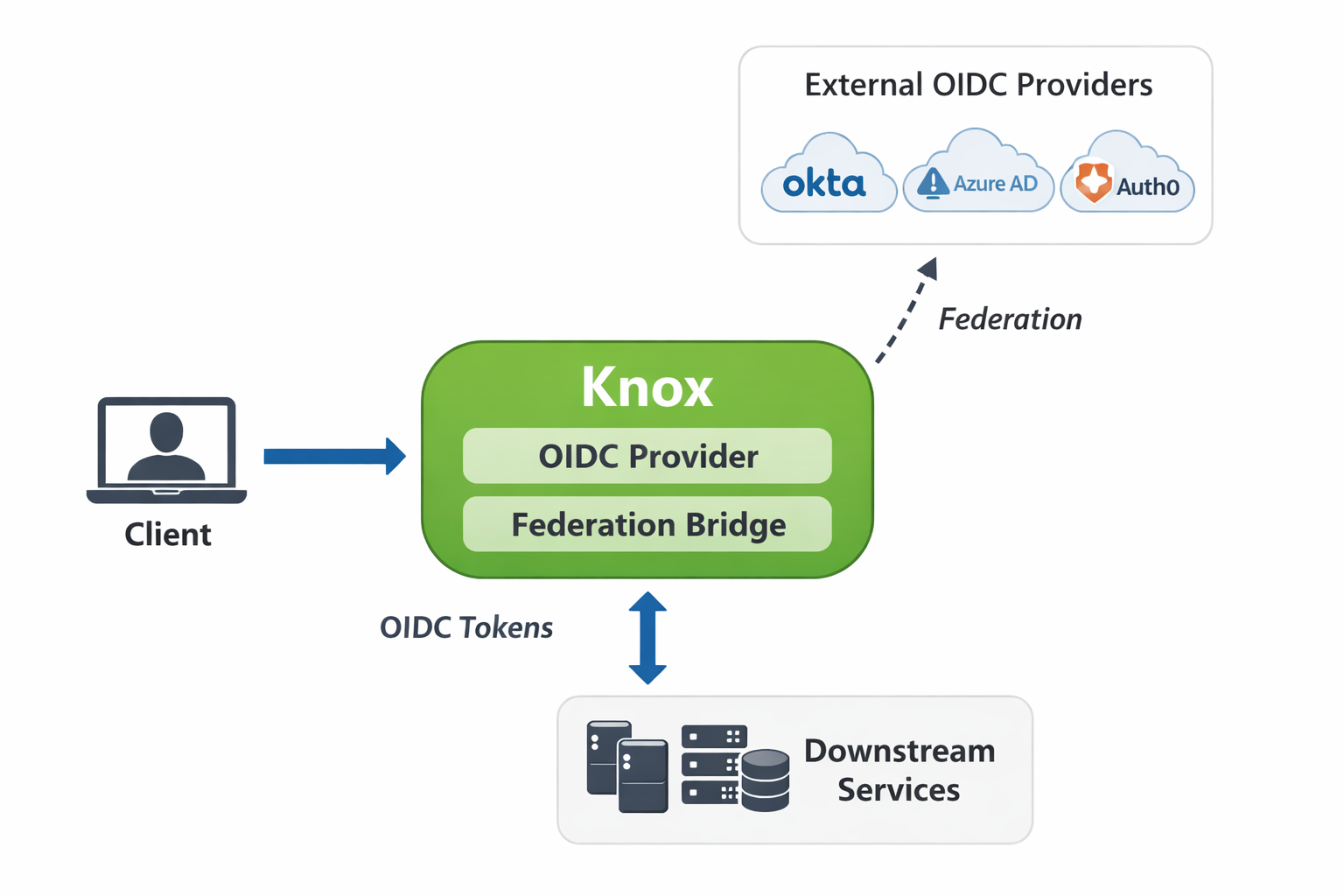
This proposal addresses this gap by enabling Apache Knox to act as an OIDC Provider while still retaining its federation capabilities. With KnoxIDF:
Knox can issue OAuth 2.0 / OIDC tokens directly to clients.
Knox can optionally federate identities and tokens from external, well-known OIDC Providers (e.g., Keycloak).
Downstream services can integrate with Knox exactly as they would with Keycloak or any standard OIDC provider.
This makes Knox both:
an OIDC Provider, and
an OIDC federation bridge, allowing gradual migration or hybrid identity architectures
2. Functional Requirements
OIDC Provider Capabilities
Knox must expose standard OIDC-compatible endpoints.
Knox must be able to issue JWT-based access tokens and ID tokens.
Supported OAuth 2.0 / OIDC Flows
Client Credentials flow
Authorization Code flow
Federation Support
Knox must be able to authenticate users via external OIDC Providers.
Tokens received from federated providers must be mapped into Knox-issued tokens.
Federation must be optional and configurable per deployment.
Topology Integration
KnoxIDF must be deployable as a Knox service and attachable to any topology.
Persistence
Federated identity data must be persisted for traceability and attribute reuse.
Only ID token–related data should be stored (no access tokens or refresh tokens).
As part of preparing this document I already implemented a POC version of this new feature, but this is still a POC. Going forward I share what/why I implemented and conclude with some possible improvement ideas.
3. Design
3.1 New Knox Service: gateway-service-knox-idf
A new Knox service named gateway-service-knox-idf shall be introduced.
Key characteristics:
Can be added to any Knox topology.
Operates independently from pac4j-based inbound authentication.
Exposes OIDC/OAuth-specific REST endpoints.
Can be configured to either:
act as a standalone OP, or
federate authentication to an external OP.
This design keeps KnoxIDF modular and avoids changes to existing gateway authentication flows.
3.2 Login page changes
In the case of Authorization Code flow, the login page will display any pre-configured federated OPs, if the feature is enabled. To do that, the existing SSOCookieProvider needed to be updated to fetch this data from the KNOXIDF service configuration and pass it to Knox's login.html, where new JS code takes care of showing the alternative login path like this:
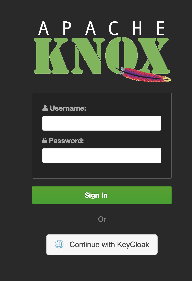
This way, end-users can decide if they want to use Knox's own authentication providers (PAM, LDAP, SAML, Kerberos, etc...) or if they want to identify themselves using the external OIDC Provider (as part of the POC, only Keycloak is supported/tested, but this should be easily extendable to other OIDC providers such as Okta, AzureAD, PingFederate,...).
3.3 REST API Endpoints
KnoxIDF exposes a set of REST endpoints aligned with standard OIDC expectations. These endpoints are compatible with clients configured for Keycloak-like providers.
Key categories include:
Authorization endpoint
Used for Authorization Code flow
- Extends existing
PasscodeTokenResourceBase
Token endpoint
Issues access tokens and ID tokens
Supports:
Client Credentials
Authorization Code
- Extends existing
PasscodeTokenResourceBase
Metadata / configuration endpoints
Expose provider metadata needed by OIDC clients
UserInfo Endpoint
Allows clients to retrieve authenticated user claims using an access token
Enables downstream services to obtain identity and attribute information without parsing the ID token directly.
Characteristics:
Requires a valid Knox-issued access token.
Returns claims derived from:
Knox-issued identity data, or
Federated identity attributes when federation is enabled.
When federation is used, the response is based on the persisted ID token attributes stored during authentication.
- Registration Endpoint
- Allows clients to register their client ID/clientSecret pair
- Extends existing
ClientCredentialsResource
3.4 Federation Architecture
When federation is enabled:
The authorization process delegates authentication to the external OP.
Knox processes and validates the received ID token.
Knox issues its own tokens to the client.
Federation is implemented as a token brokering mechanism:
Client initiates an OAuth/OIDC flow against Knox.
Knox delegates authentication to a configured external OP (e.g., Keycloak).
External OP authenticates the user and returns an ID token.
Knox:
Validates the ID token.
Extracts identity and attribute claims.
Persists federated identity data.
Issues Knox-signed tokens to the client.
This ensures downstream services only need to trust Knox, regardless of how authentication was performed upstream.
3.4.1 Database Design
Federated identity data is persisted using new database tables:
federated_identity
Stores the core identity mapping between Knox and the external OP.
Columns:
- id: a generated unique ID used as a PK
- user_id: a generated unique user ID, used as an identifier within Knox
- provider: the name of the federated OP (e.g. KEYCLOAK)
external_subject: the external subject (user ID)
external_issuer: the external issuer
created_at: creation timestamp
federated_identity_attr
Stores individual attributes extracted from the federated ID token.
Columns:
identity_id: foreign key to
federated_identityattr_key: the attribute name
attr_value: the attribute value
Design considerations:
Only ID token data is persisted.
No access tokens, refresh tokens, or secrets are stored.
Enables future attribute reuse, auditing, and enrichment.
3.4.2 JdbcFederatedIdentityService configuration
By default, the storage and the corresponding FederatedIdentityService points to an empty implementation, which returns default values (empty lists, blank String instances, etc...). It's the end-user's responsibility to explicitly configure this feature (when federation is enabled with at least one federated OP) by setting the relevant federated identity service implementation in the gateway-site.xml as follows:
    <property>
        <name>gateway.service.knoxidf.federatedidentity.impl</name>
        <value>org.apache.knox.gateway.services.knoxidf.federation.JdbcFederatedIdentityService</value>
    </property>
Failing to do this, the token generation and user info fetch actions will return an error indicating that the federated identity could not be found.
3.5 Advanced User Parameter Mappings
KnoxIDF supports advanced mechanisms for enriching ID tokens with additional user-related claims. These mechanisms allow administrators to inject static claims or dynamically resolve user attributes from external systems, enabling flexible identity and attribute modeling comparable to established OIDC providers such as Keycloak.
Two approaches are currently supported: hard-coded ID token claims and pluggable user parameter providers.
3.5.1 Hard-coded ID Token Claims
Similar to other, well-known OIDPs, KnoxIDF allows administrators to define static, hard-coded claims that are automatically included in generated ID tokens. These claims are independent of the authenticated user and are useful for injecting fixed metadata such as roles, scopes, or system-level identifiers.
Hard-coded claim mappings are configured using the knox.token.hardcoded.claim.mappings property in the KNOXTOKEN service definition.
Example configuration:
      <param>
        <name>knox.token.hardcoded.claim.mappings</name>
        <value>principal_roles=admin;scope=openid;principal_id=0;principal_name=root</value>
      </param>
Each key-value pair represents an ID token claim name and its corresponding static value. All configured claims are added to the issued ID token during token generation.
3.5.2 User Parameters Provider
To support dynamic user-specific claim resolution, KnoxIDF introduces a pluggable user parameter resolution mechanism via the UserParamsProvider interface. This abstraction allows KnoxIDF to fetch OIDC-related user attributes from external systems at token issuance time.
The interface definition is as follows:
public interface UserParamsProvider {

    /**
     * Fetches OIDC parameters for the given subject name.
     *
     * @param subjectName The user login/ID (e.g., "sam").
     * @return a map of OIDC parameters (e.g., email, name, roles)
     */
    Map<String, Object> getParamsFor(String subjectName, String scope);
}
As part of this effort, a first concrete implementation has been added: LdapUserParamsProvider. This implementation resolves user attributes from an LDAP directory and maps them into ID token claims.
The LDAP provider currently uses a fixed configuration model (subject to future enhancement) and retrieves a predefined set of attributes (e.g., cn, sn, givenName, mail) for the authenticated user.
The LDAP connection endpoint is configured via the following topology parameter, which must be defined in the KNOXIDF service:
       <param>
          <name>user.params.provider.ldap.url</name>
          <value>ldap://host.docker.internal:33389</value>
       </param>
At token issuance time, KnoxIDF invokes the configured UserParamsProvider to enrich the ID token with dynamically resolved user claims, optionally filtered by the requested OIDC scope.
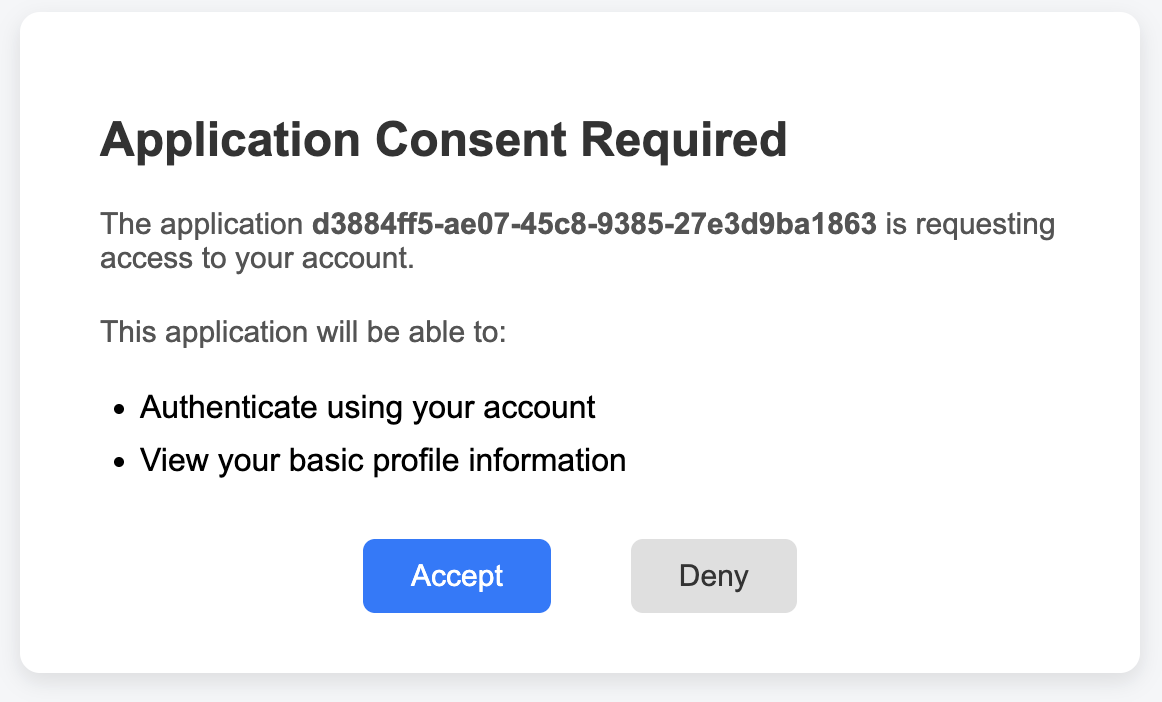
3.6 Consent Page
As part of the Authorization Code flow, KnoxIDF introduces a consent page to ensure that end-users explicitly approve the scopes requested by a client application.
Key characteristics:
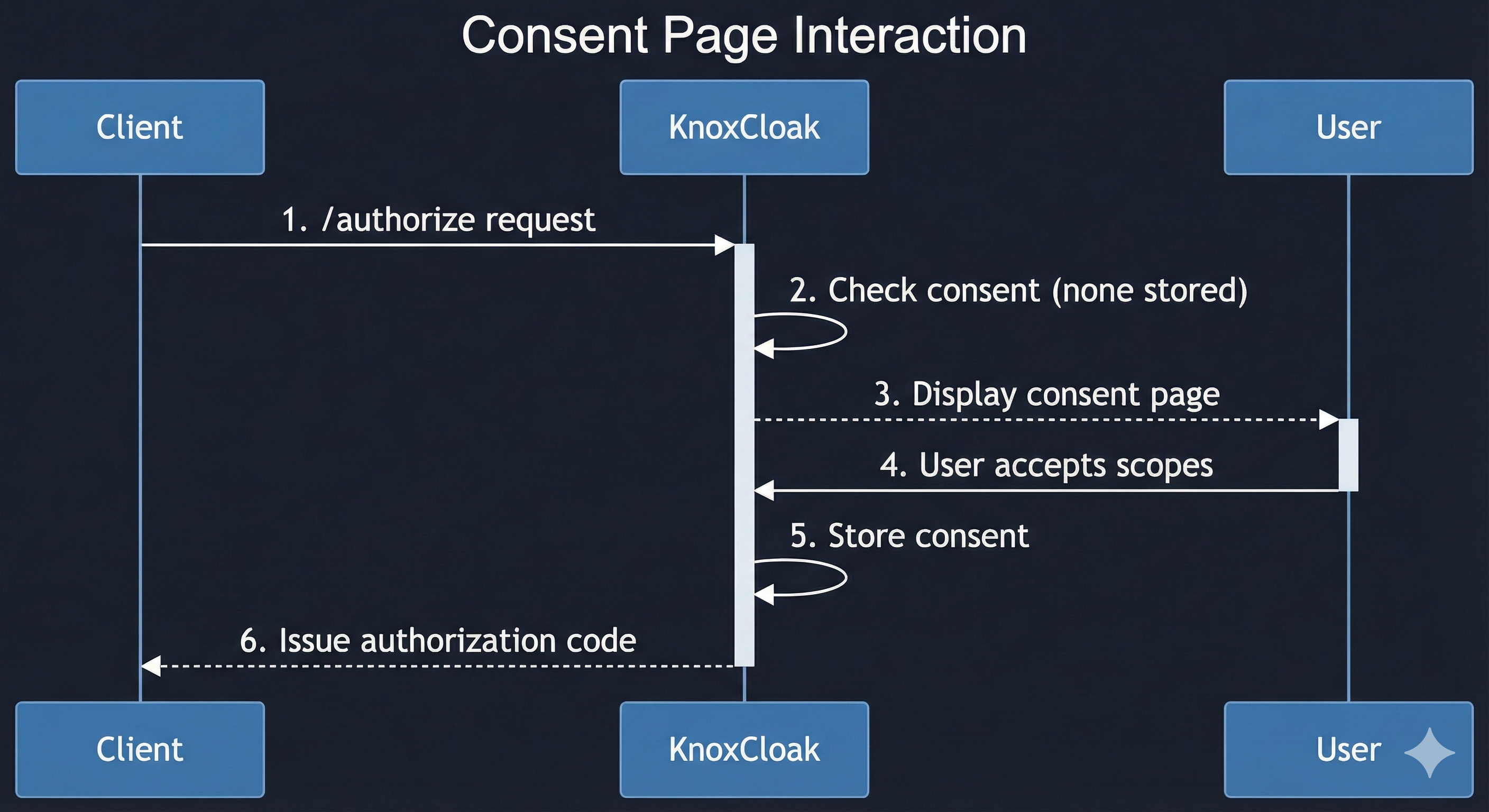
One-time consent per user and client
Once a user grants consent for a given set of scopes to a client, subsequent authorization requests for the same scopes do not require additional confirmation. This ensures a smooth user experience while maintaining explicit consent semantics.Topology-specific servlet
The consent page is implemented as a lightweight servlet that is automatically registered in a topology only if theKNOXIDFservice is included. This avoids unnecessary overhead for topologies that do not use KnoxIDF.Integration with authorization flow
During an Authorization Code request, KnoxIDF checks whether the user has already consented to the requested scopes. If consent is missing, the user is redirected to the consent page before the code is issued.
This design aligns with standard OIDC provider behavior and provides a simple but essential layer of user control over granted permissions.
Sequence:
4. Testing
4.0 Knox setup
At the time of this document being written, the Knox IDF code is sitting on a branch called knox_idf (keeping it in sync with master) in the Apache Knox repo. The following steps will help you to start and configure Knox to handle KnoxIDF-related API calls.
4.0.1 - Build Knox
git clone https://github.com/apache/knox.git

git checkout knox_idf

mvn -DskipTests -Dcheckstyle.skip=true -Dfindbugs.skip=true -Dpmd.skip=true -Drat.skip -Dspotbugs.skip=true -Dforbiddenapis.skip=true -Ppackage clean install
4.0.2 - Install Knox
Whenever I test Knox functionalities, I never use the built-in ant targets (such as ant install-test-home), instead I unzip the generated Knox deliverables into my test folder and use a Terminal window to create the required secrets and (re-)start Knox. I use the following bash script that does the job for me:
#!/bin/bash

KNOX_SOURCE=/Users/smolnar/projects/knox
KNOX_VERSION=3.0.0-SNAPSHOT
KNOX_HOME=/Users/smolnar/test/knoxGateway

function redeployKnoxLocal() {
    echo "Redeploying Knox $KNOX_VERSION ..."
    cd $KNOX_HOME
    echo "Stopping Knox (if needed)..."
    bin/gateway.sh stop
    echo "Removing old Knox deployment files..."
    rm -rf $KNOX_HOME/*
    echo "Unpacking Knox artifacts into $KNOX_HOME ..."
    unzip -q $KNOX_SOURCE/target/$KNOX_VERSION/knox-$KNOX_VERSION.zip -d $KNOX_HOME
    mv knox-$KNOX_VERSION/* .
    rm -rf mv knox-$KNOX_VERSION
    echo "Creating master secret..."
    bin/knoxcli.sh create-master --master gateway
    echo "Creating knox.token.hash.key alias..."
    bin/knoxcli.sh create-alias knox.token.hash.key --value B5oxlx9M4h4MhaGakj8k7Q2fbmPzo6h9te8dWTHs5Mg
    echo "Creating DB aliases..."
    bin/knoxcli.sh create-alias gateway_database_user --value knox
    bin/knoxcli.sh create-alias gateway_database_password --value knox
    echo "Starting Knox..."
    bin/gateway.sh start
}
Once this is done, you'll need to edit the gateway-site.xml config file in your $KNOX_HOME/conf folder and add the following params:
    <property>
        <name>ssl.enabled</name>
        <value>false</value>
    </property>
     <property>
        <name>gateway.service.knoxidffederatedidentity.impl</name>
        <value>org.apache.knox.gateway.services.knoxidf.federation.JdbcFederatedIdentityService</value>
    </property>

    <!-- Optionally, setup your PostgreSQL DB here -->
    <property>
        <name>gateway.service.tokenstate.impl</name>
        <value>org.apache.knox.gateway.services.token.impl.JDBCTokenStateService</value>
    </property>
     <property>
        <name>gateway.database.type</name>
        <value>postgresql</value>
    </property>
    <property>
        <name>gateway.database.connection.url</name>
        <value>jdbc:postgresql://localhost:5432/postgres</value>
    </property>
When all good, you need to restart Knox:
cd $KNOX_HOME; bin/gateway.sh restart
4.0.3 - Install KnoxIDF topologies
You'll see that testing the client credentials and authorization code flows, we'll need 2 dedicated Knox topologies:- knoxidf-sso (uses Knox's SSOCookieFilter for authentication)
- knoxidf-token (uses Knox's JWTProvider for authentication)
You have to copy them into $KNOX_HOME/conf/topologies and Knox will deploy them for you in a couple seconds.
4.0.4 Client registration
After all the above steps, we now arrived to the point where you need to register a client to Knox IDF. It's as simple as issuing the following curl request:
$ curl -ik -X POST http://localhost:8443/gateway/knoxidf-sso/knoxidf/api/v1/client/register \
> -H "Content-Type: application/x-www-form-urlencoded" \
> -H "X-XSRF-Header: valid" \
> -d "redirect_uris=http://localhost:8443/gateway/*,http://host.docker.internal:8443/*,http://host.docker.internal:9080/*&allowed_scopes=openid,profile"
HTTP/1.1 200 OK
Date: Mon, 27 Apr 2026 14:28:29 GMT
Content-Type: text/plain
Content-Length: 357

{"client_secret":"WXpBNU5tUTFPVGN0WXpkaVppMDBaVEF3TFdKaE0yUXRabUl6T0RJd01ERTNaRE0zOjpORGc0WkRkaFlqTXRObUl4TmkwME5tWTVMVGt4WmpVdE1HUTJPV00xWVdOallqWTQ=","redirect_uris":"http://localhost:8443/gateway/*,http://host.docker.internal:8443/*,http://host.docker.internal:9080/*","client_id":"c096d597-c7bf-4e00-ba3d-fb3820017d37","allowed_scopes":"openid,profile"}
You'll have to use the acquired client credentials (clientId/clientSecret pair) going forward.
4.1 Testing – Polaris
To verify KnoxIDF’s compatibility with the Client Credentials flow, we leveraged Apache Polaris using its existing Keycloak integration as a reference. The official Polaris documentation for Keycloak is available here: Polaris Keycloak IdP Guide.
Pre-requisites
Before running the tests, the following tools and setup are required:
Docker: for containerized deployment of Polaris and KnoxIDF.
Polaris source code: clone the repository locally:
git clonehttps://github.com/apache/polaris.git (in my DEV environment, this was cloned into~/projects/polaris)Gradle: for building and running Polaris test scripts.
Test Setup
- Register a client - already done in 4.04 (my client id is
c096d597-c7bf-4e00-ba3d-fb3820017d37, it's a never-expiring token). Create a KnoxIDF-specific Docker environment
In the
projects/polaris/getting-startedfolder, create a new subfolder namedpolaris_knoxidf.Copy the Keycloak subfolder as a template:
cp -r keycloak polaris_knoxidfEdit
docker-compose.ymlinpolaris_knoxidfto point toKnoxIDFinstead of Keycloak. The following key changes were made:quarkus.oidc.auth-server-urlhas to point to your Knox instance: http://host.docker.internal:8443/gateway/knoxidf-sso/knoxidf/api/v1quarkus.oidc.client-idshoud be set to your generated client ID:c096d597-c7bf-4e00-ba3d-fb3820017d37change the
tokendeclaration in thepolaris-setupservice to:token=$$(curl -s -X POST -H "Content-Type: application/x-www-form-urlencoded" 'http://host.docker.internal:8443/gateway/knoxidf-token/knoxtoken/api/v1/token' -d 'client_id=c096d597-c7bf-4e00-ba3d-fb3820017d37' -d 'client_secret=W...0=' -d 'grant_type=client_credentials' | jq -r .access_token) &&
remove the keycloak service (we don't need that here)
Run the KnoxIDF environment
cd ~/projects/polaris
docker compose -f getting-started/polaris_knoxidf/docker-compose.yml up
Running the Tests
Once the containers are up, execute the Polaris KnoxIDF test script:
./polaris_knoxidf_test.sh
This script runs the same flow as described in the Polaris Keycloak documentation, but against KnoxIDF, verifying that Client Credentials tokens are issued and accepted correctly.
Sample result:
Result
Following these steps demonstrates that:
Polaris can successfully authenticate against KnoxIDF using the Client Credentials flow.
KnoxIDF tokens are compatible with existing Keycloak-based integrations.
4.2 Testing – Authorization Code Flow with APISIX
To validate KnoxIDF as an Authorization Code provider, I used APISIX as a reverse proxy, replicating the standard Keycloak integration. This test confirms both standalone and federated operation modes.
Documentation Reference
The APISIX OIDC plugin documentation can be found in the official APISIX guides. These tests use the same configuration patterns outlined there, adapted for KnoxIDF as the OIDC provider. Some of the relevant docs are:
- https://apisix.apache.org/blog/2021/12/10/integrate-keycloak-auth-in-apisix/
- https://apisix.apache.org/docs/apisix/plugins/openid-connect/
- https://apisix.apache.org/docs/apisix/tutorials/keycloak-oidc/#implement-authorization-code-grant
- https://apisix.apache.org/docs/apisix/plugins/authz-keycloak/
Pre-requisites
Before testing, the following components must be available and running:
APISIX
Download the Docker image and start APISIX (within
~/projects/apisix-docker/example)
Keycloak (testing federation)
Download and start Keycloak.
Configure the
apisix_test_realmas per the documentation.Ensure at least one test user exists.
- Auth0 (testing federation)
- Register yourself in ww.auth0.com and create a test application. Mine is called
KnoxProxyand looks like this: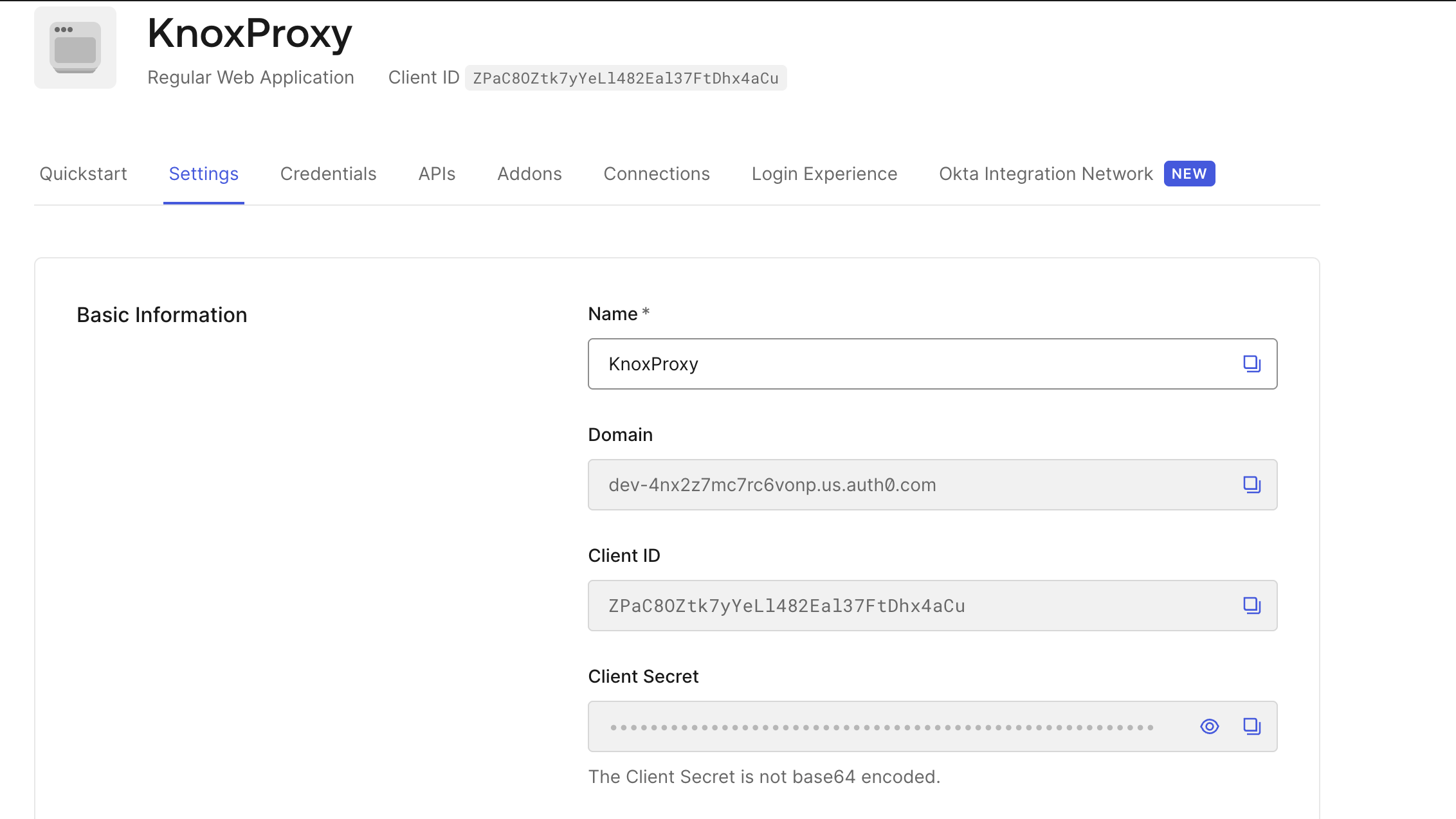
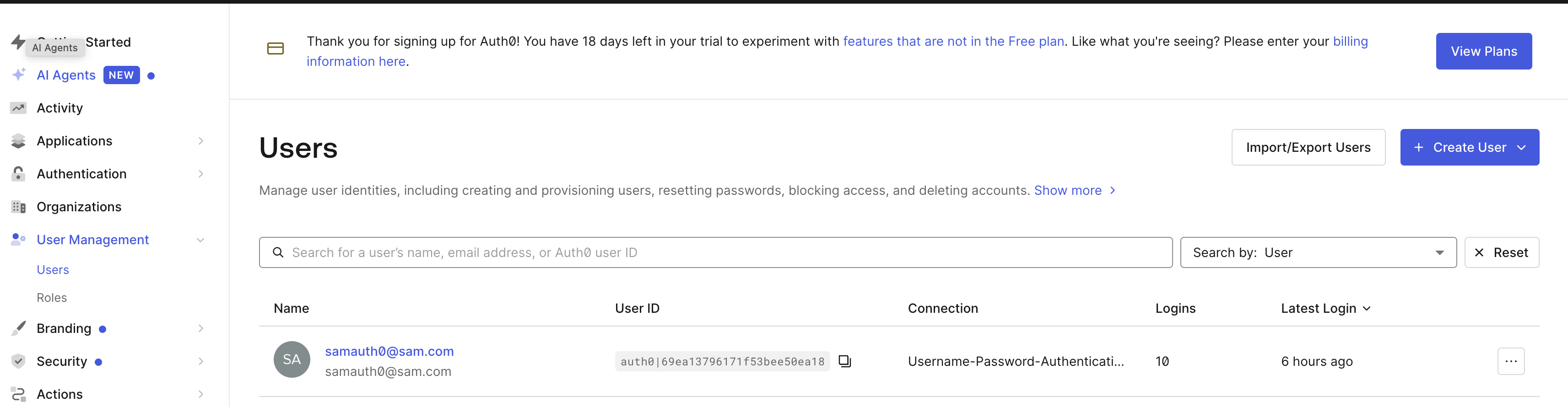
- Create a test user. Mine is samauth0@sam.com
- Register yourself in ww.auth0.com and create a test application. Mine is called
Backend service
Download and run the
kennethreitz/httpbin:latestDocker image.This provides a simple HTTP backend that displays a test image for validating authentication flow.
KnoxIDF
Run locally with the same setup used for Polaris testing.
SSL is disabled, topologies deployed.
Test Setup
1. Keycloak Route Verification
Create a Keycloak-protected route in APISIX to confirm the baseline behavior:
Configure APISIX to use Keycloak as the OIDC provider with a route pointing to the
httpbinbackend.Open an incognito browser session and navigate to the backend endpoint (e.g.,
http://host.docker.internal:9080/image/png).Successful authentication through Keycloak should redirect to the expected image.
Clean up by removing the Keycloak-protected route from APISIX.
Route creation command:
curl  -X PUT 127.0.0.1:9180/apisix/admin/routes -H "X-Api-Key: edd1c9f034335f136f87ad84b625c8f1" -d '{
    "uri":"/*",
    "id": "apisix-keycloak-protected",
    "plugins":{
        "openid-connect":{
            "client_id":"apisix",
            "client_secret":"NixXgcMKEFwP2JGVAh3mzFOP2bZAhhyp",
            "discovery":"http://host.docker.internal:8081/realms/apisix_test_realm/.well-known/openid-configuration",
            "scope":"openid profile",
            "bearer_only":false,
            "realm":"apisix_test_realm",
            "introspection_endpoint_auth_method":"client_secret_post",
            "redirect_uri":"http://host.docker.internal:9080/",
            "session": {
               "secret": "this-should-be-a-long-random-secret-1234567890",
               "cookie": {
                "domain": "host.docker.internal",
                "path": "/",
                "samesite": "Lax",
                "secure": false
               }
            }
        }
    },
    "upstream":{
        "type":"roundrobin",
        "nodes":{
            "host.docker.internal:80":1
        }
    }
}'
This step ensures the APISIX + OIDC integration works as expected before switching to KnoxIDF. Once this is ready, you may want to clean the route:
curl -X DELETE http://127.0.0.1:9180/apisix/admin/routes/apisix-keycloak-protected
2. KnoxIDF Route Verification
Create a KnoxIDF-protected route in APISIX pointing to the same backend (
httpbin) using KnoxIDF as the OIDC provider.Test both federation modes:
Federation Disabled
Set
federated.op.enabledtofalsein all KnoxIDF topologies.Navigate to
http://host.docker.internal:9080/image/pngin an incognito window.The Knox login page should display without any federated alternatives.
Successful login should redirect to the backend image.
Federation Enabled
Enable
federated.op.[KeyCloak|Auth0].enabledin the KnoxIDF topologies, and configure the details of the enabled federated OIDP(s). After saving your changes, Knox will redeploy the topologiesNavigate to the same endpoint in an incognito window.
Assuming you enabled both, the Knox login page should now offer KeyCloak and Auth0 as a federated login option.
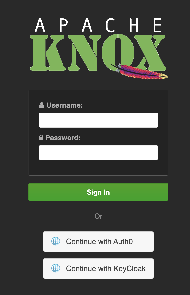
Logging in via any of the authentication methods should still redirect to the backend image.
Confirm there are no errors in the APISIX logs.
Route creation command:
curl -X PUT 127.0.0.1:9180/apisix/admin/routes -H "X-Api-Key: edd1c9f034335f136f87ad84b625c8f1" -d '
{
    "uri":"/*",
    "id": "apisix-knoxidf-protected",
    "plugins":{
        "openid-connect":{
            "client_id":"c096d597-c7bf-4e00-ba3d-fb3820017d37",
            "client_secret":"WXpBNU5tUTFPVGN0WXpkaVppMDBaVEF3TFdKaE0yUXRabUl6T0RJd01ERTNaRE0zOjpORGc0WkRkaFlqTXRObUl4TmkwME5tWTVMVGt4WmpVdE1HUTJPV00xWVdOallqWTQ=",
            "discovery":"http://host.docker.internal:8443/gateway/knoxidf-sso/knoxidf/api/v1/.well-known/openid-configuration",
            "scope":"openid profile",
            "bearer_only":false,
            "introspection_endpoint_auth_method":"client_secret_post",
            "redirect_uri":"http://host.docker.internal:9080/",
            "token_endpoint_auth_method": "client_secret_post",
            "session": {
               "secret": "this-should-be-a-long-random-secret-1234567890",
               "cookie": {
                "domain": "host.docker.internal",
                "path": "/",
                "samesite": "Lax",
                "secure": false
               }
            }
        }
    },
    "upstream":{
        "type":"roundrobin",
        "nodes":{
            "host.docker.internal:80":1
        }
    }
}'
Key Notes
These tests demonstrate that KnoxIDF can act as a fully compliant OIDC Authorization Code provider, supporting:
Standalone login
Federated login through external OIDC providers (e.g., Keycloak)
APISIX behaves consistently whether KnoxIDF is used standalone or federated.
This test validates end-to-end OIDC flows, including login, consent (if required), token issuance, and redirection.
5. Future Improvements
Several advanced features commonly provided by other OIDPs are good candidates for future KnoxIDF enhancements:
Refresh Token Support 
Support long-lived sessions without reauthentication.
Particularly useful for browser-based clients.
User & Client Management APIs
CRUD APIs for OAuth clients.
Attribute mapping and claim customization.
Role & Scope Management
Fine-grained authorization via roles and scopes.
Mapping federated roles into Knox-issued tokens.
Multi-OP Federation
Support federation from multiple external OPs simultaneously.
Provider selection based on realm, client, or request context.
Additional User Parameter Provider Implementations
While the UserParamsProvider abstraction enables dynamic user claim resolution, the current implementation is limited to LDAP-based attribute lookup. Future enhancements may introduce additional provider implementations to support a wider range of enterprise identity sources.
Potential implementations include:
Database-backed user parameter providers
REST-based providers for external identity or profile services
Integration with existing Knox or Hadoop user/group resolution mechanisms
Supporting multiple provider types would allow KnoxIDF to serve as a more flexible identity broker across heterogeneous environments.
Automatic Federated Identity Service Enablement
Currently, the gateway.service.knoxidf.federatedidentity.impl configuration must be explicitly set to enable federated identity persistence. This manual step introduces the possibility of misconfiguration when KnoxIDF is used across multiple topologies.
As a future improvement, Knox could automatically enable the federated identity service implementation whenever at least one topology includes the KNOXIDF service. This would simplify deployment, reduce configuration overhead, and ensure consistent federation behavior without requiring additional administrative intervention.
Automated Docker-based tests
Knox supports automated Docker-based integration tests for a while now. It's essential that we add KnoxIDF-related tests into that framework.