DUE TO SPAM, SIGN-UP IS DISABLED. Goto Selfserve wiki signup and request an account.

DUE TO SPAM, SIGN-UP IS DISABLED. Goto Selfserve wiki signup and request an account.
...
The following is a flow chart for how HighAvailabilityManager works through its process.
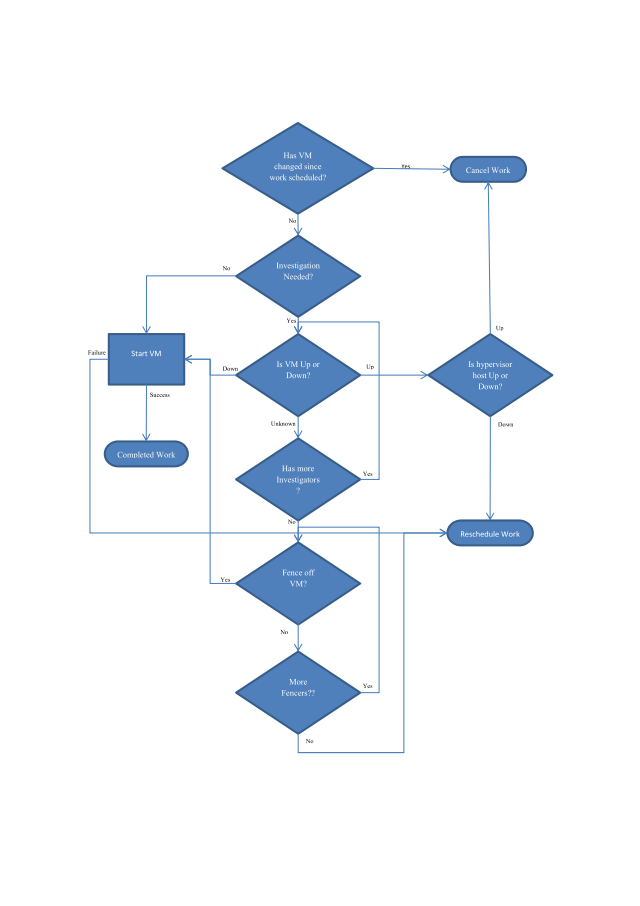
The need for Investigator rises from the fact that the technologies for the environments CloudStack is deployed into change rapidly. So depending on what new technology is available, Investigators can be written quickly and plugged into the HA process to help determine if a VM is Running or Stopped. The following are keys to the implementation of an Investigator.
The following is an example Investigator.
UserVmDomRInvestigator sends a command to the domR VM, a virtual machine that CloudStack starts to provide network services for the user VM. It utilizes the fact that the domrR VM is on the same network as the user VM and asks to arp-ping the user VM’s ip address. If the ip address responds to the arp-ping, then it returns Running. However, if the ip address does not respond, it returns Unknown. It never returns Stopped because there’s no way to tell from the network stand point that a VM is truly stopped.
A Fencer, like an Investigator, provides for a way for new technology to fence off the VM. The following are keys to the implementation of a Fencer.
The following are example Fencers.
XenServerFencer depends on the ability of the XenServer to self-fence on storage disconnect. Each XenServer writes a heartbeat on a central storage. If it is unable to write the heartbeat, the XenServer self-fences or reboots. XenServerFencer examines that the heartbeat fell behind and the XenServer have self-fenced so the VM is fenced off from writing to its disks.
RecreateFencer works on VMs with disks that are re-creatable because the data on it is either not useful or can be recreated on reboot. It returns that these VMs are fenced because a new disk can be created for that VM on every restart so no disk corruption can occur.
HighAvailabilityManager is configurable via the following variables.
Variable NameUsage| ha.retry.wait | time to wait before retrying the work time |
stop.retry.wait | time to wait before retrying the stop |
time.between.cleanup | Time to wait before the cleanup thread runs |
max.retries | number of times to retry start |
time.to.sleep | Time to sleep if no work items are found |
workers | number of worker threads to spin off to do the processing |