DUE TO SPAM, SIGN-UP IS DISABLED. Goto Selfserve wiki signup and request an account.

DUE TO SPAM, SIGN-UP IS DISABLED. Goto Selfserve wiki signup and request an account.
Originally published on the Cloud.com wiki. Author: Alex Huang. Last modified November, 2011.
CloudStack HighAvailabilityManager provides an infrastructure to implements a high availability process. It is important to distinguish between what HighAvailabilityManager does and does not do. HighAvailabilityManager does not contain the code that magically finds out if a virtual machine is alive or to fence it off within a CloudStack deployment. CloudStack works with too many different types of hypervisors, storage, and other resources for that to be implemented effectively in a single block of code. HighAvailabilityManager’s job is to provide a well-defined process within which other components provide such capabilities.
HighAvailabilityManager defines three steps for its process.
For the Investigation and Fencing steps, HighAvailabilityManager relies on adapters to provide the functionality as different deployments may have different ways to perform those steps, depending on the physical equipment deployed. There may be multiple adapters for each step. Adapters can be added, removed, and configured within the components.xml. By the time step 3, Start, is performed, the VM is at Stopped state and a normal start is performed. HighAvailabilityManager does not contain code that starts a VM in any special way. Each Investigator has three states to return. It can report that the VM is Stopped or Running. The third state is Unknown. It is important to distinguish between Stopped and Unknown. First, an Investigator should report Unknown when it doesn’t know how to handle that particular type of VM or the particular environment. For example, if an Investigator is written to interface with vCenter, it should report Unknown for VMs running on XenServer. Second, the Investigator must know that a VM is Stopped to report Stopped. For example, let’s say you wrote an Investigator to ping a VM to determine if it’s Running. If the VM responded and the mac address is as expected, then it should report the VM as Running. However, if there’s no response, that does not mean the VM is Stopped because a VM may not respond due to network disconnect or ICMP being disabled on the VM. Each Fencer is responsible for making sure that the VM has been fenced from corrupting its own disk. It returns true if fenced and false if not fenced or unable to perform that task. The HighAvailabilityManager maintains a work queue in the database where it registers at which step the VM HA process is at. A VM is scheduled for HA when the following conditions occur.
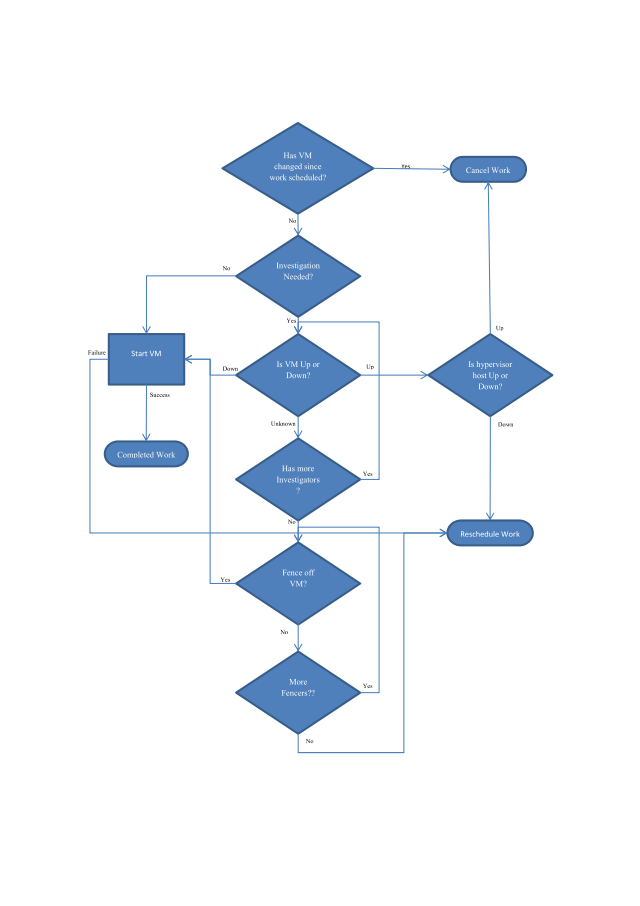
Once the work has been scheduled, the HighAvailabilityManager worker threads will work through the queue. One each work item, HighAvailabilityManager first determines if the state of the VM has changed since the work was scheduled. If it has been changed, HighAvailabilityManager cancels the work. If not, then it checks to see if the VM requires investigation. It does not require investigation in the case where the host was determined to be Down or an agent reports that the VM is Stopped. If it requires investigation, HighAvailabilityManager asks each Investigator to investigate the VM until one Investigator returns the VM is Running or Stopped. If the VM is found to be Running, HighAvailabilityManager checks if the host the VM is on is Up. If the host is Up, it then cancels the task. If the host is Down, it reschedules the work item. If the VM is found to be Stopped, then the VM is restarted. If none of the Investigators can determine the state of the VM, HighAvailabilityManager moves on to ask the Fencers to fence off the VM. If one of the Fencers says it was able to fence off the VM, then the VM is restarted. If none of them can, the work item is rescheduled. Once the VM is successfully started, the work item is completed. If the VM start fails with an error that the HighAvailabilityManager understands, the work is rescheduled. If the error is unknown, then the work item is cancelled and alert is filed.
HighAvailabilityManager work items can be checked in the op_ha_work table. A cleanup thread cleans up cancelled or completed items in the background. As HighAvailabilityManager completes each step, it will write into this table what step it is at. The steps are Scheduled, Investigating, Fencing, Restarting, Done, Cancelled, Error.
There is a special condition called rolling-death that the HighAvailibilityManager handles specifically. Under certain conditions, restarting a VM causes deaths to systems due to bugs or other problems. HighAvailabilityManager will stop HAing a VM if within a certain period of time that same VM has been HAed for a certain amount of time.
The following is a flow chart for how HighAvailabilityManager works through its process.
The need for Investigator rises from the fact that the technologies for the environments CloudStack is deployed into change rapidly. So depending on what new technology is available, Investigators can be written quickly and plugged into the HA process to help determine if a VM is Running or Stopped. The following are keys to the implementation of an Investigator.
The following is an example Investigator.
UserVmDomRInvestigator sends a command to the domR VM, a virtual machine that CloudStack starts to provide network services for the user VM. It utilizes the fact that the domrR VM is on the same network as the user VM and asks to arp-ping the user VM’s ip address. If the ip address responds to the arp-ping, then it returns Running. However, if the ip address does not respond, it returns Unknown. It never returns Stopped because there’s no way to tell from the network stand point that a VM is truly stopped.
A Fencer, like an Investigator, provides for a way for new technology to fence off the VM. The following are keys to the implementation of a Fencer.
The following are example Fencers.
XenServerFencer depends on the ability of the XenServer to self-fence on storage disconnect. Each XenServer writes a heartbeat on a central storage. If it is unable to write the heartbeat, the XenServer self-fences or reboots. XenServerFencer examines that the heartbeat fell behind and the XenServer have self-fenced so the VM is fenced off from writing to its disks.
RecreateFencer works on VMs with disks that are re-creatable because the data on it is either not useful or can be recreated on reboot. It returns that these VMs are fenced because a new disk can be created for that VM on every restart so no disk corruption can occur.
HighAvailabilityManager is configurable via the following variables.
Variable NameUsage| ha.retry.wait | time to wait before retrying the work time |
stop.retry.wait |
time to wait before retrying the stop |
time.between.cleanup |
Time to wait before the cleanup thread runs |
max.retries |
number of times to retry start |
time.to.sleep |
Time to sleep if no work items are found |
workers |
number of worker threads to spin off to do the processing |