DUE TO SPAM, SIGN-UP IS DISABLED. Goto Selfserve wiki signup and request an account.

Searching artifacts across SCA domain
Candidate: Wojtek Janiszewski <wojtek.janiszewski AT gmail DOT com>
1. General
2. Project description
2.1 (Project goal)
2.2 Requirements
Implementation of search feature should cover three main areas, which are indexing, searching and presentation. Such separation gives us modularity, which implies reuse of components and ability to test easily.
2.2.1 Indexing
Indexing would be backed by Apache Lucene indexing mechanisms.
Indexing should be performed in two phases:
Phase one: gathering basic data
Every file in contribution should be parsed and indexed. Moreover files contained in every known archive file (JAR, ZIP files) should be indexed. Parsing each file would be aware of its filetype to get best indexing data. Internally, Document object would be created and appropriate fields would be filled. Unique identifier should be assigned to newly created document.
Phase two: reference completion
For every indexed document previously created index will be searched to find documents usages. Found elements would be stored with current document data. In example, for indexed Java class we should search for its name occurences in composite files. Found identifiers as well as their friendly names would be stored in indexed document representing Java class.
Index document model
Each indexed item would have several attributes. Bold items would be document fields for searching purposes. Italic is used for attributes used for internal purposes.
Field |
Description |
|---|---|
Filename |
Full path for contribution object. |
Friendly name |
specific for file type, like QName of Java class, Qname of composite. For others it could be simply filename. |
File content |
literal for text files, for non readable files, ie. Java classes some names like method names could be extracted and used in this field |
Contribution |
contribution which file belongs to |
Archive |
archive which file belongs to |
References |
Contains names of items which are used by current: |
Usages |
Contains names of items which uses current. Generally it's reversed link for reference. |
Service/Reference/ |
Used to store extracted objects from composite file. |
All |
All above fields to provide non-filter queries. |
Item identifier |
Unique across SCA domain to identify document/domain obejct. |
References links |
Links to references documents. |
Usages links |
Links to usages documents. |
Above model shows how documents would be linked for search purposes. Example of references which could occur could be found on the diagram.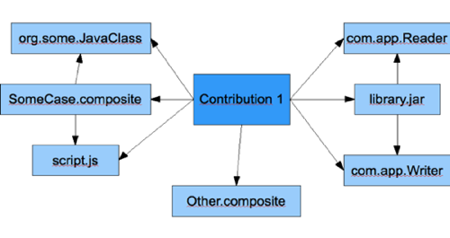
2.2.2 Searching
Searching would be backed by Apache Lucene search engine.
Custom search API for Apache Tuscany would be available via SCA component. Such element can be reused in various scenarios, ie. it can be exposed for other purposes via one of Apache Tuscany bindings. In this project we would like to use such component as a feed for web based UI.
There would be generally two operations exposed by such component. (more could be introduced for ie. administration purposes).
Fetch by phrase - search phrases are similiar to what we do in Google. Lucene query syntax would be used and various filters could be entered (basing on fields described in 2.2.1 Indexing). User could filter by:
- document name
- document friendly name
- document content
- contribution which it belongs to
- items referenced by item we look for, ie. we can search for composites which uses JavaScript file given as query parameter
- items declared in composite files
- none (all document fields would be used to search)
More query syntax elements would be used, such as:
- wildcards
- logic operators
- exclusions
- regular expressions
Fetch by item - getting item and its references. Item to fetch is identified by internal identifier. Such fetching method would be used in navigation based on hyperlinks, not search queries.
2.2.3 Presentation
Navigation
Navigation could be performed in two ways:
1. By using search box where user can type query, for "fetch by phrase" search method
2. By using links to items where user can navigate through references ("fetch by item" method). Such links could be found in several places:
- search start page - with links to available contributions
- result element view containing links to parents and children
Additionally after implementing project core some usability features coulb be added:
- JavaScript/AJAX hints while typing query, it would show suggestions for:
- artifact types
- indexed names
- most popular searches
- query syntax
Results
Display layout would be common for both "fetch by phrase" and "fetch by item". Every search would be displayed as list of results. For long result lists paging would be applied. Furthermore having sort (basing on various criteria) feature would improve navigation through results list.
View for each search result element should contain:
- highlighted phrase which matches search query
- preview link (if item is readable)
- link to parent contribution
- links to runtime nodes (fetched from contribution)
- links to direct parents (composite, component, binding etc.)
- links to children elements
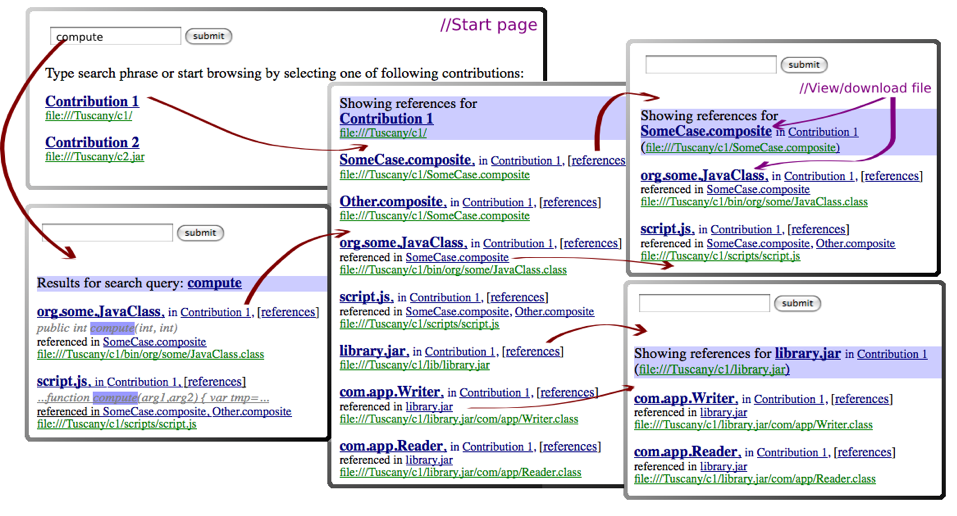
Following image shows example navigation throught search UI. It contains 5 web pages which can be reach in various flows. Red arrows shows what page wuold be generated after clicking a link. Purple color is used for comments.
2.3 Deliverables
Contribution scanner, parser and analyzer
Module which scans contributions, analyzes its artifacts and feeds Apache Lucene index. See 2.2.1 Indexing for details. Appriopriate JUnit tests should be introduced.
Search component
Module which exposes search features as simple, SCA component API. See 2.2.2 Searching for details. Appropriate JUnit tests should be introduced.
SCA Domain manager web application extension
New pages, scripts, actions etc. which would handle UI described in 2.2.3 Presentation. Appropriate JUnit testst should be introduced.
Integration tests
Module which tests integration of project deliverables with Apache Tuscany.
Documentation
User and developer documentation on Apache Tuscany web page.
3. Timeline
Before May 23
Getting started
Proposal review and discussions, prototyping, getting familiar with advanced aspects of related technologies.
May 23 - June 30 (~5 weeks)
Implementation of Contribution scanner, parser and analyzer.
July 1 - July 11 (1.5 week)
Implementation of Search component.
Implementation of Integration tests.
July 12
Submitting mid-term evaluation.
July 13 - August 9 (~4 weeks)
Implementation of SCA Domain manager web application extension.
August 10 - August 17 (1 week)
Extra week in case of delay.
Writing documentation for project. Code review.
August 18
Submitting final evaluation