Introduction
Purpose
Currently in CloudStack, the admin can limit the resources managed by CloudStack by setting limits for accounts and domains. But these existing limits are based on resource count, that limits the user on the basis of no. of VMs, no. of Volumes, no. of snapshots etc. and not of the basis of storage space, CPU, memory etc.
This feature will add new (CPU, RAM, Primary storage, Secondary storage, network rate etc.) resource types to the existing pool of resources. CS admin can set limits i.e. CPU, memory, storage etc. for accounts/domains, this gives user a freedom to launch customize VMs and to create customize volumes. This is functional specifications of feature CLOUDSTACK-713.
Current Scenario
- updateResourceLimit API has the following resource types:
- Instance - Number of instances a user can create.
- Public IPs - Number of public IP addresses a user can own.
- Volume - Number of disk volumes a user can create.
- Snapshot - Number of snapshots a user can create.
- Template - Number of templates that a user can register/create.
- Projects - Number of projects a user can create.
- Network - Number of guest networks that a user can create.
- VPC - Number of VPCs that a user can create.
References
Feature Specifications
Requirements
- Update Resource Limit: Root/Domain Admin should be able to limit the following resources
- CPUs
- RAM
- Primary (shared) storage (Volumes)
- Secondary storage (Snapshots, Templates & ISOs)
- Network bandwidth rate (in bps)
- Usage: Limits can be imposed on Accounts, Domains and Projects.
- List Resource Limit: Any User/RootAdmin/Domain Admin can list Resources
- Resource Limit Logs: Ensure proper logs are maintained into vmops.log and api.log
User permission
- Normal users would have privilege to list resource limits (listResourceLimits).
- Root/Domain-Admin would have privilege to list and update resource limits.
Use cases
Domain D1 , Account A1 and Project P1
1. Number of CPUs:
-
- Root/Domain-Admin update CPU to 10 for domain D1. Users belonging to Domain D1 should not be able to use more than that.
- Root/Domain-Admin update CPU to 10 for Account A1 in Domain D1. Users belonging to Account A1 should not be able to use more than that. Also, they should not use CPU limit defined for D1 domain.
- Limits imposed on Domain D1 should be imposed on sub-domain SD1 as well.
- Root/Domain-Admin update CPU to 10 for Project P1 having account A1 . Users belonging to Project P1 should not be able to use more CPUs than the defined limit.
2. Amount of RAM:
-
- Root/Domain-Admin update RAM to 1GB for domain D1. Users belonging to Domain D1 should not be able to use more than that.
- Root/Domain-Admin update RAM to 1GB for Account A1 in Domain D1. Users belonging to Account A1 should not be able to use more than that. Also, they should not use RAM limit defined for D1 domain.
- Limits imposed on Domain D1 should be imposed on sub-domain SD1 as well.
- Root/Domain-Admin update RAM to 1GB for Project P1 having account A1. Users belonging to Project P1 should not be able to use more RAM than the defined limit.
3. Amount of Primary Storage:
-
- Root/Domain-Admin update primary storage to 5GB for domain D1. Users belonging to Domain D1 should not be able to use more than that.
- Root/Domain-Admin update primary storage to 5GB for Account A1 in Domain D1. Users belonging to Account A1 should not be able to use more than that. Also, they should not use primary storage limit defined for D1 domain.
- Limits imposed on Domain D1 should be imposed on sub-domain SD1 as well.
- Root/Domain-Admin update primary storage to 5GB for Project P1 having account A1. Users belonging to Project P1 should not be able to use more primary storage than the defined limit.
4. Amount of Secondary Storage:
-
- Root/Domain-Admin update secondary storage to 5GB for domain D1. Users belonging to Domain D1 should not be able to use more than that.
- Root/Domain-Admin update secondary storage to 5GB for Account A1 in Domain D1. Users belonging to Account A1 should not be able to use more than that. Also, they should not use secondary storage limit defined for D1 domain.
- Limits imposed on Domain D1 should be imposed on sub-domain SD1 as well.
- Root/Domain-Admin update secondary storage to 5GB for Project P1 having account A1. Users belonging to Project P1 should not be able to use more secondary storage than the defined limit.
5. Network bandwidth rate:
-
- Root/Domain-Admin update network bandwidth rate to 1000bps for domain D1. Users belonging to Domain D1 should not be able to use more than that.
- Root/Domain-Admin update network bandwidth rate to 1000bps for Account A1 in Domain D1. Users belonging to Account A1 should not be able to use more than that. Also, they should not use secondary storage limit defined for D1 domain.
- Limits imposed on Domain D1 should be imposed on sub-domain SD1 as well.
- Root/Domain-Admin update network bandwidth rate to 1000bps for Project P1 having account A1. Users belonging to Project P1 should not be able to use more network bandwidth rate than the defined limit.
Architecture and Design description
Existing API Changes:
- updateResourceLimit : addition of the new resource types along with the previous ones.
- listResourceLimit: Request parameters resourcetype is optional but it has to be changed.
- updateResourceCount: Request parameters resourcetype is optional but it has to be changed.|| Resource type || Resource name ||
9 |
CPU |
10 |
RAM |
11 |
Primary (shared) storage (Volumes) |
12 |
Secondary storage (Snapshots, Templates & ISOs)
|
13 |
Network bandwidth rate (in bps) |
http://localhost:8080/client/api?command=updateResourceLimit&resourcetype=9&max=1024&domainid=2&apikey=pFZ6ZdlN-TmlBQWJRhncYUAUFCOGk3aCbbLGRAqtSG3KnbYnTEHXvh1MP-Y5801JAn-aFPODB-7vl1P8DiPQ1A&signature=6he37Flw1zRwNDe0yejyHk6oXcE%3d
For a User
- listResourceLimit:
Request parameters resourcetype is optional but it has to be changed.
Response Tags change: resourcetype, required
DB Changes:
New values will be added in resource_limit table
resource_limit table:
id |
domain_id |
account_id |
type |
max |
1 |
2 |
NULL |
user_vm |
2 |
2 |
2 |
NULL |
public_ip |
-1
|
3 |
2 |
NULL
|
volume |
-1 |
4 |
2 |
NULL
|
snapshot |
-1 |
5 |
2 |
NULL
|
template |
-1 |
6 |
2 |
NULL
|
project |
4 |
7 |
2 |
NULL
|
network |
4 |
8 |
2 |
NULL
|
vpc |
5 |
9 |
2 |
NULL
|
cpu |
2 |
10 |
2 |
NULL
|
ram |
4 |
11 |
2 |
NULL
|
primary_storage |
5 |
12 |
2 |
NULL
|
secondary_storage |
5 |
13 |
2 |
NULL
|
network_bandwidth_rate |
600 |
Design Decisions: TBD
- The Limit imposed (per account, per Domain, per Project) should not conflict
- What should be the maximum limit for CPU, RAM, Primary Storage, Secondary Storage
- TBD: resource type: 11 - Network bandwidth rate (in bps)
UI flow
- _On Project Dashboard: Resource page - add resource options as following:
_ 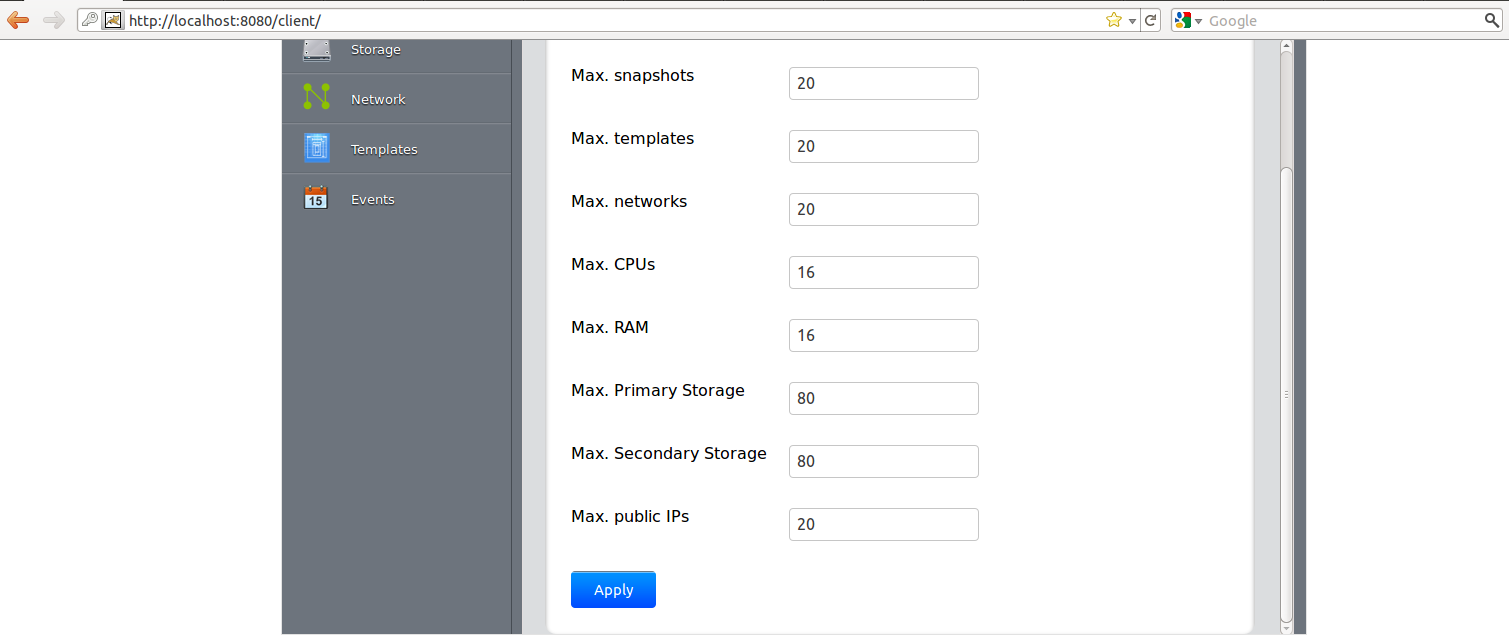
- On Domain and Account Info page add the option of additional resource proposed in this spec
