DUE TO SPAM, SIGN-UP IS DISABLED. Goto Selfserve wiki signup and request an account.

DUE TO SPAM, SIGN-UP IS DISABLED. Goto Selfserve wiki signup and request an account.
When a long-running command or job is tasked to the KVM agent, and the agent begins processing it, meanwhile if the agent restarts or crashes, management server assumes it as a job failure. Consequently, the management server attempts to revert the resource to its original state, which might not be accurate since the agent could have already completed the operation.
The FR primarily requires that cases of long running jobs and unknown successes are addressed, when the CloudStack management server loses communication with the agent.
Currently KVM agent does not have any state persistence mechanism for the job commands it processes. If the KVM agent crashes or restarts during processing any job commands it has no way to track such commands to take further action on that. If ongoing job commands can be tracked, the agent can recover or restart and handle cases of silent successes. This functionality can also be used by the KVM agent to inform the management server about command process interruptions. As a result, the management server can attempt to reconcile the resources and their states.
In CloudStack, the management server and KVM agent interact using a Command and Answer pattern. When an operation like volume copy between two storages needs to be performed, the management server issues a Command to the KVM agent. The agent receives this command, processes it by executing the necessary actions on the host, and then formulates an Answer containing the result. Management server waits for the Answer which will be identified by a sequence ID which is unique to the each Command. If any interruption occurs on the agent (like agent restart, agent crash), currently it is not able to send the Answer informing the management server about the Command processing state. Management server assumes it as a job failure on timeout without trying to know the actual resource state
Following are few such common long-running operations where an interruption on the ongoing Command will have an effect on the original resource state and these will be addressed as part of this FR
The following major scenarios are considered for the interruption of on-going command(s) by the KVM agent:
We propose to handle the above scenarios, to reconcile the resource state properly in the following sections.
In the KVM agent whenever it looses connectivity to the management server (Scenario 1) or upon agent restart (Scenario 3), a disconnect event can be generated and during that event processing all ongoing Commands can be handled without having to leave them in unknown state. Each Command can be implemented to register a hook to handle any interupptions to that Command and whenever KVM agent gets a disconnect event, all the registered hooks can be executed to handle that interruption.
For example, during volume copy if the KVM agent gets a disconnect event then the corresponding command wrapper’s disconnect hook will be initiated where in it can cancel that copy operation. The disconnect hook feature (PoC PR: https://github.com/apache/cloudstack/pull/5552/) can be explored to handle any ongoing commands in the agent when agent receives any disconnect event. This adds a way for KVM agent CommandWrappers to register callback code that handles in case of an agent disconnect event.
This adds a way for KVM agent CommandWrappers to register code to run in case of an Agent disconnect event. LibvirtComputingResource with a list to store DisconnectHooks, and then it implements the disconnected() method to call these hooks in the event of a loss of connectivity. More details can be found in this PoC PR here: https://github.com/apache/cloudstack/pull/5552
A new ReconcileResourceManager is proposed that runs within the management server to track resources like volumes, VMs, and snapshots; and activates when a command operation times out or fails.
For example, during volume migration in the KVM agent, if the Command operation is interrupted by an agent connection failure to the management server (Scenario 1) or upon agent crash (Scenario 2) then the management server can handle such events upon Command timed out. When the management server considers it as a command failure, it can use the ReconcileResourceManager to reconcile the state of the volume and persist in the database.
When a command is in progress on the agent and an interruption occurs, the management server will receive an interrupt notification via the Answer. As described, the "ReconcileResourceManager" will be implemented with required methods to handle these interruptions and reconcile the resource. If the original agent is unavailable, the manager will attempt to send new commands to other existing agents to locate the resource and determine its status.
If the KVM agent is restarted while a Command is being processed, the actual operation may be successful but since the management server won’t receive any Answer the operation may eventually time out and treats it as a failure.
To handle the KVM agent restarts (Scenario 3) while processing long running commands, state of commands can be logged as checkpoints by the management server to retain known state information after crash or reconnection.
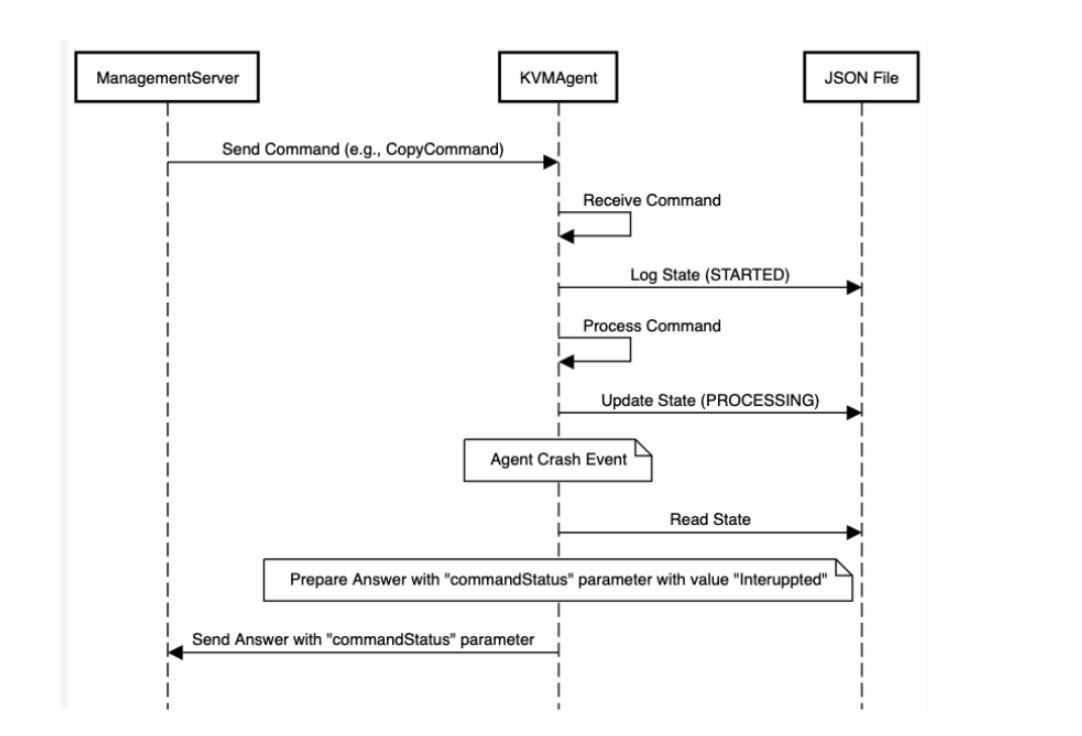
The command state logging saves the check points while processing the command, for example “START”, “PROCESSING”, “COMPLETED” with all the relevant details of the command. After agent comes up, agent can read the state of the command and take further action. For example, if the state of a command is “PROCESSING” then the agent can inform the management server to reconcile and process it.
In the agent during the command processing in the wrappers, the progress of the command execution will be logged and used after the agent restart to take actions accordingly based on the state of the command’s state.
The command state can be logged as a JSON file within the agent. For example, a CopyCommand might look like this:
{
“commandId”: “1-4192288303128511738”,
“state”: “PROCESSING”,
“timestamp”: “2024-07-25T10:20:30Z”,
“starttime”: “2024-07-25T10:10:30Z”,
”timeout”: “60”,
“request”: “Request:Seq 1-4192288303128511738: { Cmd, MgmtId: 2484172157385, via: 1, Ver: v1, Flags: 100011, [{\"org.apache.cloudstack.storage.command.CopyCommand\":{\"srcTO\".…. “
}
After the agent restarts, a new "CommandInvestigator" thread will process these JSON files. If an incomplete command is found, an Answer will be created with a "commandStatus" parameter indicating the interruption, informing the management server. The JSON files will be saved at “/usr/share/cloudstack-agent/tmp” and deleted after the Answer is sent. All logged commands must be processed, so files will only be deleted after processing. Commands exceeding their timeout will be deleted on agent startup.
For example if the copy command is send to the KVM agent and agent got restarted, following is the workflow that will happen with the new changes to inform the management server that the command has been interrupted
Following the sequence diagram for the above scenario:
API, database, service layer and agent changes
No.
-- Add table for reconcile commands
CREATE TABLE IF NOT EXISTS `cloud`.`reconcile_commands` (
    `id` bigint unsigned NOT NULL UNIQUE AUTO_INCREMENT,
    `management_server_id` bigint unsigned NOT NULL COMMENT 'node id of the management server',
    `host_id` bigint unsigned NOT NULL COMMENT 'id of the host',
    `request_sequence` bigint unsigned NOT NULL COMMENT 'sequence of the request',
    `state_by_management` varchar(255) COMMENT 'state of the command updated by management server',
    `state_by_agent` varchar(255) COMMENT 'state of the command updated by cloudstack agent',
    `command_name` varchar(255) COMMENT 'name of the command',
    `command_info` MEDIUMTEXT COMMENT 'info of the command',
    `answer_name` varchar(255) COMMENT 'name of the answer',
    `answer_info` MEDIUMTEXT COMMENT 'info of the answer',
    `created` datetime COMMENT 'date the reconcile command was created',
    `removed` datetime COMMENT 'date the reconcile command was removed',
    `updated` datetime COMMENT 'date the reconcile command was updated',
    `retry_count` bigint unsigned DEFAULT 0 COMMENT 'The retry count of reconciliation',
    PRIMARY KEY(`id`),
    INDEX `i_reconcile_command__host_id`(`host_id`),
    CONSTRAINT `fk_reconcile_command__host_id` FOREIGN KEY (`host_id`) REFERENCES `host`(`id`) ON DELETE CASCADE
) ENGINE=InnoDB DEFAULT CHARSET=utf8;
Command.java
    public enum State {
        CREATED,        // Command is created by management server
        STARTED,        // Command is started by agent
        PROCESSING,     // Processing by agent
        PROCESSING_IN_BACKEND,  // Processing in backend by agent
        COMPLETED,      // Operation succeeds by agent or management server
        FAILED,         // Operation fails by agent
        RECONCILE_RETRY,        // Ready for reconciliation
        RECONCILING,    // Being reconciled by management server
        RECONCILED,     // Reconciled by management server
        RECONCILE_FAILED,       // Fail to reconcile by management server
        TIMED_OUT,      // Timed out on management server or agent
        INTERRUPTED,    // Interrupted by management server or agent (for example agent is restarted),
        DANGLED_IN_BACKEND     // Backend process which cannot be processed normally (for example agent is restarted)
    }
new method for each Command
    public boolean isReconcile() {
        return false;
    }
| Scenarios | Current behavior | How to deal with it |
|---|---|---|
| Agent cannot send Answer to management server, therefore timed out on management server | Agent: (for reconcile command only)
Management server: (for reconcile command only)
|
| Agent interrupt the process or processing in backend | Management server
|
| Agent interrupt the process or processing in backend | Agent (when restart)
|
| timed out on management server | Management server
|
| Agent process the command
| Management server
|
Management server (all good): CREATED -> COMPLETED
Management server (failed): CREATED -> FAILED
Management server is restarted: CREATED -> INTERRUPTED
Management server time out: CREATED -> TIMED_OUT
Agent (all good): STARTED → PROCESSING → COMPLETED → Send Answer to management server → Mgmt server updates the reconcile command jobs (table: reconcile_commands ) , and removes if COMPLETED→ Agent removes the JSON file if job is not found or COMPLETED or FAILED
Agent (wrong): STARTED → PROCESSING → FAILED → Send Answer to management server → Mgmt server removes the reconcile command jobs (table: reconcile_commands) → Agent removes the JSON file if job is not found.
Agent is restarted: STARTED → PROCESSING → INTERRUPTED (processed by java) → Send CommandInfo to management server via PingCommand every minute
Agent is restarted: STARTED → PROCESSING_IN_BACKEND → DANGLED_IN_BACKEND (processed in backend)→ Send CommandInfo to management server via PingCommand every minute
Agent timed out: STARTED → PROCESSING → TIMEDOUT (processed by java)→ Send Answer to management server
Agent timed out: STARTED → PROCESSING_IN_BACKEND → DANGLED_IN_BACKEND (processed in backend) → Send Answer to management server and Send CommandInfo via PingCommand every minute
Agent → First Management server → (If it is not the source mgmt server and not found in the memory, send to) Other management server to reconcile.
States: INTERRUPTED/TIMED_OUT/RECONCILE_RETRY/RECONCILE_FAILED
-> RECONCILING
-> RECONCILED (all good) / RECONCILE_FAILED (failed, will retry) / RECONCILED_RETRY (success, but need more information, will retry)
| Action | scenario 1 Connection failures between the agent and the management server | scenario 2 Agent crash (or force killing the agent process) | scenario 3 Agent is restarted manually | scenarios 5 (Needed ?) mgmt server is restarted |
|---|---|---|---|---|
| Migrate VM |
|
|
| If VM is Migrating
|
Migrate VM with volumes (between NFS) Note: this action is not supported on PowerFlex |
|
| same as left | |
Migrate Volume (on NFS)
ROOT/DATA volume of Stopped VM | ROOT/DATA volume of Stopped VM | |||
Migrate Volume (on Powerflex)
| Current: | Current: | Current: |
Migrate VM with volumes (If VM is Migrating)
Migrate Volumes (If volume is Migrating)
Please note:
Migration between NFS and Local requires the fix: https://github.com/apache/cloudstack/pull/10266
| NFS to NFS | NFS to Local | Local to Local | Local to NFS | Powerflex to Powerflex | Powerflex <------> NFS | |
|---|---|---|---|---|---|---|
| Migrate VM | PrepareForMigrationCommand (dest) MigrateCommand (source) | - | - | - | PrepareForMigrationCommand (dest) MigrateCommand (source) | - |
| Migrate VM with volumes | CopyCommand (template to primary if needed) CreateObjectCommand (new volume) ModifyTargetsCommand PrepareForMigrationCommand (dest) MigrateCommand (source) DeleteCommand (source) | same as "NFS to NFS" | same as "NFS to NFS" | same as "NFS to NFS" | Migrating a volume online with KVM from managed storage is not currently supported. | Pool [%s] is not compatible with volume [%s], skipping it. |
| Migrate ROOT Volume (of Running VM) | KVM does not support volume live migrationdue to the limited possibility to refresh VM XML domain. Therefore, to live migrate a volume between storage pools, one must migrate the VM to a different host as well to force the VM XML domain update. Use 'migrateVirtualMachineWithVolumes' instead. | same | same | same | MigrateVolumeCommand
| Storage pool pr503-t11980-kvm-ol8-kvm-pri3 is not suitable to migrate volume |
| Migrate ROOT Volume (of Stopped VM) | CopyCommand (primary1 to secondary) CopyCommand (secondary to primary2) DeleteCommand (secondary) DeleteCommand (primary1) | same | same | same | CopyCommand (primary1 to primary2)
| same as above |
| Migrate DATA Volume (of Running VM) | KVM does not support volume live migrationdue to the limited possibility to refresh VM XML domain. Therefore, to live migrate a volume between storage pools, one must migrate the VM to a different host as well to force the VM XML domain update. Use 'migrateVirtualMachineWithVolumes' instead. | same | same | same | MigrateVolumeCommand
| same as above |
| Migrate DATA Volume (of Stopped VM) | CopyCommand (primary1 to secondary) CopyCommand (secondary to primary2) DeleteCommand (secondary) DeleteCommand (primary1) | same | same | same | CopyCommand (primary1 to primary2)
| same as above |
| Migrate DATA Volume (unattached) | CopyCommand (primary1 to secondary) CopyCommand (secondary to primary2) DeleteCommand (secondary) DeleteCommand (primary1) | same | same | same | CopyCommand (primary1 to primary2)
| same as above |