DUE TO SPAM, SIGN-UP IS DISABLED. Goto Selfserve wiki signup and request an account.

DUE TO SPAM, SIGN-UP IS DISABLED. Goto Selfserve wiki signup and request an account.
Currently Cloudstack accepts only URL's to register a template/volume. If the user has a downloaded template/volume available, user has to host it either on dropbox etc. or run web server so as to get downloadable url. It is desirable to be able to upload a template/volume directly through standard web browser.
This feature enables the users to directly upload the template/volume to Cloudstack and eliminates the dependency on an external http server. This will be a complementary functionality and users can continue to register template/volume with URL as well.
Support for Http/unencrypted upload
Splitting of template/volume during upload and merge back
Ability to cancel in-progress uploads by admin
The browser-based uploading process will have the following steps:
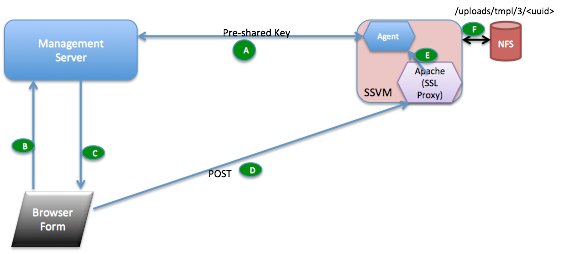
A new API getUploadParams to enable users to upload volume/template from a local or network file share. The API response has a POST URL to which the volume/template needs to be uploaded. This is available to regular and admin users of Cloudstack. The request and response parameters are described below (all required parameters are in bold font)
{
postURL:https://ssvmpublicip/upload/C7D351D2-F167-4CC8-A9FF-3BECB0A625C4,
payload:TKPFeuz2nHmE/kcREEu24mnj1MrLdzOeJIHXR9HLIGgk56bkRJHaD0RRL2lds1rKKhrro4/PuleEh4YhRinhxaAmPpU4e55eprG8gTCX0ItyFAtlZViVdKXMew5Dfp4Qg8W9I1/IsDJd2Kas9/ftDQLiemAlPt0uS7Ou6asOCpifnBaKvhM4UGEjHSnni1KhBzjgEyDW3Y42HKJSSv58Sgmxl9LCewBX8vtn9tXKr+j4afj7Jlh7DFhyo9HOPC5ogR4hPBKqP7xF9tHxAyq6YqfBzsng3Xwe+Pb8TU1kFHg1l2DM4tY6ooW2h8lOhWUkrJu4hOAOeTeRtCjW3H452NKoeA1M8pKWuqMo5zRMti2u2hNZs0YY2yOy8oWMMG+lG0hvIlajqEU=,
signature:de7c9b85b8b78aa6bc8a7a36f70a90701c9db4d9,
expires: 2014-10-17T12:00:00+0530,
uuid:C7D351D2-F167-4CC8-A9FF-3BECB0A625C4
}
http://managementip:8080/client/api?command=getUploadParams&type=template&response=json&name=centos 64 64bit&displayText=centos 64 64bit&zoneid=-1&format=VHD&isextractable=false&passwordEnabled=false&isdynamicallyscalable=false&osTypeId=1b510c30-3352-11e4-aaca-a5c7f57670d0&hypervisor=XenServer&requireshvm=false&apiKey=miVr6X7u6bN_sdahOBpjNejPgEsT35eXq-jB8CG20YI3yaxXcgpyuaIRmFI_EJTVwZ0nUkkJbPmY3y2bciKwFQ&signature=Lxx1DM40AjcXU%2FcaiK8RAP0O1hU%3D
{
postURL:https://ssvmpublicip/upload/DD0A9FC6-C17E-4180-963C-870B9D03A80A,
payload:TKPFeuz2nHmE/kcREEu24mnj1MrLdzOeJIHXR9HLIGgk56bkRJHaD0RRL2lds1rKKhrro4/PuleEh4YhRinhxaAmPpU4e55eprG8gTCX0ItyFAtlZViVdKXMew5Dfp4Qg8W9I1/IsDJd2Kas9/ftDQLiemAlPt0uS7Ou6asOCpifnBaKvhM4UGEjHSnni1KhBzjgEyDW3Y42HKJSSv58Sgmxl9LCewBX8vtn9tXKr+j4afj7Jlh7DFhyo9HOPC5ogR4hPBKqP7xF9tHxAyq6YqfBzsng3Xwe+Pb8TU1kFHg1l2DM4tY6ooW2h8lOhWUkrJu4hOAOeTeRtCjW3H452NKoeA1M8pKWuqMo5zRMti2u2hNZs0YY2yOy8oWMMG+lG0hvIlajqEU=,
signature:de7c9b85b8b78aa6bc8a7a36f70a90701c9db4d9,
expires: 2014-10-17T12:00:00+0530,
uuid:DD0A9FC6-C17E-4180-963C-870B9D03A80A
}
curl -X POST "https://ssvmpublicip/upload/C7D351D2-F167-4CC8-A9FF-3BECB0A625C4" -F "file=@volume.vhd" -F "signature=de7c9b85b8b78aa6bc8a7a36f70a90701c9db4d9" -F "payload=TKPFeuz2nHmE/kcREEu24mnj1MrLdzOeJIHXR9HLIGgk56bkRJHaD0RRL2lds1rKKhrro4/PuleEh4YhRinhxaAmPpU4e55eprG8gTCX0ItyFAtlZViVdKXMew5Dfp4Qg8W9I1/IsDJd2Kas9/ftDQLiemAlPt0uS7Ou6asOCpifnBaKvhM4UGEjHSnni1KhBzjgEyDW3Y42HKJSSv58Sgmxl9LCewBX8vtn9tXKr+j4afj7Jlh7DFhyo9HOPC5ogR4hPBKqP7xF9tHxAyq6YqfBzsng3Xwe+Pb8TU1kFHg1l2DM4tY6ooW2h8lOhWUkrJu4hOAOeTeRtCjW3H452NKoeA1M8pKWuqMo5zRMti2u2hNZs0YY2yOy8oWMMG+lG0hvIlajqEU=" -F "expires=2014-10-17T12:00:00+0530" -v
200 OK
curl -X POST "https://ssvmpublicip/upload/DD0A9FC6-C17E-4180-963C-870B9D03A80A" -F "file=@templatelocation.vhd" -F "signature=de7c9b85b8b78aa6bc8a7a36f70a90701c9db4d9" -F "payload=TKPFeuz2nHmE/kcREEu24mnj1MrLdzOeJIHXR9HLIGgk56bkRJHaD0RRL2lds1rKKhrro4/PuleEh4YhRinhxaAmPpU4e55eprG8gTCX0ItyFAtlZViVdKXMew5Dfp4Qg8W9I1/IsDJd2Kas9/ftDQLiemAlPt0uS7Ou6asOCpifnBaKvhM4UGEjHSnni1KhBzjgEyDW3Y42HKJSSv58Sgmxl9LCewBX8vtn9tXKr+j4afj7Jlh7DFhyo9HOPC5ogR4hPBKqP7xF9tHxAyq6YqfBzsng3Xwe+Pb8TU1kFHg1l2DM4tY6ooW2h8lOhWUkrJu4hOAOeTeRtCjW3H452NKoeA1M8pKWuqMo5zRMti2u2hNZs0YY2yOy8oWMMG+lG0hvIlajqEU=" -F "expires=2014-10-17T12:00:00+0530" -v
200 OK
User should be able to query the status of uploaded template/volume by calling listtemplates/listvolumes API with unique uuid obtained as part of the getUploadParams response (present in POST URL as mentioned above). The polling for status should start on successful completion of the POST request.
http://managementip:8080/client/api?command=listVolumes&id=C7D351D2-F167-4CC8-A9FF-3BECB0A625C4&response=json&apiKey=miVr6X7u6bN_sdahOBpjNejPgEsT35eXq-jB8CG20YI3yaxXcgpyuaIRmFI_EJTVwZ0nUkkJbPmY3y2bciKwFQ&signature=Lxx1DM40AjcXU%2FcaiK8RAP0O1hU%3D
{ "listvolumesresponse" : { "count":1 ,"volume" : [ {"id":"C7D351D2-F167-4CC8-A9FF-3BECB0A625C4","name":"windows","zoneid":"c2bcad2f-1eb1-45ba-bebe-1c21873831b7","zonename":"zone","type":"DATADISK","provisioningtype":"thin","size":0,"created":"2014-10-17T15:24:06+0530","state":"Uploading","account":"admin","domainid":"fad51d88-449b-11e4-9cf2-2d5524b62490","domain":"ROOT","storagetype":"shared","hypervisor":"XenServer","diskofferingid":"a1bb6667-780c-47ad-91cb-b98aed589c18","diskofferingname":"Custom","diskofferingdisplaytext":"Custom Disk","destroyed":false,"isextractable":true,"status":"1% Uploaded","tags":[],"displayvolume":true,"quiescevm":false} ] } }
http://managementip:8080/client/api?command=listTemplates&response=json&templatefilter=self&id=DD0A9FC6-C17E-4180-963C-870B9D03A80A&apiKey=miVr6X7u6bN_sdahOBpjNejPgEsT35eXq-jB8CG20YI3yaxXcgpyuaIRmFI_EJTVwZ0nUkkJbPmY3y2bciKwFQ&signature=Lxx1DM40AjcXU%2FcaiK8RAP0O1hU%3D
{ "listtemplatesresponse" : { "count":1 ,"template" : [ {"id":"DD0A9FC6-C17E-4180-963C-870B9D03A80A","name":"centos 64 64bit","displaytext":"centos 64 64bit","ispublic":false,"created":"2014-10-17T10:54:40+0530","isready":false,"passwordenabled":false,"format":"tar","isfeatured":false,"crossZones":false,"ostypeid":"1b510c30-3352-11e4-aaca-a5c7f57670d0","ostypename":"CentOS 6.2 (64-bit)","account":"admin","zoneid":"c2bcad2f-1eb1-45ba-bebe-1c21873831b7","zonename":"zone","status":"8% Downloaded","templatetype":"USER","hypervisor":"XenServer","domain":"ROOT","domainid":"fad51d88-449b-11e4-9cf2-2d5524b62490","isextractable":true,"details":{"hypervisortoolsversion":"xenserver61"},"tags":[],"sshkeyenabled":false,"isdynamicallyscalable":false} ] } }
If the template/volume fails to upload (HTTP code other than 200 OK), the user should request for a new upload url and upload it again. The same upload URL shouldn't be reused.
This section covers when and how the pre-shared key is generated by management server, how is it stored, how is it passed to SSVM
The signature returned from the management server in the response of getUploadParams will be validated on the SSVM Agent.
The PSK will also be used to encrypt and decrypt the payload data sent from the management server in the api response and received on the SSVM agent in the api request.
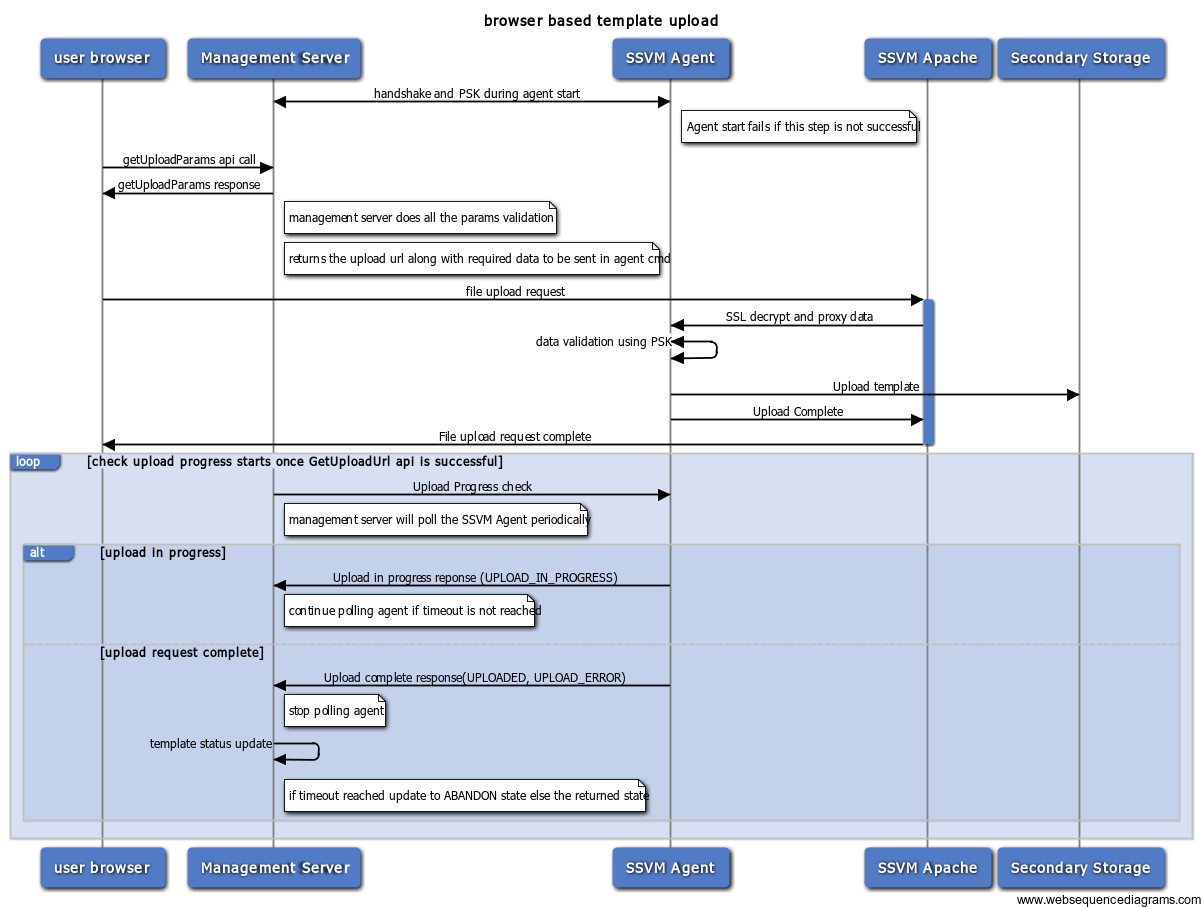
When the management server receives getUploadParams api call, it selects SSVM and secondary store in the zone requested by the user and returns a POST url to that SSVM. There can be multiple SSVMs in the same zone. Management servers decides which SSVM to handle this based on the load.
SSVM agent will keep track of all upload status assigned to it and sends it to management server (based on management server initiated polling). If the template/volume is selected to be cross-zone, it will uploaded to one zone and then copied to other zones from it (already existing functionality).
Management server owns the lifecycle of volume/template (initially gets created with upload state as "NOT_UPLOADED"). It polls the SSVM agent (using an already existing agent command) to get the status and triggers appropriate state transitions. Polling starts after the successful completion of the getUploadParams API. The polling 'interval' and 'timeout' are determined by global configuration parameters.
Failure at any point during the upload process to SSVM would result in upload state getting transitioned to "UPLOAD_ERROR" (refer to the state machine below). Also if the upload is not completed within 'timeout' configuration the state transitions to "UPLOAD_ERROR". This will take care of SSVM agent failure/SSVM failure scenarios.
If the management server itself goes down during the upload, the polling is resumed by the new management server that takes ownership of the SSVM. The 'timeout' is always taken in account from the time template entry gets created in db.
TBD - check existing code and reuse
The SSVM agent will listen for any connections from Apache web server (using the NioServer utility). It will be using the localhost and port number (come from a configuration) to listen.
SSVM apache proxies the data from https to http url on localhost:port using ProxyPass.
All the http events and data will be proxied by apache to agent. SSL validation only happens at apache layer.
The below failures can happen while SSVM agent is receiving the template. When management server polls for the status of the template/volume, if any of these below errors happen, the agent returns appropriate information and management server transitions the state accordingly.
The process is considered success If the volume/template upload is successfully completes (and installed in case of template) within the polling timeout. In this case agent returns a success status to management server during the polling.
Template/Volume go through below state machine transitions, when it goes through the browser based upload.
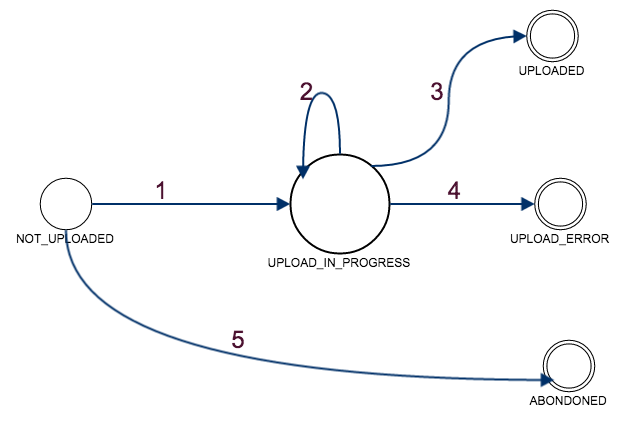
States:
NOT_UPLOADED: getUploadParams API was successful and the template is registered. But, upload hasn't started yet (agent has no data about this upload)
UPLOAD_IN_PROGRESS: User has initiated the POST request on SSVM Apache and the validation/upload is in progress
UPLOADED: SSVM agent successfully copied the template/volume to secondary storage
UPLOAD_ERROR: Any failure in between user initiating the POST request and template being downloaded OR failure to complete within configured timeout
ABANDONED: the POST request isn't initiated within the configured timeout. In this case the SSVM agent has no record of the upload (TBD: Do we really need to distinguish ERROR and ABANDONED?)
State Transitions:
A cleanup thread will be running at regular intervals (configurable, provide details). It will pick up all volume/template with upload state as "UPLOAD_ERROR" and "ABANDONED" and send agent command to cleanup any partial data from secondary store. The cleanup will be a best-effort approach.
There isn't any recovery or retry mechanism as this is a POST request. Once error happens user gets notified with a clear error message as part of the response. The template/volume will remain in the error state and admin will be able to troubleshoot it based on the appropriate log messages in management server log, agent log, apache access/error log files. This failed entries will eventually get be cleaned by the cleanup process. The user has to reinitiate the upload by calling getUploadParams API again.
The POST url returned by the management server to upload template/volume is expected to be used only once. If there is a download in-progress/error/success state for template/volume in the URL and the SSVM agent gets a new request for the same URL, the agent rejects this request saying there is another download in progress (409 conflict).
Open item: The limitation here is that if the template/volume cleanup happened and the template is cleaned, agent would start accepting the url again. This will be fixed later.
No schema changes. Some configuration items will be created.
The following new configurations will be added
A new UI to upload volume/template which should be able to accept "browse and upload" file.
UI flow:
Upload url should be active only for one call - Its partially handled now (see below for details). The limitation needs to be addressed.
CLOUDSTACK-....
template-upload branch off master