DUE TO SPAM, SIGN-UP IS DISABLED. Goto Selfserve wiki signup and request an account.

DUE TO SPAM, SIGN-UP IS DISABLED. Goto Selfserve wiki signup and request an account.
Up until CloudStack version 4.20.0.0 there was no support for native VM backups, only volume backups; VM backups relied on either Veeam or Dell Networker. Version 4.20.0.0 introduced the NAS backup plugin, a native backup solution for KVM full VM backups. However, the current functionality is not adequate for all use cases, namely, the following flaws are present:
Every backup is a full VM backup. #8907 and #9524 introduced the notion of incremental volume backups and incremental VM snapshots for the KVM plugin in ACS, respectively; thus, there should be support for incremental VM backups as well.
The plugin forces the user to use additional NAS storages (NFS, CephFS, CIFS/Samba) in order to backup the VMs. As ACS already has the concept of secondary storages, which are storage areas separate from the primary storage, there is no need to add a new storage concept in order to perform backups, as backups can be copied to the secondary storage. Furthermore, we could extend the secondary storage selectors introduced in #7659 to allow backup storage selectors, thus giving control over where the backups will be saved to the operators. By avoiding extra configurations, we make the system more flexible and natural for cloud operators.
The backups are stored without any compression. Using the qemu-img tool, we could compress QCOW2 files to save space.
The backups are not validated neither during creation nor post-creation.
Motivated by the aforementioned points and to provide a more complete native backup plugin for the KVM hypervisor, this document will present a novel virtual machine native backup solution for Apache CloudStack and KVM.
In this section we present some basic definitions that will be used throughout this spec:
To illustrate the active backup chain and backup delta definitions, let us follow the example below:
At the start, the VM will not have an active backup chain, as no backups have been taken, this state is illustrated in figure 1:
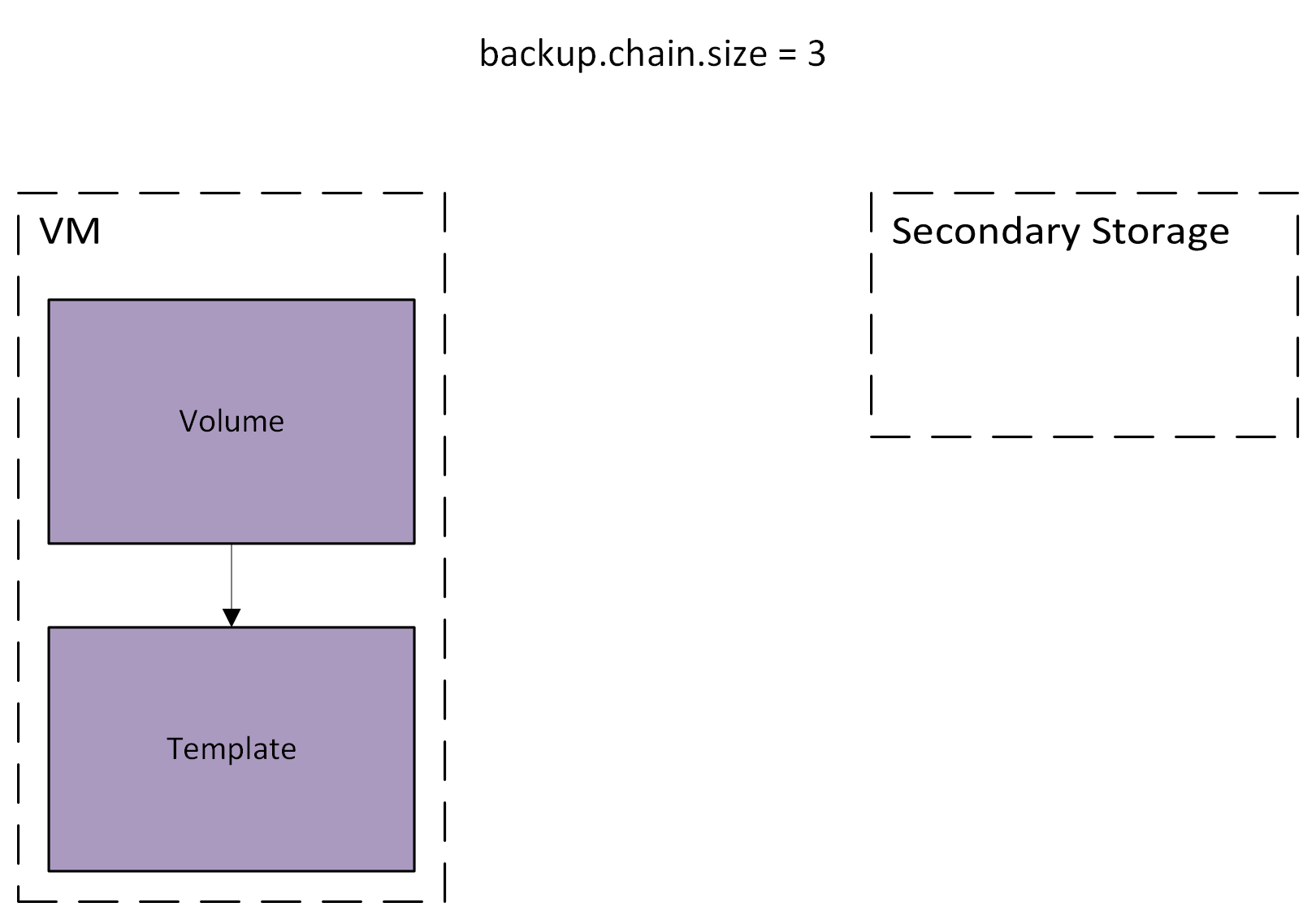 Figure 1. Initial state.
Then, during the first backup, a backup delta will be created and the volume will be consolidated and copied to the secondary storage, forming the first (full) backup. Also, the VM will have an active backup chain. This state is illustrated in figure 2:
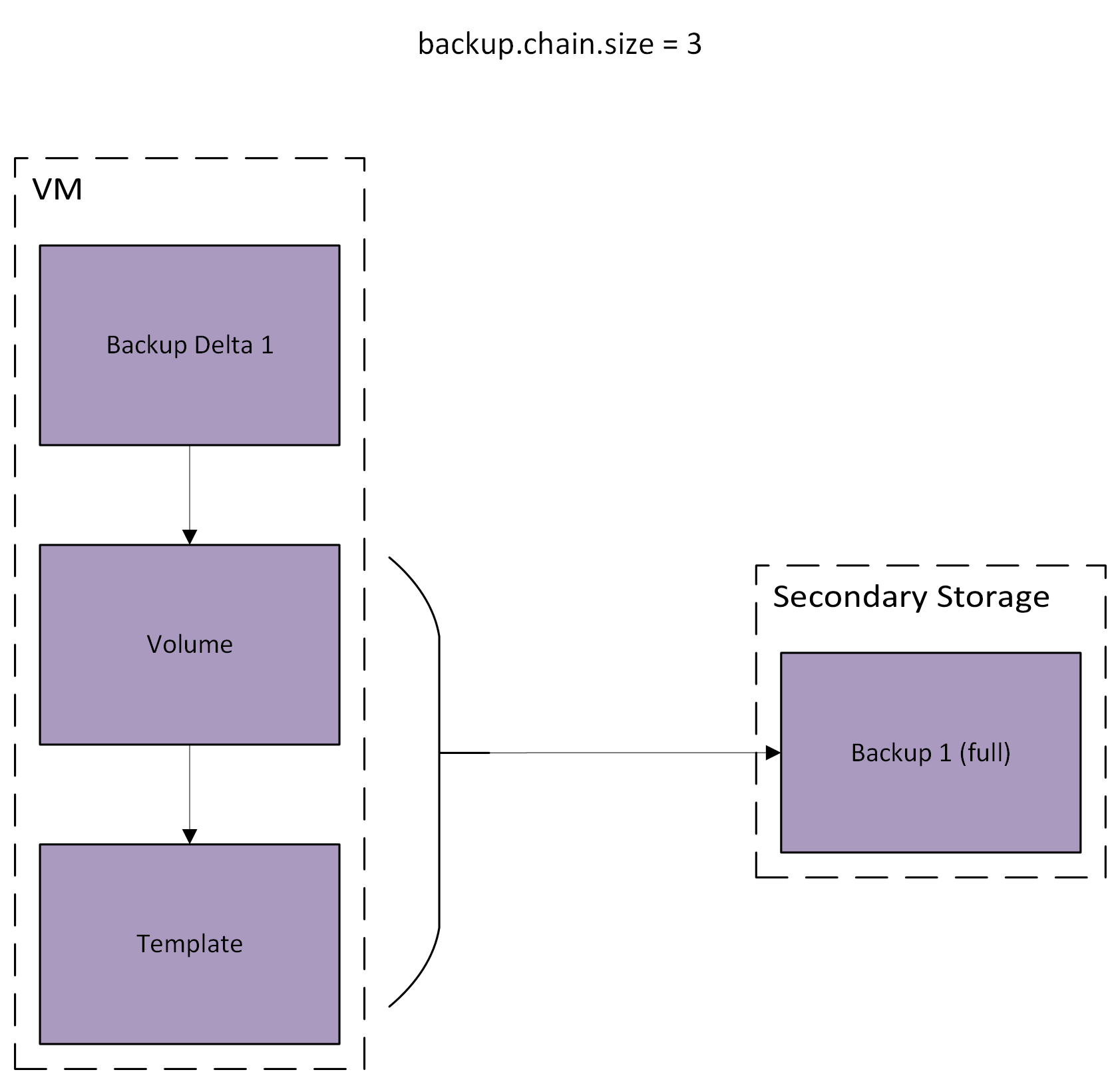 Figure 2. After taking the first backup.
During the second backup, a new backup delta will be created, the previous one will be copied to the secondary storage, forming the second (incremental) backup. Also, the active backup chain size will be increased by one. Figure 3 illustrates the state during the copy from primary to secondary of the previous backup delta. After it is copied, it will be merged into the base volume.
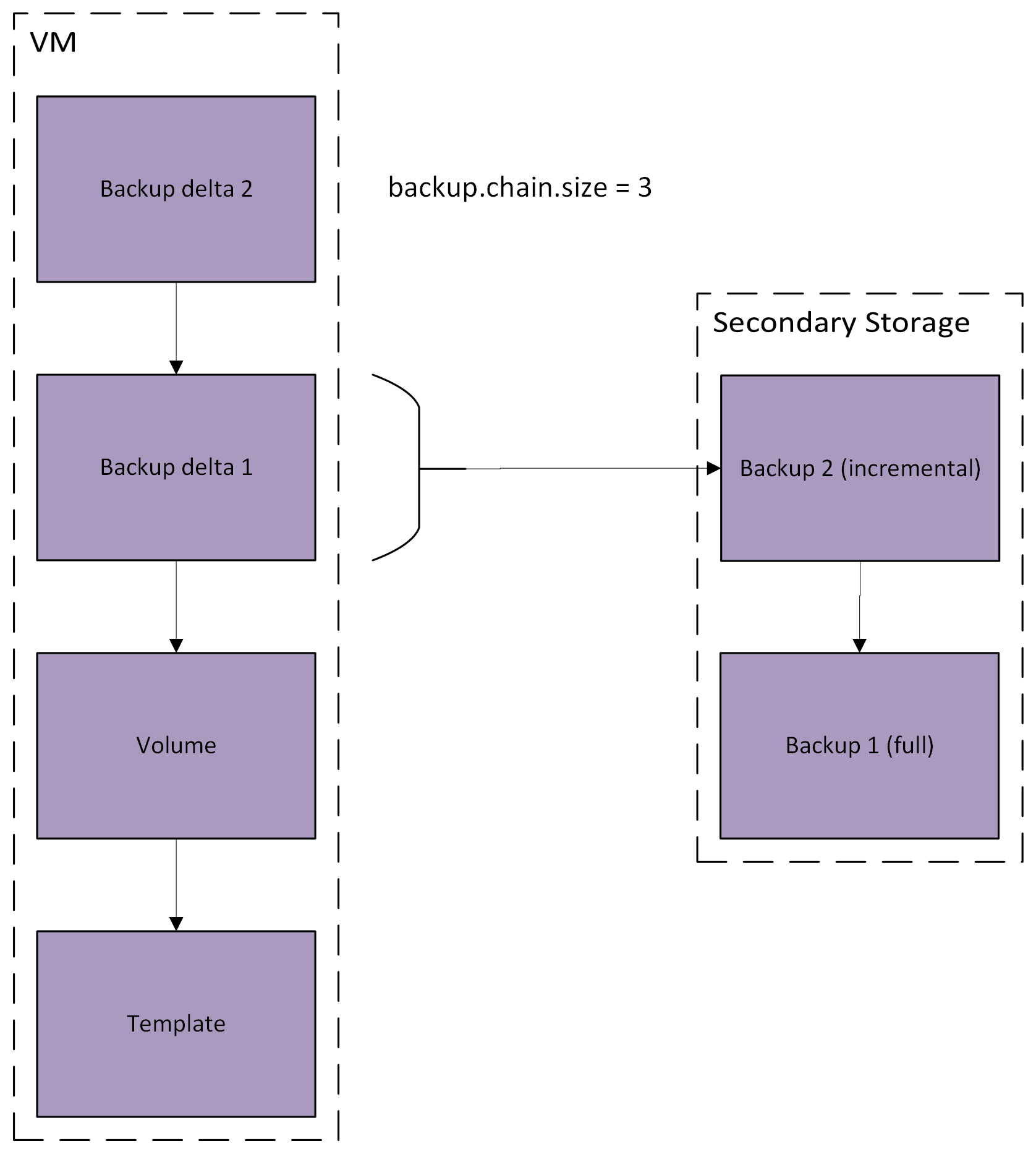 Figure 3. Taking a second backup.
Considering the state above, after taking another backup, the number of backups on the chain will have reached the value configured for backup.chain.delta, and thus the backup chain will end, and we will not have an active backup chain, neither will we have a backup delta, this state is illustrated in figure 4:
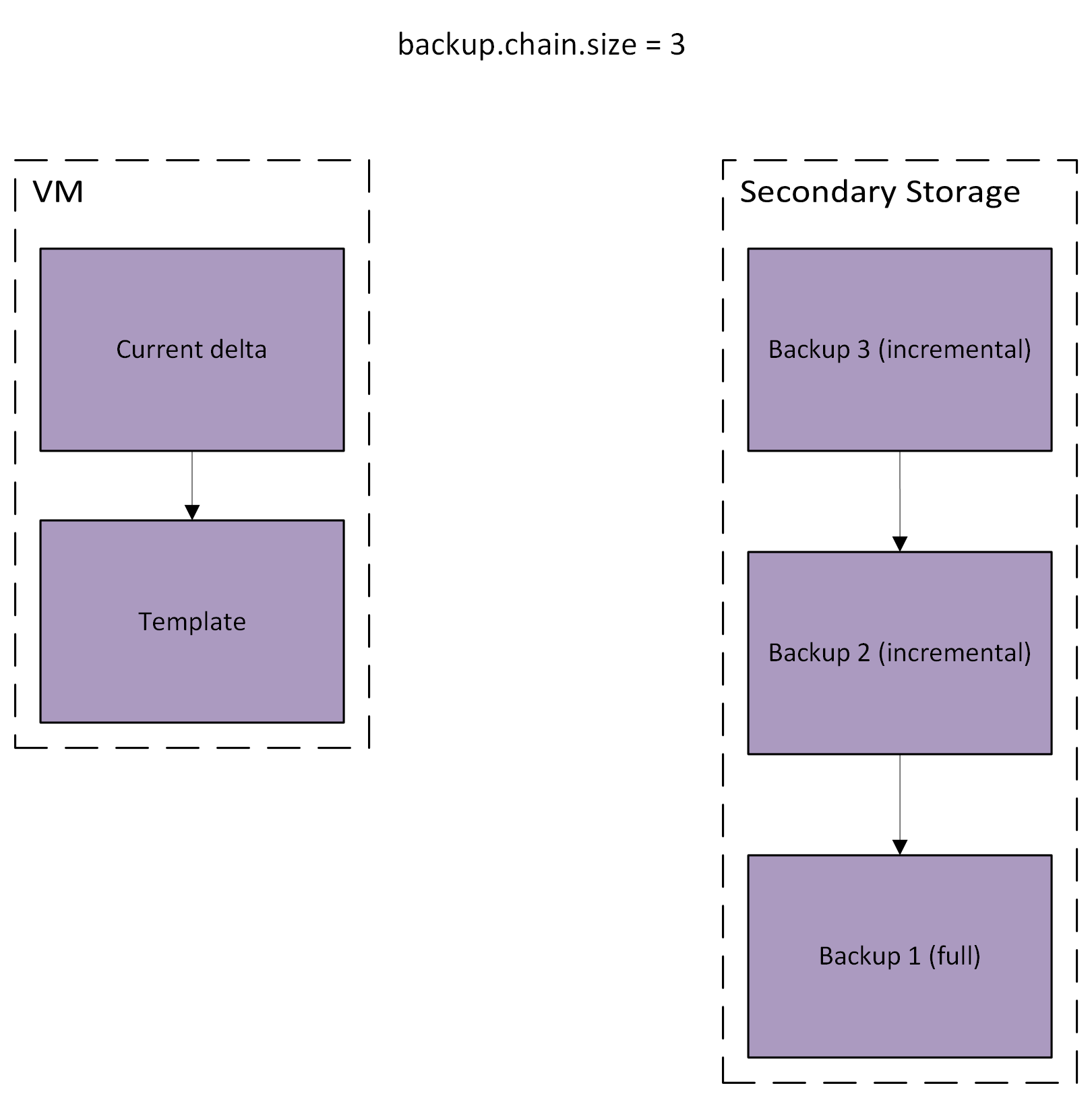 Figure 4. After a backup chain was completed.
To address the described problems, we propose to create a new backup plugin that will use native features to support incremental VM backups with KVM and ACS when using file-based storage. Many ideas for the incremental backups will be the same as the ones in #9524. The main characteristics of the feature are outlined below, all of them will be further presented and explained in the next sections.
Allow users to download a single file from a backup. Where users inform a path inside one of the backed up volumes and ACS generates a download link for it.
virDomainSnapshotCreateXML (the API used for this feature).While this feature will be compatible with disk-only VM snapshots, if a VM snapshot is reverted while there is an active backup chain, the next backup may have to be a full backup. When reverting a backup, if the VM has any VM snapshots, those will need to be removed before reverting the backup. Otherwise, we would have to create a new tree for the VM's volumes, and keep many trees would add complexity to the implementation. This limitation might be addressed in the future if a significant use case is presented.
Currently, the only way to create new offerings is to import them, using an external ID listed by the backup provider. Since we are proposing a solution where ACS is the provider, we will not have an external ID to inform on the importBackupOffering. Thus, a new API called createBackupOffering will be created, which will define a new backup offering from scratch, this API will have the necessary parameters to configure the behavior of KBOSS backups.
The createBackupOffering API will have the following parameters:
| Parameter | Description | Default Value | Required |
|---|---|---|---|
name | Specifies the name of the offering | - | Yes |
description | The description of the backup offering | - | Yes |
compress | Specifies whether the offering supports backup compression | false | No |
validate | Specifies whether the offering supports backup validation | false | No |
validationSteps | A comma-separated list of which validation steps should be performed. |
| No |
validationInterval | Specifies the interval (in hours) between two validations of the same backup | false | No |
allowQuickRestore | Specifies whether the offering supports quick restore | false | No |
allowExtractFile | Specifies whether the offering supports file extraction from backups | false | No |
compressionlibrary | Compression library, for offerings that support compression. Accepted values are zstd and zlib. If the image only supports zlib, it will be used regardless of this parameter. | zstd | No |
backupchainsize | Backup chain size for backups created with this offering. | - | No |
zoneId | The zone ID for the offering | - | Yes |
userDrivenBackups | Whether users are allowed to create adhoc backups and backup schedules | - | Yes |
domainIds | the ID of the containing domain(s), null for public offerings | - | No |
We will create two new DB tables and a new view, internal_backup_pool_ref, internal_backup_store_ref, and internal_backup_view. The first will store metadata about backup deltas, which are on the primary storage; the second will store metadata about the backups, which are on the secondary storage; the third table will be a generic details table, that may be used by any backup provider, for this provider, a some information will be stored in it: Whether the backup is current, if it is the end of its chain, what is its parent and which image store it is in. Regarding the view, it is used to facilitate some processes in the code. When a backup delta is created, all three tables will be updated.
The internal_backup_pool_ref table will contain the following columns:
| Name | Type | Description |
|---|---|---|
| id | bigint | Row ID |
| backup_id | bigint | The backup's ID. Foreign key that points to the backups table. |
| storage_pool_id | bigint | The storage's ID. Foreign key that points to the storage_pool table. |
| volume_id | bigint | The volume's ID. Foreign key that points to the volumes table. |
| backup_delta_path | varchar(255) | Path of the created delta |
| backup_parent_path | varchar(255) | Path of the created delta's parent |
The internal_backup_store_ref table will contain the following columns:
| Name | Type | Description |
|---|---|---|
| id | bigint | Row ID |
| backup_id | bigint | The backup's ID. Foreign key that points to the backups table. |
| volume_id | bigint | The volume's ID. Foreign key that points to the volumes table. |
| volume_size | bigint | The volume's size at the time of the backup |
| path | varchar(255) | Path of the backup |
The backup_details will be the same as all the other details tables:
| Name | Type | Description |
|---|---|---|
id | bigint | Row ID |
backup_id | bigint | The backup's ID. Foreign key that points to the backups table. |
name | varchar(255) | The detail name |
value | varchar(1024) | The detail value |
display | tinyint(1) unsigned |
The internal_backup_view will contain the following columns:
| Name | Type | Description |
|---|---|---|
id | bigint | Backup ID |
uuid | varchar(255) | Backup UUID |
vm_id | bigint | VM ID |
type | varchar(255) | Backup type |
date | datetime | Backup creation date |
status | varchar(32) | Backup status |
backup_offering_id | bigint | Backup offering ID |
image_store_id | text | Secondary storage ID where the backup is stored |
parent_id | text | Backup parent ID |
end_of_chain | text | If the backup is the end of its chain |
current | text | If the backup is current or not |
Furthermore a new configuration will be created: backup.chain.size, which will determine the max size of a backup chain. The default value will be 8. If cloud admins set it to 1, all the backups will be full backups. With values lower than 1, the backup chain will be unlimited, unless it is stopped by another process. Please note that unlimited backup chains have a higher chance of getting corrupted, as new backups will be dependant on all of the older ones. In any case, if the backup has validation enabled, the validation process will catch corrupt backups.
Two new VM states will be created:
BackingUp: When the backup process begins, the VM will transition from the Ready or Stopped to the BackingUp state, this state cannot be reached otherwise. During the backup process, the backup job will be queued alongside the other VM jobs; therefore, we will not have to worry about the VM being stopped/started during the backup, as each job is processed sequentially for each given VM.BackupError: If an exception which cannot be automatically recovered from happens (if the MGMT/agent service goes down, for example) or the job times out, the VM will go from the BackingUp to the BackupError state. While the VM is in this state, the VM may not be started, stopped, rebooted, migrated or snapshotted; its volumes cannot be attached, detached, migrated or snapshotted. The finishBackupChain API may be called to try to fix this state.The proposed VM backup creation workflow is summarized in the following diagram. Every step is repeated for all the volumes of the VM, except the virDomainSnapshotCreateXML step and the validation step, which are done for the VM as a whole.
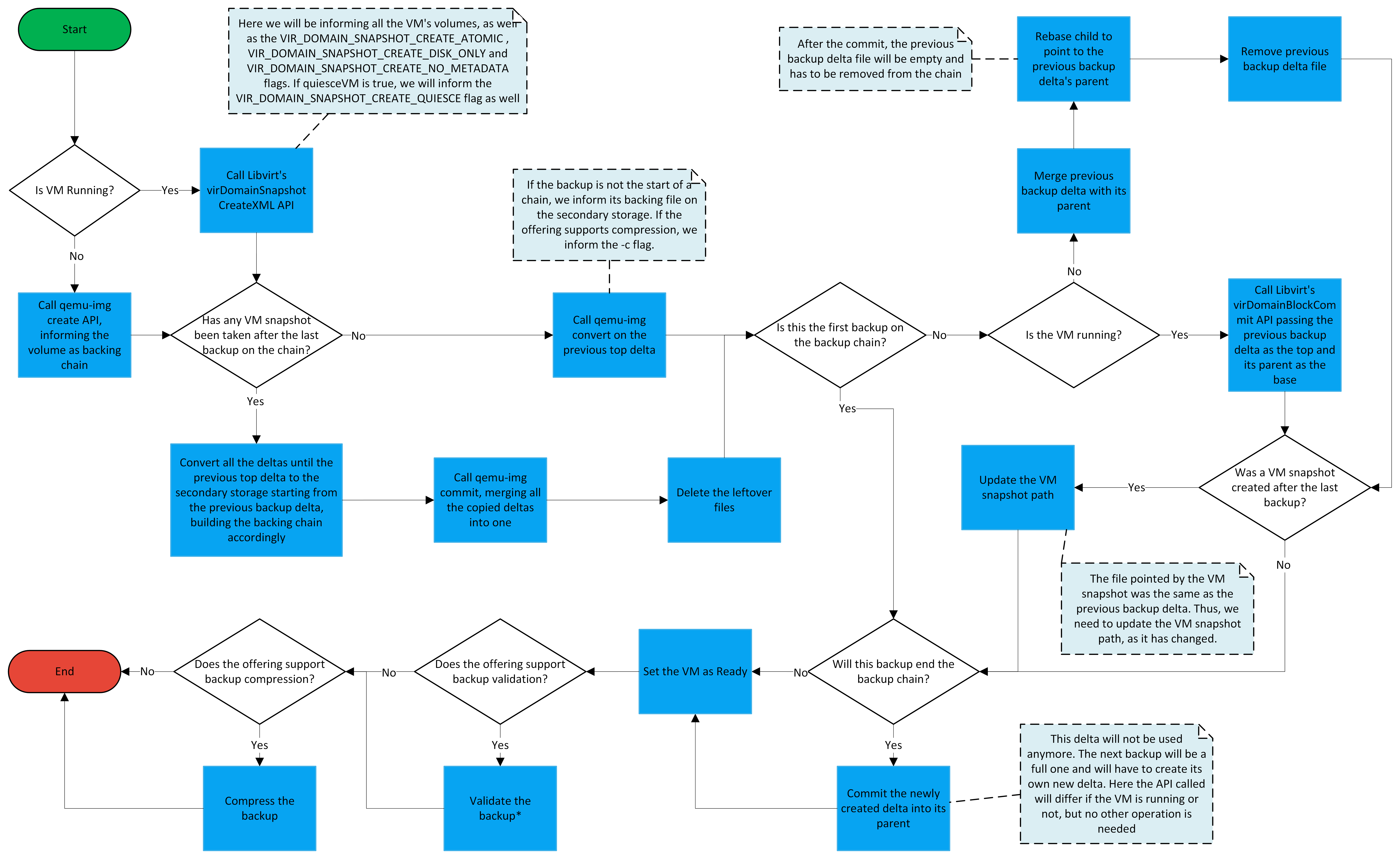
virDomainSnapshotCreateXML API, informing all the VM's volumes with the snapshot key and the external value, and using the flags:VIR_DOMAIN_SNAPSHOT_CREATE_ATOMIC: to make the snapshot atomic across all the volumes;VIR_DOMAIN_SNAPSHOT_CREATE_DISK_ONLY: to make the snapshot disk-only;VIR_DOMAIN_SNAPSHOT_CREATE_NO_METADATA: to tell Libvirt not to save any metadata for the snapshot. This flag will be informed because we do not need Libvirt to save any metadata, all the other processes regarding the VM snapshots will be done using qemu-img.VIR_DOMAIN_SNAPSHOT_CREATE_QUIESCE: if quiesceVM is true, this flag will be informed as well to keep the VM frozen during the snapshot process, once the snapshot is done it will be already thawed.qemu-img create for every volume of the VM, to create a delta on top of the current file.A <-- B <-- C <-- D, with A being the volume base file, B being the delta created during the last backup, C being the delta created by the VM snapshot operation, and D being the delta created on the last step, we will convert B and C to the secondary storage, when converting the deltas, we already inform their correct backing files, in this example, the backing file for B would be the last backup, while the one for C would be B;qemu-img commit, merging all the converted deltas from the last step into one. Here we must inform the -b parameter, to let qemu-img know not to commit all the way into the volume's base file. In the example above, C would be commited to B.C.qemu-img convert on the previous top delta. If the backup is not the start of a chain, we inform its backing file on the secondary storage.virDomainBlockCommit API informing the previous backup delta as the top and its parent as the base.qemu-img commit, to commit the backup delta to it;virDomainBlockCommit; else use qemu-img commit.In order to let users choose whether the VM will be frozen for the snapshot process, a new parameter will be added to the createBackup and createBackupSchedule APIs, called quiesceVM. The VM will only be kept frozen during the initial snapshot creation process, during the rest of the backup it will be running.
If a VM snapshot is reverted while there is an active backup chain, the next backup may have to be a full backup:
The impacts this feature will have on the disk-only VM snapshot feature will be further discussed on the VM snapshot section.
If the backup offering supports compression, after all the backup creation steps have finished (but before validation, if supported), we will launch a asynchronous job to start the backup compression. The compression will be broken into two steps: compress the backup into new files and substitute the original backup files. The reason to break the compression into two steps is so that while the first step is being done, the backup may still be restored; the restore will only be blocked during the last step, which is the fastest. These jobs will execute in the compute plane hosts instead of the SSVMs.
The host will have the better performance, meaning that the compression will be faster. However, if left unlimited, multiple concurrent compression processes could affect the host's performance, thus the guest VMs would be affected. On the other hand, the SSVM tends to be quite limited, and would easily get overloaded. Meaning that operators might need to upgrade their compute offerings, and also multiply the number of SSVMs in the environment (which also means more public IPs being used). Also, we need the compression process to not take too long, otherwise it might not end before the next backup.
To address the concerns over the host's resource usage, a few new configurations will be created:
backup.compression.max.concurrent.compressions: Will determine the max number of concurrent compressions. The idea is to limit the concurrent load on the hosts. Defaults to 5. Values lower than 1 remove the limit, meaning that as many compressions as necessary will be done at the same time. This configuration will be at the cluster and global level. A new property on agent.properties will be created with the same name that when set will override the cluster/global level.backup.compression.rate.limit: Will limit the compression rate (in MB/s) lowering the stress on the host's resources. Defaults to 0; if a value lower than 1 is used, no limit will be applied to the compression rate. This configuration will be at the cluster and global level.backup.compression.coroutines: Will set the number of parallel coroutines for the compression process. This is translated to qemu-img '-m' parameter.The compression process follows the following steps, each being its own job:
qemu-img convert to create a copy of the backup and compress it, informing its backing file and the -c flag. This is the slowest part.In order to add more information for users regarding the backup compression, two new columns will be added to the backups table:
| Name | Type | Description |
|---|---|---|
| compression_status | varchar(55) | Compression status, which may be Uncompressed, Compressing, FinalizingCompression, Compressed or CompressionError |
| uncompressed_size | bigint | Old physical size of the backup, before the compression was done |
As the compression is a long running job, it is prone for timeouts or interruptions, thus, the backup.compression.max.job.retries and backup.compression.retry.interval configurations will be created, which will determine the number of retries and their interval, each job will be retried a number of times equal to the value of the backup.compression.max.job.retries configuration, by default, 2.
A new global and cluster-wide configuration (backup.compression.timeout) will be created to determine the timeout of the compression. Defaults to 8 hours. Values lower than 1 will disable the timeout. If the backup compression times out, it may be retried, if all the retries fail, the compression state will go into CompressionError, any leftover files will be deleted and the backup will be left uncompressed.
To allow operators to track the compression jobs, a new API (listBackupCompressionJobs) will be added, it will allow listing the current, scheduled and executed compression jobs. It will only be available for Root Admin accounts. It will have the following parameters:
| Parameter | Description |
|---|---|
id | List only the job with the specified ID |
backupid | List jobs associated with the specified backup |
hostid | List jobs associated with the specified host. When this parameter is provided, the executing parameter is implicit |
zoneid | List jobs associated with the specified zone |
type | List jobs of the specified type. Accepts Starting or Finalizing |
executing | List jobs that are currently executing |
scheduled | List jobs scheduled to run in the future |
To allow operators to pause the compression processes, the backup.compression.task.enabled account/domain/global setting will be created, when set to false in the global scope, no compression jobs will be executed, regardless of the value in other scopes. When true in the global scope, you may disable the compression task for certain domains or accounts by setting the value to false in the domain/account.
The API finishBackupChain will be added to allow users to force a backup chain on a VM to end. This API may be called on VMs that are on the BackupError state and it will do a best-effort attempt at normalizing the VM and returning it to its original state, as well as finishing the backup chain on the VM. The API hast the following parameter:
| Parameter | Description |
|---|---|
vmId | ID of the VM to finish the chain. |
As with the backup creation, this process will be queued with the other VM jobs and serialized, so we will not have to worry about the VM starting during the restoration process. Furthermore, the current backup chain will be severed.
It is important to note that, when restoring a backup, the size of the VM's volumes will be restored to what it was when the backup was taken. This happens because each QCOW2 has its size defined within themselves, thus, when copying a backup from the secondary storage to substitute the VM's volumes, the size of the volumes will be updated as well.
The proposed standard VM backup restoration workflow is summarized in the following diagram. Every step, except the two initial verifications, is repeated for all the volumes of the VM.
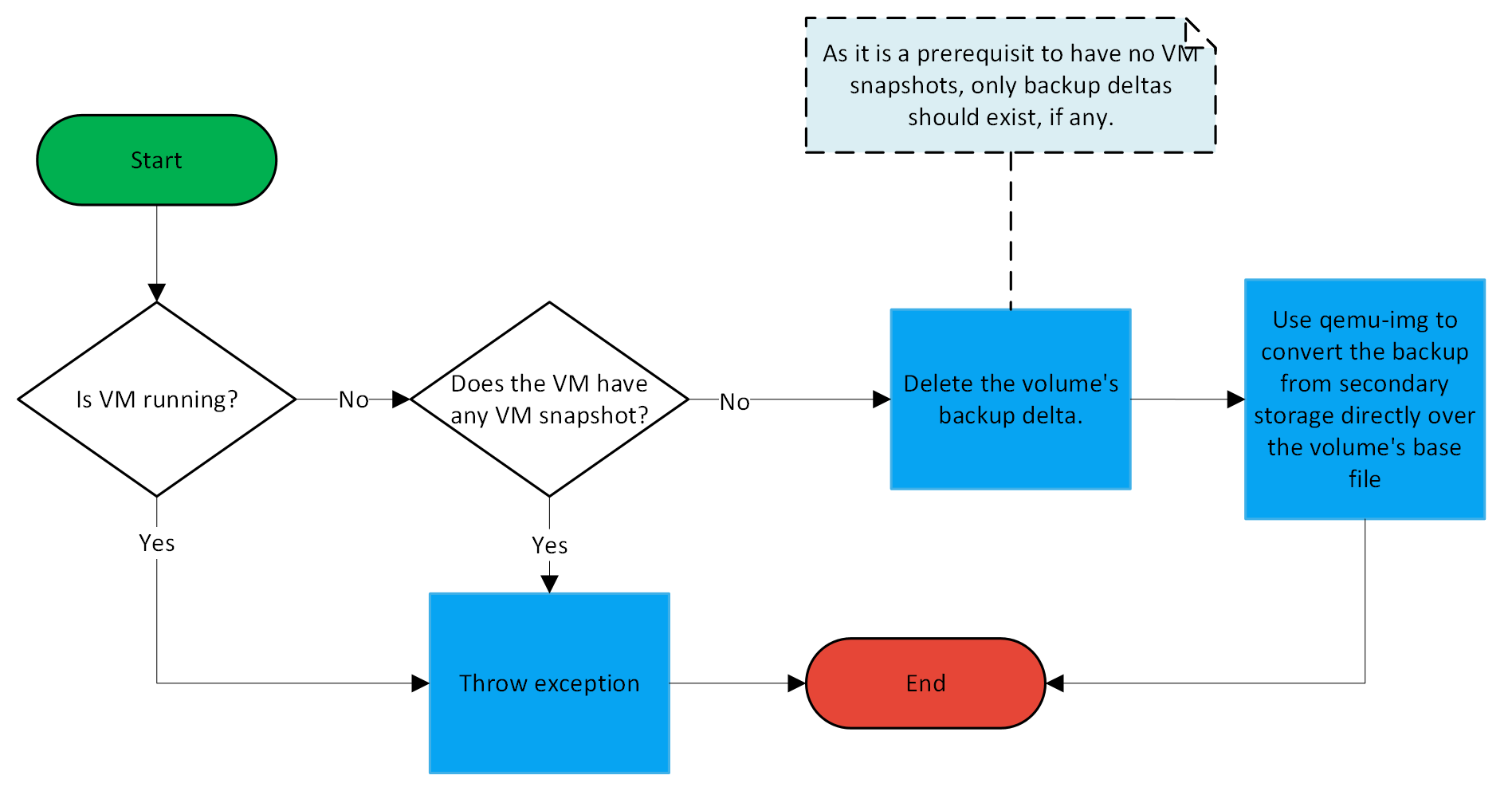
qemu-img convert to convert the backup from the secondary storage directly over the volume's base file.After a backup restoration, all of the restored volumes will be full clone, no longer depending on a template.
We will also allow the user to restore a single volume that was part of the backup. A new volume will be created and attached to the target VM. The proposed volume backup restoration workflow is summarized in the following diagram.
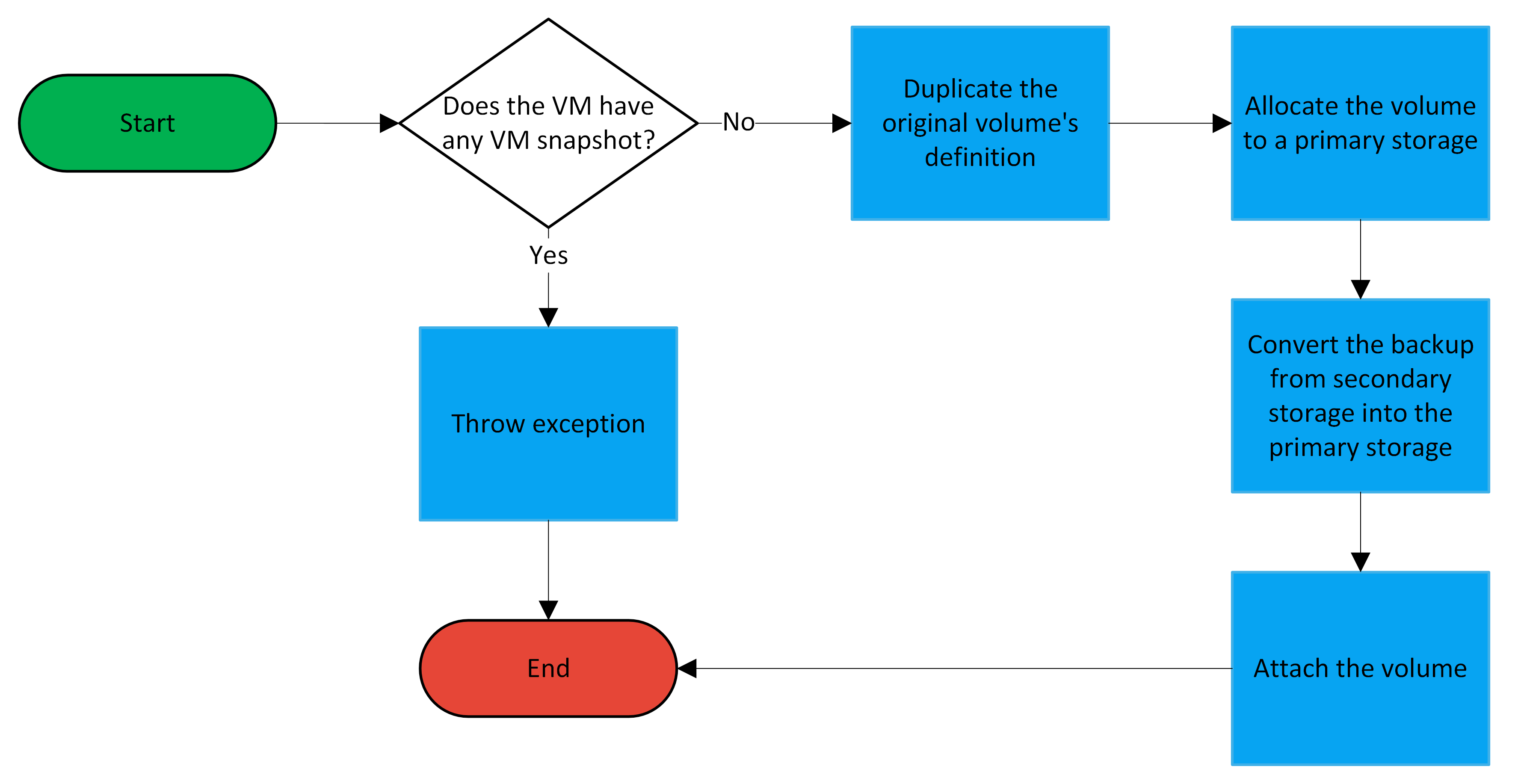
Concept-wise the implementation is simple, but a new workflow must be created so that ACS allocates a volume to a primary storage before attaching it to the VM, so that we have a target for step 2.
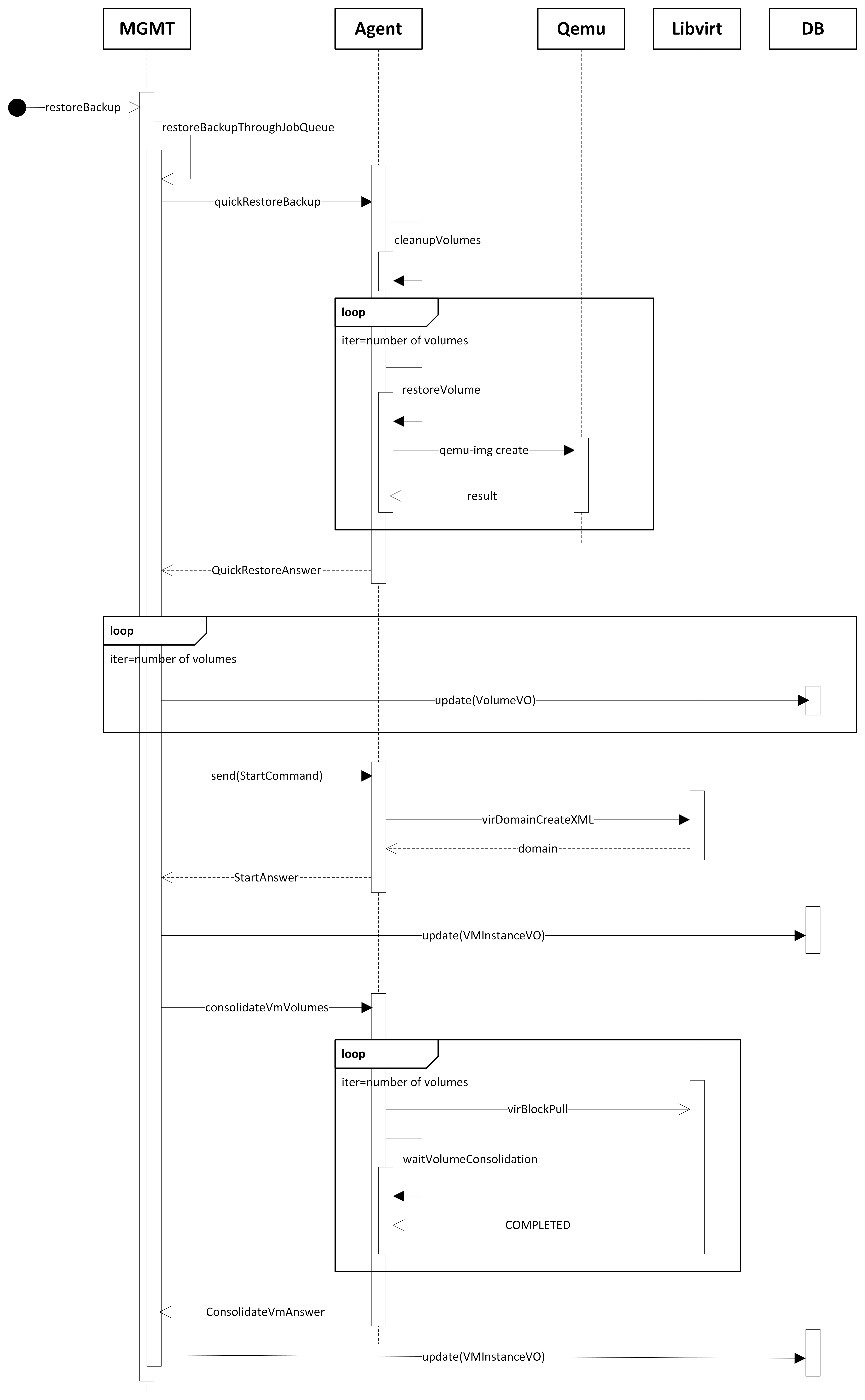
The quick restoration process is similar to the two processes above, however, instead of converting the volume from the secondary storage, for each volume being reverted, we create a delta on the primary storage that has the backup in the secondary storage as a backing file. Then, we start the VM (if it is not running when quick restoring a single volume), and use Libvirt's virDomainBlockPull to consolidate the volumes while the VM runs. The diagram below describes the process for quick reverting a VM. The process for a single volume will be similar, except for the VM start, which will only happen if the VM is not running already.
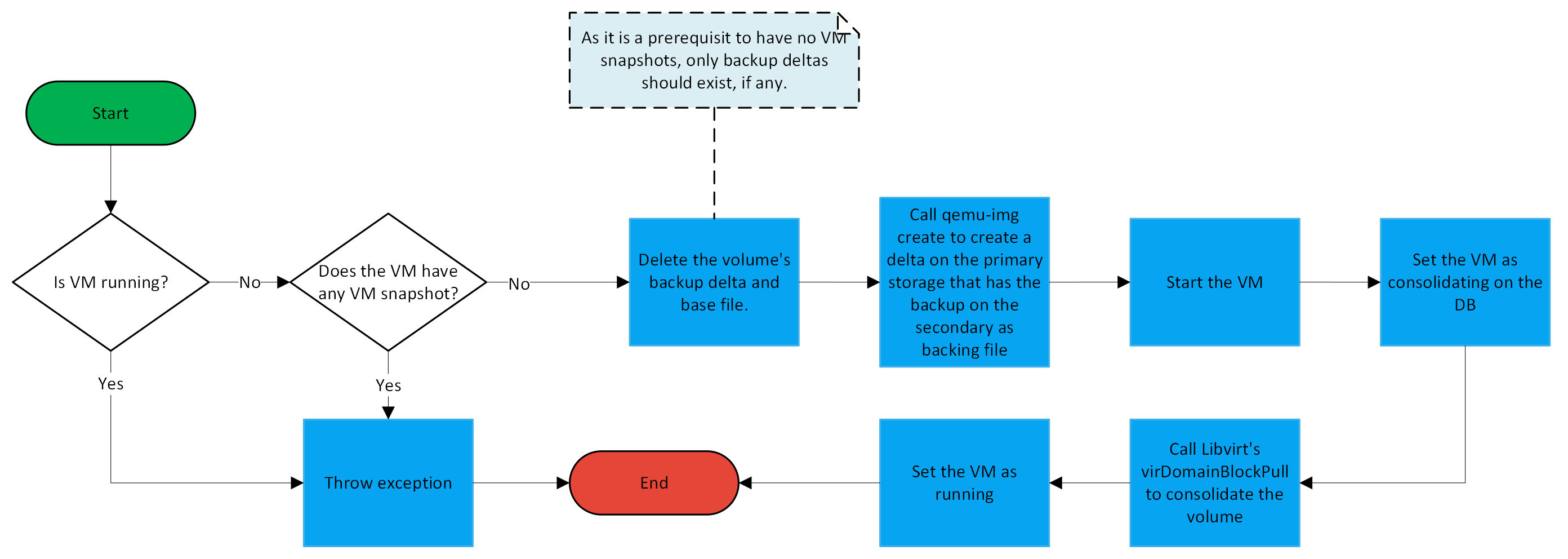
qemu-img create to create a new delta on the primary storage with the backup on the secondary storage as the backing file.Consolidating on the DB. The VM is accessible normally while on this state, however, new operations, such as VM stop or migrate, are not allowed.virDomainBlockPull to pull all the necessary data from the volume's backing files. When the process finishes, the volume will not depend on any backing file anymore.Running.Since the process above involves a lot of communication between different components. The following (simplified) sequence diagram details a bit more the process:
The advantage of using the quick restore over the standard one is that the user will not have to wait for the backup copy into the primary storage to start using the VM. However, during the consolidation process, the volume performance might be affected, as any reads to old data must fetch the data from the secondary storage.
This feature will be compatible with KBOSS, as we mostly just need to restore the backup to the given VM.
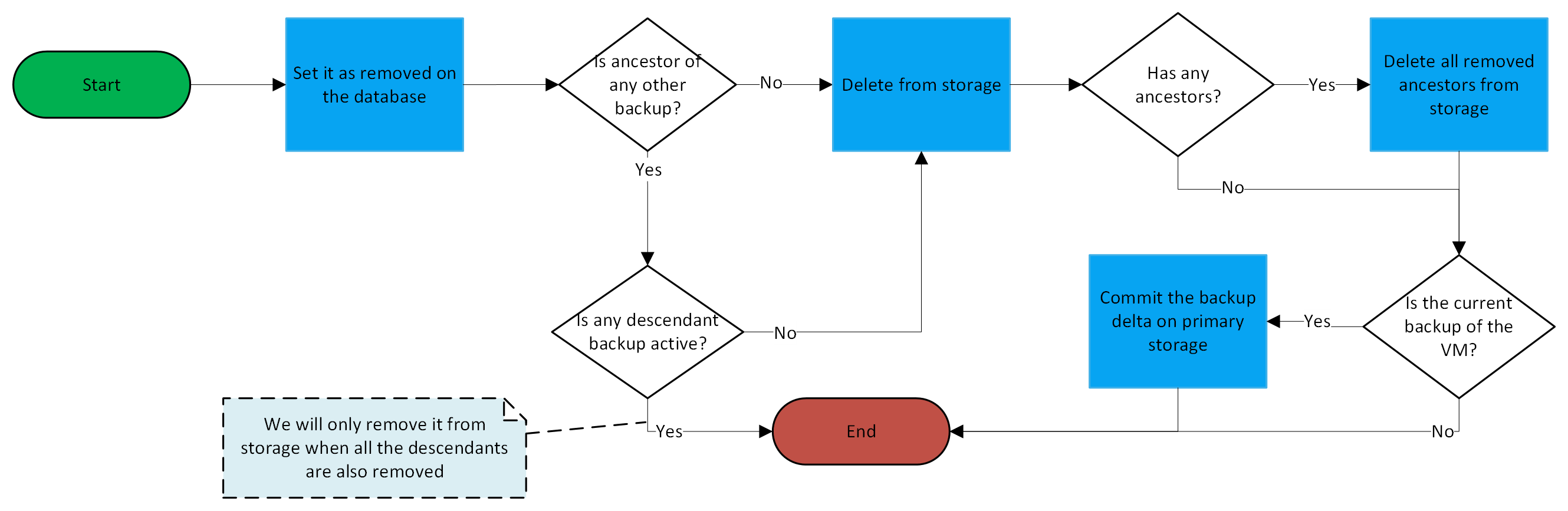
The backup deletion process is somewhat similar to the KVM incremental snapshot deletion process (see #8907). It will also be added to the VM job queue, since it might have to merge the top delta file of the VM's volumes. The process is summarized on the diagram below.
The backup validation process will consist of three steps: wait for the VM to boot; execute a user-defined command; take a screenshot of the console of the VM. The first two steps can only be performed if the VM has the QEMU guest agent installed and it is configured to start on system startup. The main idea of the backup validation process is to verify that the VM is able to boot using the backup being validated. The validation steps that will be executed are defined in the backup offering through the validationSteps parameter, by default, only the screenshot step is executed.
The backup validation will be executed at the end of the backup creation process, as an asynchronous job. To allow operators to pause the validation processes, the backup.validation.task.enabled account/domain/global setting will be created, when set to false in the global scope, no validation jobs will be executed, regardless of the value in other scopes. When true in the global scope, you may disable the validation task for certain domains or accounts by setting the value to false in the domain/account.
Furthermore, operators will be able to configure periodic validation of already validated backups. At the end of the validation process, if the backup is deemed valid, a hash of the backup will be stored. The next validations of that backups will only take the hash and compare it to the original. Since the backup was already marked as valid, as long as the hash of the backup does not change, it should remain valid. To configure the periodic backup validation process, operators may use the validationInterval parameter of the backup offerings. Furthermore, a new VM setting with the same name will be created that overrides the configuration set in the backup offering. By default, only operators will be able to see this VM setting, as it will be added to the user.vm.denied.details list of settings.
The backup.validation.max.concurrent.operations configuration will be created to determine the max number of concurrent validations per host. The idea is to limit the concurrent load on the hosts. Defaults to 1. Values lower than 1 remove the limit, meaning that as many validations as necessary will be done at the same time. This configuration will be at the cluster and global level. A new property on agent.properties will be created with the same name that when set will override the cluster/global level.
Regarding the wait for boot step, the backup.validation.boot.default.timeout configuration will be created to specify the default time to wait for a validation VM to boot. By default it is set to 240 seconds. It will be at the account/domain/global scope. Furthermore, a VM setting called backupValidationBootTimeout will also be created for the same purpose, when set, it overrides the value on the backup.validation.boot.default.timeout configuration. By default, the VM setting will only be writable for operators.
Regarding the command execution step, 4 new VM settings will be created to configure how this step will be executed:
backupValidationCommand: A command to be executed after the VM has started. This might be a script that does some validation and returns an output.backupValidationCommandArguments: A comma-separated list of arguments to be passed to the executed command.backupValidationCommandExpectedResult: The result expected to be returned by the executed command. If this is not set, we will only check if the exit value of the process is 0. If the command result is different than what has been set, the backup will be considered invalid. As Libvirt returns the value of the process as a Base64-encoded string, this setting should be set as a Base64-encoded string of the result that is expected of the command. This also helps avoid issues with transmitting special characters through the API.backupValidationCommandTimeout: A timeout to wait for the command to finish.By default, backupValidationCommand, backupValidationCommandArguments and backupValidationCommandExpectedResult will be available for end-users to edit. While backupValidationCommandTimeout will be visible to end-users, but not editable.
As backupValidationCommand will only accept a single command or path to an executable script that must exist inside the user's VM, users are encouraged to create scripts inside their VM that validate what is needed and inform the script's fully qualified path on the setting.
Regarding the screenshot step, the backup.validation.screenshot.default.timeout configuration will be created to specify the default time to wait before taking a screenshot of the VM's console. By default it is set to 60 seconds. It will be at the account/domain/global scope. Furthermore, a VM setting called backupValidationScreenshotWait will also be created for the same purpose, when set, it overrides the value on the backup.validation.screenshot.default.timeout configuration. By default, the VM setting will only be writable for operators.
Moreover, to recover the screenshots, a new API will be created called downloadValidationScreenshot, this API will have a single parameter, backupId, which is the ID of the backup that should have its screenshot downloaded. Each backup can have at most a single validation screenshot.
The following diagram describes the backup validation process.
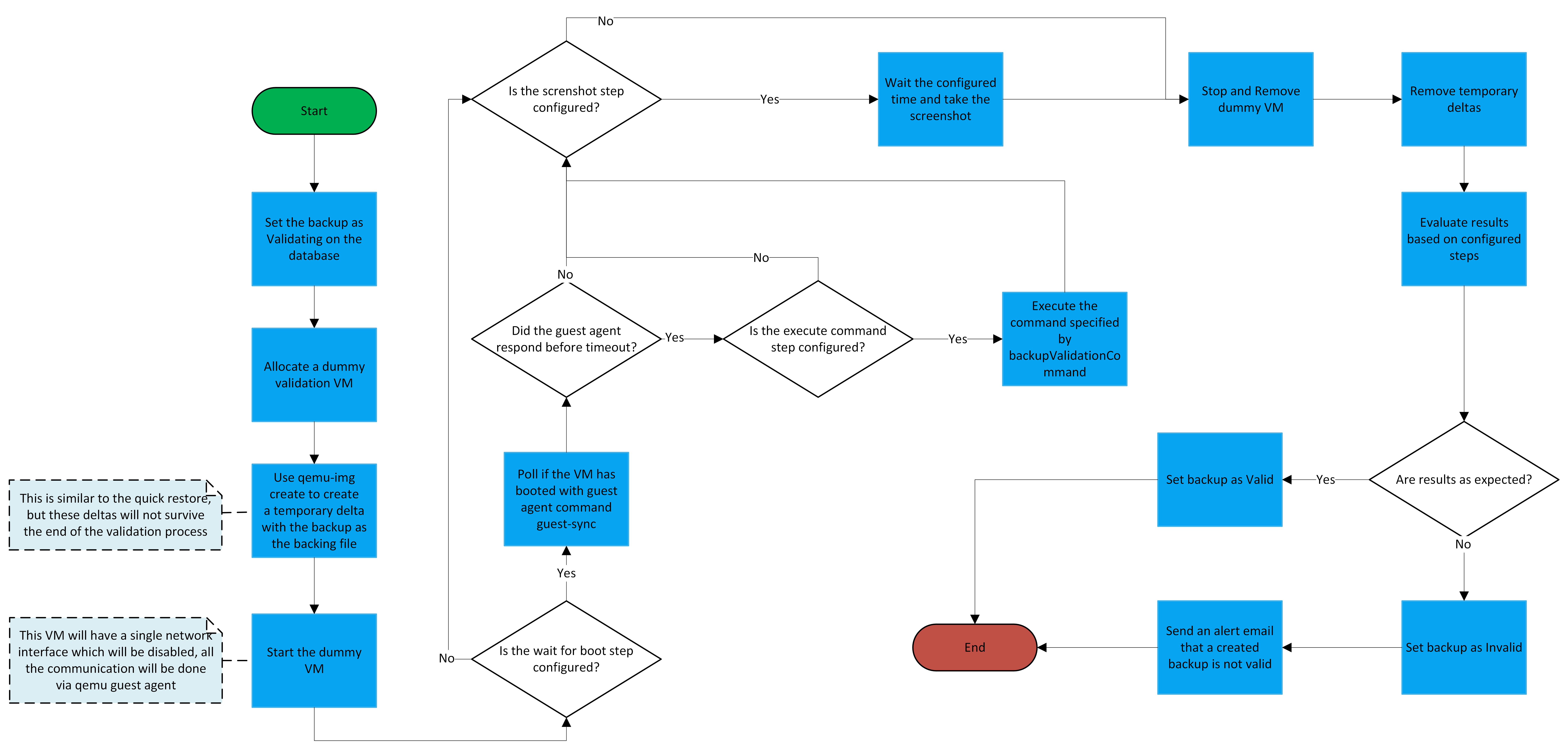
Validating on the database.backup.validation.dummy.vm.limit is set to true (account/domain/global setting), the account must have enough quota to allocate the VM and its volumes. Furthermore, the Usage events will always be created. This VM will be allocated with a single NIC which is disabled.guest-sync request.guest-exec request. If configured, we will inform the arguments as well.Valid.Invalid.backup.validation.terminate.invalid.chain account/cluster/global configuration. The default value is true.UnableToValidate. In this case the job will be rescheduled to be executed at a later time. Regarding this, two new cluster/global configurations will be created: backup.validation.max.job.retries which specifies the number of retries, by default, 2; backup.validation.retry.interval which determines the minimum amount of time (in minutes) to retry a backup validation job, by default, 300.Sometimes, users do not need to restore a complete backup of their volumes. Instead, they simply want a single file from the backup. To allow users to extract a single file from created backups, a new API extractFileFromBackup will be created, which, when called, will return a download link for the Zipped file. This API will have the following parameters:
| Name | Description | Type | Required |
|---|---|---|---|
| backupId | the ID of the backup | Long | Yes |
| volumeId | the ID of the volume | Long | Yes |
| filePath | the path to the file/directory | Long | Yes |
| partition | Which partition is the file located. If not informed, every non boot partition will be searched | String | No |
| fileSystem | Which FS is being used in the given partition. If not informed, ACS will try to derive it | String | No |
The API workflow is summarized below:

modprobe nbd max_part=16. The max_part option must be informed, so that the kernel may create device files for the partitions on the NBD device. We assume that no disk will have more than 16 partitions.qemu-nbd to connect to the newly created image.blkid to list the partitions and FS of the connected device.pvs to locate the PV.lvdisplay to locate the LV.blkid.vgchange -a n <lv_name> to deactivate the VG.qemu-nbd to disconnect from the image.Please note that the file extraction feature is not compatible with encrypted volumes.
This session will go over changes and/or interaction with other features.
During the disk-only VM snapshot revert, we must check if there was a backup taken after the snapshot being reverted. If there was, we must merge the backup delta with its parent. The procedure will be the same used in the backup creation process, when the backup being taken is not the first one. Namely this part:
virDomainBlockCommit API informing the old backup delta as the top and its parent as the base.qemu-img commit, to commit the backup delta to it;However, if the backup delta is also the current volume's path, we do not need to go through the above procedure. We must only remove the current delta and its parent (which will be another delta).
In any case, if there was a backup after the snapshot being reverted, we must also mark its chain as ended.
Furthermore, all of the file-based KVM disk-only VM snapshot processes that merge deltas will also have to be tweaked to take into account that there might be a backup delta between two VM snapshot deltas.
When reverting a volume snapshot, if the VM has an active backup chain, the next backup will be a full backup for the volume that was reverted. Furthermore, the old backup delta for that volume will be removed.
If a volume is attached after the VM already has backups, it will start to be contemplated on the next backups, even if the next backup will be incremental for all the other volumes, for the newly attached volume, it will be a full backup. When restoring the older backups, if the volume has any backup delta on its backing chain, it will be merged with the rest of the volume, to keep it clean, so that the next backup will be a full one (as the rest of the volumes will be as well).
Even if a VM is restored to a point where the volume was not attached, it will still stay attached and will not be affected by the restore operation.
If a volume is detached after the VM already has backups and this volume has any backup delta on its backing chain, it will be merged with the rest of the volume, to keep it clean. When restoring the old backups, from when the VM still had that volume, a duplicate volume will be created and attached to the VM.
VM migration will not be affected.
During the volume migration process, we will check if the volume is attached to a VM which has a ongoing backup chain. If it is, we will merge the backup delta with its parent, so that the volume is returned to only having either a single file (if full clone) or a top file with a template as a backing file (if linked clone). We do this because we cannot guarantee that a host will have access to the target primary storage to copy the backup delta. For example, for migration between two local storages, the origin host will not have direct access to the target storage, and thus cannot copy the delta by itself.
The next backup for that volume will be a full backup.
There will be no changes to the cold volume migration process. However, as it consolidates the volume, the next backup for that volume will be a full backup.
The secondary storage migration process will be executed by the KVM compute plane hosts. The process will be as follows:
Processing each backup individually enables a safe procedure, lowering the chances of a timeout, and diminishing the possible problems with an interruption on the copy process.